


Document Automation Technology in 2026: Power, Pitfalls, and What Actually Works
Written with AI assistance under our editorial guidelines
Document automation adoption remains limited, with only 10% of organizations using generative AI for this purpose while 60% of finance leaders still rely on Excel. The technology requires constant oversight and refinement rather than being a one-time solution, and organizations often underestimate the hidden costs of manual document workflows until reaching a critical breaking point.
Welcome to the uncomfortable heart of the automation revolution. If you think document automation technology is some polished, plug-and-play savior for modern business, it’s time for a reality check. As we grind into 2025, raw statistics paint a stark picture: only about 10% of organizations have embraced generative AI for document automation, while nearly 60% of finance leaders still cling to Excel as their main “automation” tool. The gap between hype and reality is wide. Meanwhile, those who leap ahead face a minefield—cyber threats, integration nightmares, and a skills gap that leaves even the most ambitious teams gasping for air. This isn’t the sanitized, futuristic vision you’ve been sold. It’s a messy, gritty, and high-stakes transformation, where the winners rewrite the rules and the losers get buried under digital rubble. Here are the seven brutal truths every leader, professional, and knowledge worker needs to confront—before the system breaks you.
Why document automation technology is breaking the system
The unseen crisis of manual document chaos
In the age of algorithmic everything, you’d think the manual processing of contracts, invoices, and compliance reports would be obsolete. Not even close. According to the Rossum Document Automation Trends 2025 report, the hidden costs of manual document workflows bleed organizations dry—lost hours, missed deadlines, compliance failures, and burnout that quietly erodes morale. What most companies don’t see: every misfiled contract or delayed invoice isn’t just paperwork, it’s friction in the gears of your entire business. The emotional toll is real—teams overwhelmed, innovation stifled, and a creeping sense that work is little more than digital janitorial duty.

Most organizations don’t tally the human cost until the tipping point. According to an anonymous industry veteran, “Most businesses don’t realize how much time they lose until it’s too late.”
— Alex
The myth of ‘set and forget’ automation
If you think dropping in a document automation platform is a one-time fix, think again. The fantasy of “set and forget” automation is among the most persistent—and dangerous—myths in tech. Document automation technology isn’t a slow cooker; it’s more like a high-performance engine that needs constant tuning. Without regular oversight, rule refinement, and system audits, even the most advanced solution can turn into a bottleneck. According to Adlib, 2025, poorly maintained automation tools can quietly introduce new errors, misroute sensitive data, and erode trust faster than manual mistakes ever could.
Hidden risks of ignoring document automation upkeep:
- Legacy data formats slip through the cracks, breaking automated workflows and causing system-wide confusion.
- Updates in regulatory requirements are missed, leading to compliance violations and legal exposure.
- AI models, if left unchecked, start amplifying biases and errors, scaling mistakes across thousands of documents.
- Integration points with other systems break as APIs change, leading to untraceable data loss.
Take the case of a mid-size healthcare provider that automated patient intake forms. They neglected to update templates and validation rules for a year. Result? An avalanche of rejected insurance claims and a compliance audit that nearly cost them their license. The “set and forget” mindset is a shortcut to disaster.
Who really wins—and loses—when automation takes over
When document automation technology rolls in, the spoils aren’t divided evenly. Winners are those who upskill, embrace AI literacy, and leverage automation to amplify their strengths. Losers? The ones chained to repetitive, manual work that automation can—and will—replace. And in the middle: the survivors, who adapt just enough to hang on, but never truly thrive.
| Role/Group | Winners | Losers | Survivors |
|---|---|---|---|
| Tech-savvy analysts | Increased productivity, higher value work | Redundant roles disappear | Reskill or shift duties |
| Compliance officers | Better oversight, reduced risk | Manual processors phased out | Manage automation exceptions |
| Legacy IT administrators | Evolve into automation architects | Cling to outdated tools | Maintain hybrid environments |
| Entry-level clerical staff | Upskill to QA/data roles | Routine data entry jobs eliminated | Support new workflows |
Table 1: Impact of document automation technology on different roles. Source: Original analysis based on Rossum, 2025 and Adlib, 2025.
The visible effects—like layoffs or new promotions—are just the surface. Underneath, automation quietly reshapes workplace culture, rewarding adaptability and punishing inertia. Knowledge becomes power, and those who don’t evolve are left behind, sometimes before they realize what hit them.
From mail merge to machine learning: A brief, gritty history
The early days: Templates, macros, and the illusion of progress
Rewind to the late 1990s and early 2000s. Document automation technology meant clunky mail merges in Word, clumsy Excel macros, and brittle template systems that broke as soon as someone sneezed. These tools promised efficiency but delivered only marginal gains, often shifting errors from human hands to faulty scripts.
Timeline of document automation technology evolution:
- 1990s: Simple mail merge, desktop macros, and hard-coded templates.
- 2000s: Rule-based engines and early workflow software; clunky but marginally more flexible.
- 2010s: Cloud-based document platforms, web forms, and basic integrations with CRM/ERP.
- 2020s: Rise of AI—NLP, data extraction, and dynamic templates reshape expectations.
What’s truly changed? The leap from static templates to learning systems. But for many, legacy habits remain: half-automated, half-manual processes that are neither efficient nor reliable.
The AI revolution: NLP, data extraction, and dynamic content
Fast forward to now, and artificial intelligence has redefined what’s possible in document automation. Natural Language Processing (NLP) reads and understands contracts; data extraction tools pull meaning from messy PDFs; dynamic content adapts to context and input on the fly. According to the PRNewswire 2025 report, hyperautomation—where RPA, AI, and human oversight converge—is the new gold standard.

Current AI-powered document automation can:
- Instantly classify document types and extract key data fields.
- Apply retrieval-augmented generation (RAG) to turn unstructured data into actionable insights.
- Flag anomalies and suggest corrections in real-time. But even cutting-edge platforms have limits: AI models still struggle with ambiguous language, poor-quality scans, or context-specific legalese.
Key AI concepts in document automation
- Natural Language Processing (NLP): Machines interpreting and understanding human language in documents.
- Optical Character Recognition (OCR): Converting scanned images into editable, searchable text.
- Retrieval-Augmented Generation (RAG): Combining data extraction with generative AI to provide contextually relevant outputs.
- Hyperautomation: Integrating AI with robotic process automation for seamless, end-to-end document workflows.
The dirty secret: Integration hell with legacy systems
Here’s a brutal truth: shiny new automation won’t save you if your backbone is still running on brittle legacy systems. Integration is where most dreams die. Old databases, homegrown apps, and out-of-date APIs form an obstacle course that can cripple even the best solutions. According to expert opinion, most companies vastly underestimate the time, money, and frustration needed to make new and old tech play nice.
As Morgan, an IT transformation lead, bluntly puts it: “Legacy integration is where most dreams die.”
What nobody tells you about document automation technology
Hidden costs and unexpected pitfalls
Slick sales decks rarely mention the real costs: training users, cleaning bad data, and managing a wave of shadow IT as staff scramble to circumvent clunky interfaces. The sticker price of automation technology is just the start. In many cases, operational savings are offset by the headaches of rollout and maintenance.
| Cost Category | Implementation Cost | Ongoing Savings | Notes |
|---|---|---|---|
| Software/licenses | High | Moderate | Recurs annually |
| Training | Substantial | Long-term | Initial learning curve steep |
| Data cleanup | Often underestimated | High | Dirty data = broken automation |
| Shadow IT risk | High | Low | Workarounds lead to security issues |
| Process redesign | Significant | Variable | Success depends on culture |
Table 2: Document automation implementation vs. operational savings. Source: Original analysis based on Rossum, 2025 and Adlib, 2025.
Take, for instance, a multinational that rushed to automate contract workflows. They skipped data cleanup and proper training—six months in, their “smart” system was so misconfigured that it took another six months (and a small army of consultants) just to restore basic functionality. The cautionary tales are everywhere, even if few want to talk about them.
The shadow workforce behind ‘automated’ docs
For all the hype about replacing humans, automation tech often relies on a hidden army: people labeling training data, performing quality assurance, and fixing what machines miss. These invisible workers keep the gears turning, but the ethical implications are real. Are we just shifting routine labor to less-visible (and often less-privileged) hands?
The documentary reality: offshore QA teams, gig workers correcting OCR errors, and temp staff bridging the gap between machine outputs and business needs.

Out of sight, out of mind—but not out of the workflow.
How AI can amplify your mistakes at scale
AI-driven document automation tools are relentless amplifiers. Feed them bad data or unchecked rules, and those mistakes don’t just multiply—they go global. A single misclassification can contaminate thousands of records, while a logic error in template mapping can create a cascade of contract errors.
Red flags to watch for in document automation tools:
- Overly rigid templates that can’t adapt to real-world document variety.
- Lack of audit trails, making error tracking impossible.
- Black-box AI models with no explainability or control.
- No built-in system for human review before final output.
The only way out: robust error mitigation strategies. Embedding checkpoints, frequent audits, and mandatory human-in-the-loop oversight are no longer optional—they’re non-negotiable survival tactics.
How document automation technology is reshaping industries
Legal: From billable hours to digital casework
Law firms and courts were once the epicenter of paperwork drudgery. Document automation has shifted the game—standard contracts, discovery documents, and even court filings can now be generated and validated in minutes, not days. Success stories abound: legal teams slashing drafting time by 70%, compliance risks dropping, and junior associates free to tackle more strategic work.
But not all is rosy. In one high-profile case, an overzealous rollout of auto-generated filings led to a series of embarrassing errors—court cases delayed, reputations bruised. The lesson is clear: automation must augment human expertise, not sideline it.

Healthcare: Compliance, chaos, and new trust issues
Healthcare is ground zero for both opportunity and risk. Document automation technology now powers patient intake, insurance forms, and regulatory reports. The payoff: reduced administrative time and improved accuracy. According to the Rossum, 2025, some organizations have halved time spent on documentation.
But with great power comes new chaos. Privacy breaches and compliance failures are an ever-present threat. Automation can streamline, but it can also introduce new vulnerabilities if controls are weak.
| Compliance Area | Pre-Automation | Post-Automation |
|---|---|---|
| HIPAA/GDPR adherence | Manual checks, high error rate | Automated validation, lower risk |
| Audit trails | Paper logs, hard to trace | Digital logs, easier tracking |
| Data accuracy | Prone to manual entry errors | Improved via validation logic |
| Privacy breach risk | Human mistakes common | New AI system vulnerabilities |
Table 3: Healthcare compliance before and after automation. Source: Original analysis based on Rossum, 2025.
Finance: The race for speed versus security
In finance, automation is both a shield and a sword. Banks and fintech companies deploy document automation for KYC, loan processing, and regulatory filings—driven by the need to scale fast and stay compliant. Benefits are tangible: error rates drop, turnaround times shrink, and fraud detection tightens. But the stakes are higher than ever—a single misstep can cost millions, or worse, invite regulatory wrath.
"In finance, one mistake can cost millions." — Jamie
Cybersecurity risks have escalated, with AI-powered fraud schemes targeting document flows. According to PRNewswire, 2025, vigilance is non-negotiable. The speed advantage is real, but so is the risk.
Unlikely adopters: Nonprofits, startups, and small-town governments
It’s not just titans of industry making moves. Nonprofits, scrappy startups, and even small-town governments are quietly using document automation technology to punch above their weight. For nonprofits, automating grant applications and donor management frees staff to focus on mission—not paperwork. Startups build scalable processes from day one. Small municipalities digitize permit workflows, cutting public wait times.

Yet, the challenges are unique: limited budgets, short tech cycles, and the ever-present risk of disruption if platforms change. Still, these unlikely adopters prove that automation isn’t just for the Fortune 500—if you play it smart.
Cutting through the hype: What actually works in 2025
Feature matrix: Comparing traditional, rule-based, and AI-powered tools
With dozens of document automation options, choosing the right tool is anything but trivial. Traditional, rule-based, and AI-powered platforms each have strengths—and serious trade-offs.
| Feature/Criteria | Traditional Tools | Rule-Based Systems | AI-Powered Platforms |
|---|---|---|---|
| Template management | Static | Conditional logic | Dynamic, adaptive |
| Data extraction accuracy | Low | Moderate | High (with learning curves) |
| Customization | Limited | High | Very high |
| Integration ease | Poor | Moderate | Best (if modern APIs exist) |
| Ongoing maintenance | High | Medium | Requires AI retraining |
| Error amplification risk | Low | Moderate | High (if unchecked) |
| User-friendliness | Basic | Moderate | Mixed (can be black box) |
Table 4: Feature matrix for document automation technology. Source: Original analysis based on Rossum, 2025 and Adlib, 2025.
There is no one-size-fits-all solution. For high-volume, low-complexity needs, traditional systems might suffice. Complex, evolving workflows demand AI muscle—if you’re prepared for the learning curve.
Checklist: Is your organization really ready for automation?
Before you bet the farm on automation, ask yourself: is your house in order?
Priority checklist for document automation technology implementation:
- Audit current workflows: Identify repetitive, high-volume document processes.
- Clean your data: Garbage in, garbage out—ensure data quality before you start.
- Assess integration points: Map out legacy systems, APIs, and data silos.
- Build AI literacy: Upskill staff; automation is only as smart as the people using it.
- Plan for oversight: Embed checkpoints and human review into your workflows.
- Set up metrics: Define KPIs to measure success and catch drift early.
- Prepare for change management: Communicate risks and rewards to the whole team.
Common readiness gaps? Underestimating the time required for training and data cleanup, and overestimating the out-of-the-box capabilities of even top platforms.
Signs your automation project is headed for disaster
Warning signs often hide in plain sight. Ignore them, and you join the ranks of failed rollouts.
Hidden warning signs that experts won’t tell you:
- Users are bypassing the system with manual tweaks (“just this once” becomes the new norm).
- Exception rates climb, but nobody tracks why.
- IT and business teams stop talking; silos re-emerge.
- Documentation goes stale, and nobody notices until a critical process fails.
- Shadow IT solutions pop up, exposing new security risks.
Steps to course-correct? Appoint clear ownership, invest in ongoing training, and build automated alerting for process drift. Transparency is your best defense against silent failure.
Insider strategies: Making document automation technology work for you
Beyond templates: Customization, APIs, and workflow triggers
The real power of automation is in customization. Off-the-shelf templates work for generic needs, but API connections and workflow triggers unlock enterprise-level transformation. If your platform can’t fit your unique processes, you’re just adding another layer of friction.
When to use APIs? If you need real-time sync between your document workflow and CRM, ERP, or compliance systems, APIs are non-negotiable. For basic, repeatable documents, off-the-shelf features may suffice.
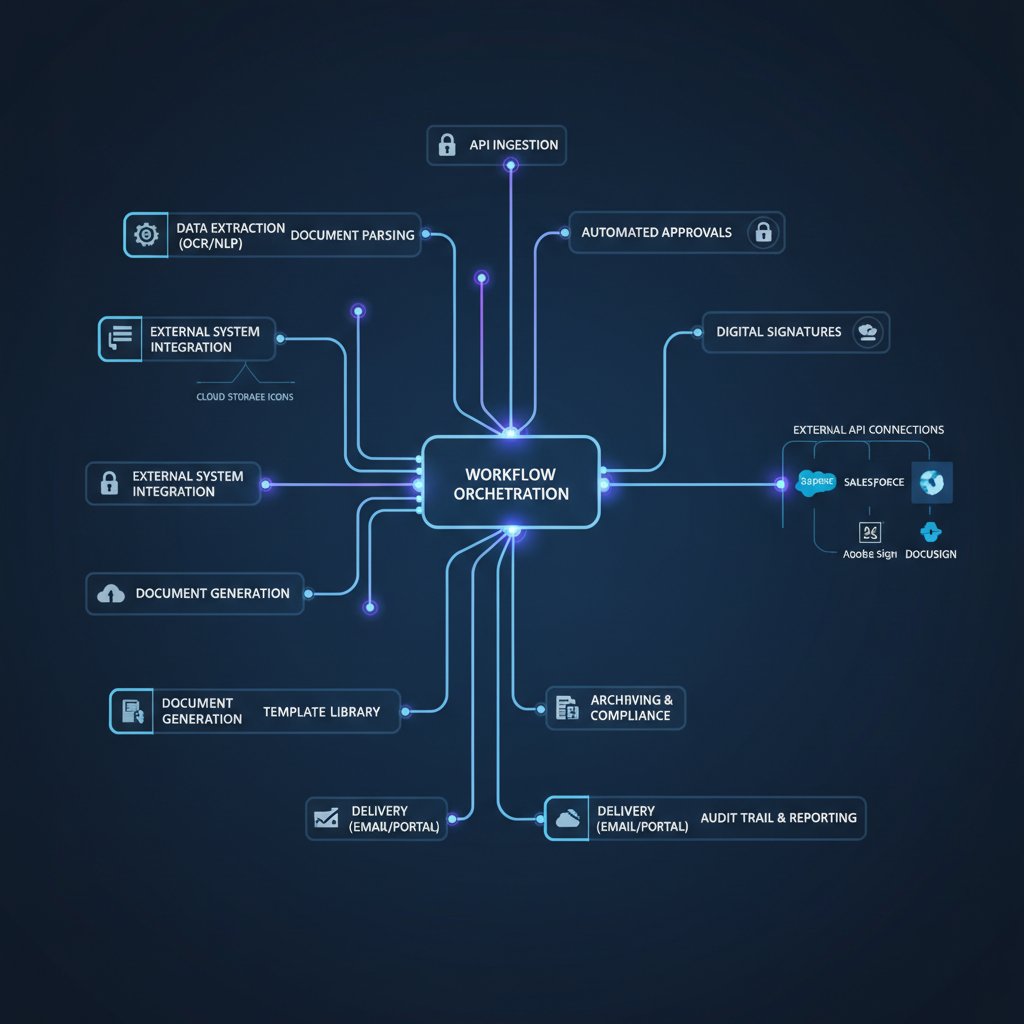
Choose flexibility as your north star. Tools like filecreator.ai exemplify how seamless integration and customization can turn document headaches into strategic assets.
Balancing automation and human oversight
No matter how advanced your document automation technology gets, human oversight is the final guardrail between efficiency and chaos. The best systems embed human-in-the-loop checkpoints, ensuring that edge cases, anomalies, and context-specific decisions always get a second look.
Best practices for oversight include:
- Regularly scheduled audits of automated outputs.
- Designated checkpoints where human review is required for critical documents.
- Transparent error-reporting channels to catch issues early.
"Automation is only as smart as the people guiding it." — Taylor
In the end, the synergy between skilled humans and smart automation delivers results that neither could achieve alone.
Leveraging AI for continuous improvement
AI-driven automation isn’t static—it’s a living system that thrives on feedback loops and iteration. The organizations that win are those that treat automation as a journey, not a destination.
Unconventional uses for document automation technology:
- Real-time compliance checks across rapidly changing regulatory landscapes.
- Automated generation of personalized client communications at scale.
- Dynamic contract negotiation, where AI suggests terms based on recent deal history.
- Integrating sentiment analysis into HR documentation for culture monitoring.
The frontier? Adaptive workflows that learn and evolve, shifting resources and strategies on the fly as data trends emerge.
Debunking the biggest myths about document automation technology
Myth 1: Automation kills jobs
It’s a seductive narrative, but it’s not the full story. Automation doesn’t just replace jobs—it transforms them. According to the Rossum, 2025, 34% of finance leaders now emphasize AI literacy as a critical skill.
New roles and skills are emerging: automation architects, AI trainers, workflow analysts, and quality auditors. The mundane is disappearing, but meaningful, higher-order work is on the rise.
New job titles in the age of document automation
- Automation Architect: Designs and oversees automated workflows.
- Data Curator: Ensures data quality and manages training datasets.
- AI Trainer: Refines model outputs and retrains AI systems.
- Workflow Analyst: Monitors process performance and optimizes flows.
Myth 2: No-code solutions are always better
No-code is hot, but it’s no panacea. For simple, one-off needs, drag-and-drop automation is fast and flexible. But when you’re scaling across teams, integrating with complex systems, or handling sensitive data, customization is non-negotiable.
Filecreator.ai is a prime resource for exploring automation options that balance no-code simplicity with robust API extensibility—offering flexibility for organizations with diverse, evolving needs.
Myth 3: Once automated, always automated
Automation isn’t a “set it and forget it” affair. It requires constant auditing, updating, and adaptation to stay relevant.
Steps to audit and update document automation workflows:
- Schedule regular process reviews—don’t wait for things to break.
- Update templates and rules as business logic evolves.
- Monitor exception rates and investigate root causes.
- Retrain AI models with new data to prevent drift.
- Solicit user feedback and act on it quickly.
Pro tip: Treat automation systems like living software. Invest in longevity with proactive stewardship.
The future of document automation technology: What’s next?
Emerging trends: AI, blockchain, and smart contracts
The line between documents and data is vanishing. AI continues to drive hyperautomation, while blockchain and smart contracts bring transparency, traceability, and self-executing agreements to the table. But the risks are as real as the promises: implementation complexity, unknown vulnerabilities, and the ever-present challenge of aligning tech with human values.

Smart contracts, for instance, can eliminate manual approvals and speed up transactions, but a single coding error can have catastrophic consequences. As with all tech, the tools are only as good as the people deploying them.
The ethical dilemma: Privacy, bias, and the value of human judgment
Advanced automation introduces new ethical challenges. AI-powered document systems can inadvertently encode bias, compromise privacy, or make decisions with real human impact. According to current industry analysis, robust safeguards are essential.
| Ethical Risk | Potential Impact | Recommended Safeguard |
|---|---|---|
| Privacy breaches | Data leaks, reputational harm | Strong encryption, access controls |
| Algorithmic bias | Unfair outcomes | Diverse training data, audits |
| Over-delegation | Loss of accountability | Human-in-the-loop oversight |
| Lack of transparency | Low trust, regulatory issues | Explainable AI, audit trails |
Table 5: Ethical risks and safeguards in document automation technology. Source: Original analysis based on current industry standards.
How to futureproof your organization (and yourself)
Staying relevant means staying sharp—and agile.
Step-by-step guide to mastering document automation technology:
- Build foundational skills in AI literacy, process mapping, and data management.
- Start small: pilot automation on low-risk processes before scaling up.
- Regularly audit and refine your workflows, inviting feedback from all users.
- Foster a culture of learning—automation is a moving target.
- Stay plugged into industry forums, conferences, and resources like filecreator.ai to keep pace with best practices.
Adaptation isn’t optional—it’s existential.
Glossary and jargon-buster: decoding document automation speak
Clarity is power in a jargon-soaked industry. Here’s what matters—and what doesn’t.
Industry jargon explained:
Application Programming Interface—a set of rules that allow different software systems to communicate. Essential for integration-heavy document automation.
The convergence of AI, RPA, and workflow automation into a unified, adaptive system.
The technology enabling machines to interpret and process human language in documents.
AI method combining data extraction with generative capabilities for nuanced document outputs.
Unofficial tech solutions created by users outside of IT governance—often a risk with poorly implemented automation.
AI systems designed to make their decisions and logic transparent to humans—a key trust factor in document automation.
Understanding these terms isn’t just for show. It’s the difference between leading your automation journey and being led astray by buzzwords masquerading as progress.
Key takeaways: What you need to know before you automate
The document automation revolution isn’t a clean break from the past—it’s a high-stakes, high-reward transformation packed with unexpected landmines and hidden goldmines. The most important insights?
Hidden benefits of document automation technology experts won’t tell you:
- Automation, done right, doesn’t just save time—it uncovers hidden process flaws and opportunities for innovation.
- AI-powered analytics can surface trends from unstructured data you never knew you had.
- The journey to automation often catalyzes wider digital transformation, upskilling your entire team.
- Error reduction isn’t just about accuracy; it’s about freeing up human potential for creative and strategic work.
- Well-implemented automation boosts morale—when staff escape the grind, they find new purpose.
As the research shows, document automation technology is as much about culture and strategy as it is about software and AI. The organizations that survive—and thrive—are those that approach automation with critical eyes and courageous hearts. Know the brutal truths, challenge the sales pitches, and make technology your weapon, not your weakness.
Ready to dig deeper? Check out resources like filecreator.ai for real-world insights and expert guidance on navigating this wild new landscape.
Sources
References cited in this article
- Rossum Document Automation Trends 2025 report(rossum.ai)
- PRNewswire: AI at a Crossroads 2025(prnewswire.com)
- Adlib: The "Big 8" Trends in Document Management in 2025(adlibsoftware.com)
- PwC UK: LegalTech Roadmap(pwc.co.uk)
- SimpliGov: Document Automation in Government(simpligov.com)
- Docuphase: Beyond Paper Chaos(docuphase.com)
- Doctech: The Frightening Reality of Manual Document Processes(doctech.co.uk)
- Thoolie: The Future of Document Automation(thoolie.com)
- super.AI: Next-Gen Document Automation(super.ai)
- Rossum: Intelligent Document Processing(rossum.ai)
- Parseur: AI Data Extraction(parseur.com)
- Docsumo: IDP Integration Challenges(docsumo.com)
- Qntrl: Next-Gen Automation Integration(qntrl.com)
- AIIM: 5 Myths Regarding Document Automation(info.aiim.org)
- Wolters Kluwer: Document Automation Myths(wolterskluwer.com)
- ActiveDocs: How AI fits into Document Automation(activedocs.com)
- Provectus: AI Document Automation Challenges(provectus.com)
- Agrello: Document Automation Future Trends(agrello.io)
- SenseTask: Top 5 Trends for 2025(sensetask.com)
- LegalGPS: Document Automation for Law Firms(legalgps.com)
- Artsyl: Document Automation for Legal Industry(artsyltech.com)
- Scytale: Automation & Healthcare Compliance(scytale.ai)
- Docuphase: Healthcare Document Management(docuphase.com)
- Experlogix: Best Document Automation Tools 2025(experlogix.com)
- Templafy: Document Automation Guide(templafy.com)
- Forage AI: Best Document Processing Solution 2025(forage.ai)
- DocuXplorer: AI Document Management Tools(docuxplorer.com)
- Avokaado: Key Trends 2025(avokaado.io)
- SenseTask: Document Process Automation Strategies(sensetask.com)
Perfect Documents, Instantly
Filecreator.ai transforms the way you produce professional documents. Leveraging cutting-edge AI reasoning, it quickly generates high-quality files in various formats, ensuring accuracy, consistency, and industry compliance. Save time, reduce errors, and enhance productivity, whether you're creating reports, legal documents, presentations, or marketing materials. Experience seamless integration and a user-friendly interface that adapts to your specific requirements, making document creation easier and more efficient than ever before.
Get startedStart Creating Professional Documents Today
Join thousands of professionals who trust AI-powered document generation
Frequently Asked Questions
What percentage of organizations are currently using generative AI for document automation?
According to the article, only about 10% of organizations have embraced generative AI for document automation as of 2025.
What tool do most finance leaders still rely on instead of document automation?
Nearly 60% of finance leaders still use Excel as their main 'automation' tool, according to the article.
Is document automation a 'set and forget' solution?
No. The article describes the 'set and forget' concept as a dangerous myth, stating that document automation requires constant tuning, regular oversight, rule refinement, and system audits to function effectively.
What are some of the hidden costs of manual document workflows?
According to the Rossum Document Automation Trends 2025 report cited in the article, hidden costs include lost hours, missed deadlines, compliance failures, and burnout that erodes team morale.
What challenges do organizations face when implementing document automation?
The article identifies cyber threats, integration nightmares, and a skills gap as major challenges that ambitious teams encounter when implementing document automation technology.
Continue Reading
Explore more from Professional Document Generator

Document Automation Tools: the Real Costs and Benefits
Document automation tools are projected to reach $24.3B by 2032. This article examines the real risks, actual benefits, and how to select the right solution for your business.

Document Automation Platforms in 2026: Power, Risks, and ROI
Discover insights about document automation platform

Document Automation Solutions: Benefits and Real-World Challenges
Document automation solutions reshape business workflows. This article examines the real benefits, hidden costs, and practical challenges of implementing automation in document management.

Are Document Automation Services Revolutionizing Business or Just Adding Chaos?
Document automation services finally exposed: discover the true ROI, hidden pitfalls, and bold new strategies for 2026. Don’t automate blind—read this first.

Automatic Document Creator Tools: How They Reshape Work
Automatic document creator tools use AI to automate document creation, fundamentally changing how teams work and compete.

Document Automation Tool: 9 Harsh Truths and Real Solutions
This article examines 9 harsh realities of document automation tools and how they affect workflow. It covers persistent myths, real challenges, and research-backed solutions for improving productivity.