


Document Automation Software Comparison: Hidden Costs and Real ROI
Written with AI assistance under our editorial guidelines
Document automation software promises to eliminate chaos through AI-powered workflows and instant compliance, but hidden costs, integration challenges, and unmet expectations often undermine returns on investment. Organizations face pressure from exponential document growth—digital documents double every two to three years—forcing employees to waste nearly two hours daily on document-related tasks, creating productivity losses that demand automated solutions.
The boardroom pitch is always the same: automate your documents and the chaos melts away. The promise of document automation software, especially in 2025, is intoxicating—AI-powered workflows, instant compliance, and zero errors. But scratch beneath the glossy marketing, and a different reality emerges. Document automation can be a lifeline—or a vortex of hidden costs, integration nightmares, and shattered expectations. This article slices through the noise with a document automation software comparison that exposes the brutal truths, reveals unexpected victories, and lays bare the risks that most reviews gloss over. Whether you’re a business leader, IT strategist, or the poor soul buried under a mountain of PDFs, here’s the unvarnished truth you can’t afford to ignore.
Why document automation matters now more than ever
The digital document explosion
It’s easy to underestimate the scale of the digital paper trail modern businesses leave behind. According to a 2024 survey by AIIM, organizations are producing digital documents at a rate that’s doubling every 2 to 3 years. The sheer volume is staggering—contracts, invoices, HR forms, compliance records, marketing collateral, all multiplying unchecked. This document overload isn’t just a logistical headache; it’s a clear and present threat to productivity, compliance, and sanity. Managing these sprawling files manually isn’t just inefficient—it’s business malpractice.
The psychological cost of this relentless document churn is rarely discussed but deeply felt. Employees spend precious hours searching, formatting, and reformatting files, sapping morale and fueling burnout. It’s the modern equivalent of Sisyphus, endlessly pushing PDFs up a hill that never flattens out. According to IDC Research, 2024, the average knowledge worker wastes nearly two hours a day on document-related tasks. That’s lost time, lost energy, and, ultimately, lost revenue.

Beyond the human toll, the environmental impact is severe. Inefficient document workflows mean more printing, more energy-intensive storage, and a massive digital carbon footprint. According to GreenBiz, 2024, document management can account for up to 20% of an organization’s IT-related energy consumption. The quest for efficient automation is no longer just about saving time or money—it’s a frontline battle for sustainability.
From hype to hard reality: a brief history
Rewind to the late ’90s and early 2000s: document automation was the domain of clunky macros and rigid templates. The big promises—efficiency, error reduction, transparency—rarely materialized. Most “automation” amounted to little more than glorified mail merges. Systems were siloed, integrations were non-existent, and the human element was an afterthought. Even as platforms evolved, they often failed to bridge the gap between lofty claims and daily realities.
Why did so many early solutions flop? The answer is brutally simple: automation doesn’t fix a broken process—it amplifies it. Businesses rushed to automate without first streamlining workflows. The result? Automated chaos, at scale.
| Year | Major Breakthrough | Common Pitfall |
|---|---|---|
| 1997 | Word macros, basic scripts | Rigid, error-prone |
| 2005 | Workflow engines emerge | Siloed, hard to scale |
| 2012 | Cloud solutions debut | Poor security, integration struggles |
| 2020 | AI-powered automation | Hype outpaces reality |
| 2023 | No/Low-code platforms rise | User adoption gaps, hidden costs |
Table 1: Timeline of document automation’s evolution—breakthroughs and recurring failures.
Source: Original analysis based on PeerSpot Buyer’s Guide 2025, AIIM, 2024
"Automation doesn’t fix a broken process, it amplifies it." — Alex, IT consultant
What users really want (and rarely get)
Ask any power user or process owner, and you’ll hear the same wish list: seamless integration with existing systems, intuitive interfaces, and unfailing reliability. Yet, according to the PeerSpot Buyer’s Guide 2025, most platforms fall short. Integration complexity, poor training resources, and limited flexibility are routine complaints.
Hidden benefits of document automation few experts mention:
- Enables remote collaboration with full audit trails, improving transparency and trust.
- Accelerates onboarding for new hires by standardizing core processes.
- Reduces legal exposure by automating compliance checks and retention policies.
- Frees up IT resources, letting them focus on innovation, not firefighting.
- Supports disaster recovery with centralized backups and version control.
But beneath the functional must-haves, emotional drivers reign: the deep desire for control, predictability, and proof that tech isn’t just another burden. People crave time savings—not just in theory, but in daily reality. They want risk reduction that’s tangible, not hypothetical. And, above all, they want the confidence to move fast without fearing compliance missteps or catastrophic errors.
The anatomy of document automation software: what really sets tools apart
Core features versus real-world impact
Every vendor’s website is a wall of checkboxes: e-signature support, customizable templates, workflow builders, analytics dashboards. But which features actually move the needle? According to The Digital Project Manager, 2025, only a handful of features consistently drive real-world benefits.
| Feature | Saves Time | Reduces Errors | Often Goes Unused |
|---|---|---|---|
| AI-driven template population | ★★★★★ | ★★★★☆ | ☆ |
| Workflow automation | ★★★★☆ | ★★★★☆ | ★☆☆☆☆ |
| Compliance checks | ★★★☆☆ | ★★★★★ | ☆ |
| Analytics dashboards | ★★☆☆☆ | ★☆☆☆☆ | ★★★★☆ |
| E-signature integration | ★★★★☆ | ★★★★☆ | ★☆☆☆☆ |
Table 2: Feature matrix—real-world impact of common document automation capabilities
Source: Original analysis based on The Digital Project Manager, 2025, Experlogix Review, 2025
So why do so many “must-have” features collect dust? The answer is often misalignment: tools are packed with bells and whistles that look great in demos but don’t fit real workflows. Organizations that chase the most features—rather than the right ones—end up with shelfware and decision fatigue.
AI, automation, and the myth of the effortless workflow
There’s a dangerous myth at the heart of the document automation software comparison: that AI will make everything seamless, hands-off, and perfect. In reality, AI is only as effective as the data, processes, and oversight behind it. Training models, setting up triggers, and refining templates all require significant human involvement. The learning curve is real, and so are the consequences of mistakes—misrouted contracts, compliance violations, and unintentional data leaks.
"AI is a tool, not a magic spell." — Jenna, operations manager
Even the best AI-driven systems need regular monitoring, feedback loops, and contingency plans. Automation amplifies efficiency, but it also amplifies errors when things go sideways. Human oversight is not optional—it’s essential, especially when regulatory stakes are high.
Security, compliance, and the new battlegrounds
In 2025, document security isn’t just a technical issue—it’s existential. With cyberattacks targeting digital records and regulators tightening their grip, document automation platforms must offer robust encryption, granular access controls, and airtight audit trails. According to a 2024 Ponemon Institute report, more than 60% of data breaches now involve unprotected or mismanaged documents.
Compliance is an obstacle course: from GDPR in Europe to HIPAA in the U.S., to emerging data sovereignty laws worldwide. No platform is truly “set and forget”—constant vigilance, regular audits, and platform updates are non-negotiable.

The best tools bake compliance into every step, not just as a checklist but as a living, adaptive process. But many tools lag behind, leaving businesses exposed to regulatory fines and reputational damage.
Who wins and who loses: the true cost of automation
The hidden costs nobody advertises
It’s the details that’ll kill you. Vendors tout “transparent” pricing, but the real costs lurk in the shadows: endless training sessions, months-long migrations, lost productivity during rollout, and the ever-present specter of shadow IT—a Frankenstein’s monster of unauthorized workarounds. According to Gartner, 2024, 35% of failed automation projects cite unanticipated costs as the root cause.
| Platform | License Fee | Migration Cost | Training Cost | Maintenance | Hidden Costs |
|---|---|---|---|---|---|
| Platform A | $12k/year | $5k | $3k | $4k/year | Custom integration |
| Platform B | $10k/year | $12k | $2k | $6k/year | Consultant fees |
| Platform C | $15k/year | $3k | $5k | $5k/year | Downtime, lock-in |
Table 3: Cost-benefit analysis of leading document automation platforms—hidden expenses highlighted
Source: Original analysis based on PeerSpot Buyer’s Guide 2025, Gartner, 2024
The psychological toll is real, too. When roles shift, some employees see automation as a threat. Others are burdened with learning new systems while juggling their day jobs. The result: friction, resentment, and, often, grassroots resistance that can stall even the best-laid plans.
When automation backfires
Here’s the dirty secret: not every automation project ends in triumph. Take the case of a regional logistics provider that tried to automate its entire contract workflow in one fell swoop. The platform checked all the technical boxes but failed to account for the company’s unique approval process. The result? Weeks of confusion, lost contracts, and frantic calls to IT.
Automating a broken process doesn’t fix it—it just institutionalizes the pain. Common dangers include encoding bad workflows, ignoring edge cases, and underestimating the time required for meaningful training. According to McKinsey, 2024, nearly 30% of automation initiatives stall or fail outright due to poor change management.
- No executive buy-in: Automation without leadership support is DOA.
- Unclear ownership: Who’s responsible when things break?
- One-size-fits-all approach: Templates that ignore business nuance.
- Weak integration: Clunky handoffs between systems.
- Poor user training: “Just figure it out” is not a strategy.
- Hidden costs: Unbudgeted maintenance, migration, or consultant fees.
- Vendor lock-in: Difficulty exporting or migrating files.
Unseen winners: small teams and underdogs
But it’s not all doom and gloom. Small businesses and lean teams can leapfrog giants by embracing smart, nimble automation solutions. Without legacy systems to untangle, they can move fast, experiment, and pivot when needed. In creative sectors and non-profits, automation opens doors to new ways of working—think rapid content production, streamlined grant applications, or collaborative editing across continents.
"We automated out of desperation, not luxury, and it saved us." — Devon, startup founder
Unconventional use cases—from indie publishers to grassroots NGOs—prove that automation’s biggest victories often happen off the main stage. When every hour and dollar counts, the right tool can mean the difference between stagnation and survival.
How to actually compare document automation software (beyond the buzzwords)
Setting your priorities: what really matters for your team
A sobering truth from document automation software comparison: no two organizations need the exact same toolkit. The key is mapping platform features to your actual business needs, not to the vendor’s marketing deck. Do you need airtight compliance or just basic workflow automation? Is multi-format export a must, or is integration with legacy ERP systems your top priority?
Self-assessment checklist for evaluating organizational readiness:
- Have we mapped our core document workflows end-to-end?
- Do we know where most errors and bottlenecks occur?
- Are we clear on compliance requirements—now and in the future?
- What’s our tolerance for change, and who owns the rollout?
- Can we allocate time for comprehensive user training?
- Have we budgeted for hidden costs like migration and downtime?
- Are there strong advocates (“champions”) inside the business?
- Is our IT stack modern enough to support new integrations?
- How risk-averse is our organization to vendor lock-in?
- Do we have a plan for ongoing support and optimization?
Don’t fall for “feature FOMO”—the fear of missing out on the latest buzzword. Simplicity and alignment beat a bloated features list every time.
Breaking down the comparison table: what to look for
Comparison tables are a staple of any software hunt, but they’re often more obfuscation than illumination. The trick is reading between the lines: does the platform shine where you need it, or just on paper?
| Platform | AI Automation | Compliance | Integrations | Customization | Lock-In Risk | Hidden Costs |
|---|---|---|---|---|---|---|
| Platform X | ★★★★★ | ★★★★☆ | ★★★☆☆ | ★★☆☆☆ | ★☆☆☆☆ | Medium |
| Platform Y | ★★★★☆ | ★★★☆☆ | ★★★★★ | ★★★★★ | ★★★★☆ | High |
| Platform Z | ★★★☆☆ | ★★★★★ | ★★★★☆ | ★★★☆☆ | ★★★☆☆ | Low |
Table 4: Side-by-side comparison of leading document automation platforms—context is everything
Source: Original analysis based on PeerSpot Buyer’s Guide 2025, The Digital Project Manager, 2025
The “winner” isn’t the one with the most stars—it’s the one that fits your context with the fewest compromises.
Questions you should ask every vendor (but rarely do)
Transparency is the scarcest commodity in enterprise software. Don’t settle for sales pitches—demand answers.
- What are the real costs—implementation, migration, ongoing support?
- How often do you update for new compliance regimes?
- Can we export all our data in open formats at any time?
- What happens if we exceed user/document limits?
- How do you handle data breaches—policy and precedent?
- What integrations are native, and which are third-party?
- What’s your average incident response time?
- How granular are role-based permissions?
- Will you provide a sandbox for testing before purchase?
- Can we access a community or peer network for support?
Independent reviews and user communities are invaluable—real-world stories cut through the hype. Consult trusted resources like PeerSpot Buyer’s Guide 2025 for unvarnished feedback.
Inside the black box: technical deep dive for non-engineers
How workflows, templates, and AI really work
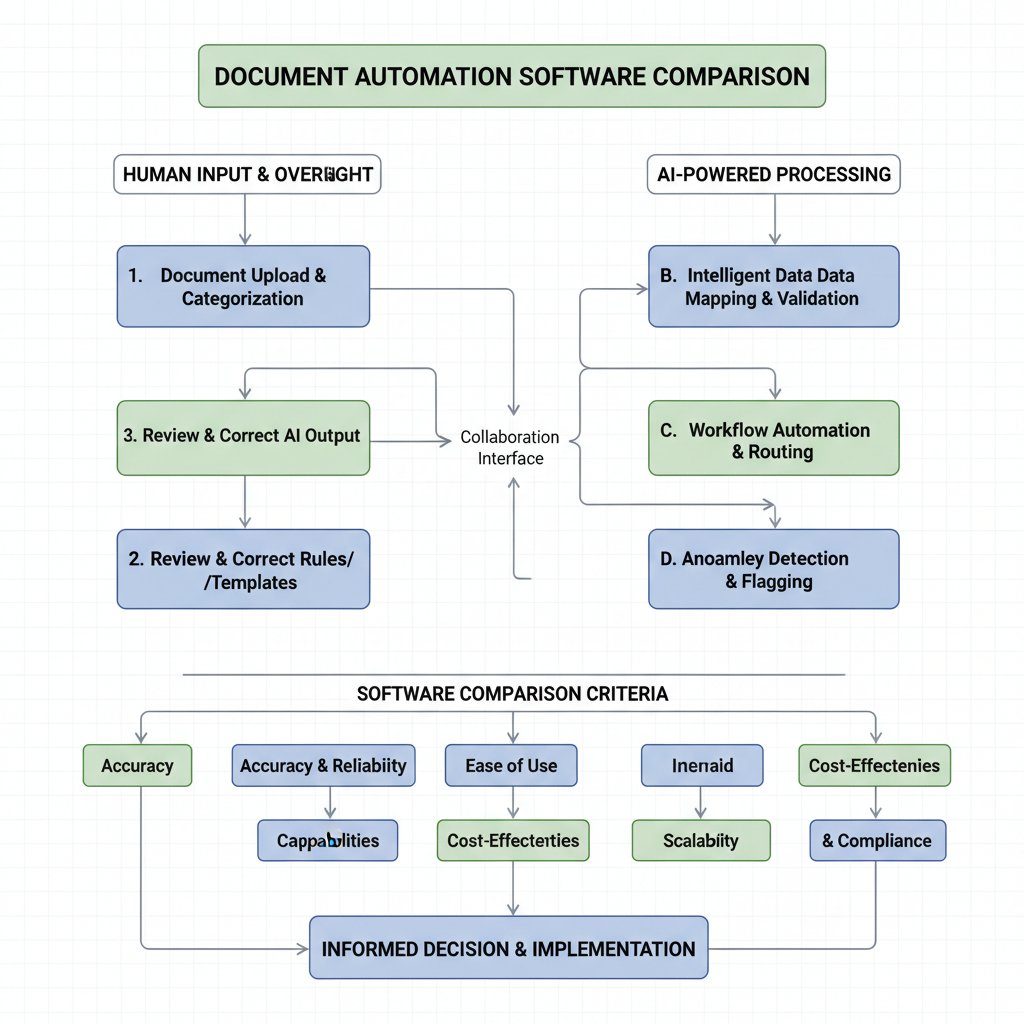
At its core, document automation is about orchestrating three elements: workflows (the sequence of steps), templates (predefined structures), and AI engines (the logic that adapts and fills content). Picture a relay race: data enters, triggers fire, templates populate, and human checkpoints ensure everything stays on course. Each part must be finely tuned to your process.
Templates are the backbone—they standardize structure and branding. Triggers (from API calls, emails, or user actions) automate repetitive flows. AI brings “smarts”—auto-filling fields, suggesting edits, flagging compliance gaps. But even the best architecture crumbles if not mapped to real workflows.
Jargon decoded: understanding the lingo
Don’t let vendor jargon muddy the waters. Here’s a cheat sheet for the core terms that matter in document automation software comparison:
Application Programming Interface. Allows different software to communicate—essential for integrations.
Platforms that let non-engineers design workflows using visual builders, reducing IT bottlenecks.
A repository of ready-made document formats—vital for consistency and speed.
Events (like data entry or deadline) that start automated workflows.
“If-this-then-that” rules enabling dynamic documents (e.g., different clauses for different regions).
A log of all document activity. Critical for compliance, especially in regulated industries.
Ensuring data stays within specific geographic or legal jurisdictions—a growing compliance demand.
Jargon isn’t just annoying; it can obscure real capabilities. Always ask vendors to demonstrate, not just describe.
Integration wars: why your stack might break
Integration complexity is the silent killer of automation dreams. Legacy ERPs, custom CRMs, and cobbled-together cloud stacks can clash with new tools, breaking workflows and frustrating users. Vendor lock-in is another trap: proprietary formats or weak export options can make switching platforms agonizingly expensive.
Savvy buyers demand open APIs, robust export options, and clear documentation. Solutions like filecreator.ai have built reputations on their ability to play nice with diverse tech environments, minimizing integration headaches and maximizing flexibility for customization.
Contrarian takes: when not to automate
The cases where manual wins
Automation is not a panacea. There are crucial situations where manual processes outshine their automated counterparts. Highly creative or custom document workflows—think bespoke proposals, sensitive legal negotiations, or one-off executive reports—often require a human touch. In regulatory environments with ambiguous or rapidly-changing requirements, rigid automation can create compliance risks rather than prevent them.
- When the process is unique and unlikely to repeat.
- Where regulatory ambiguity demands nuanced judgment.
- For highly sensitive documents requiring tight, manual oversight.
- In creative fields where rigid templates stifle innovation.
- When legacy systems cannot integrate, introducing risk.
- When the cost of automation exceeds the potential ROI.
How automation can kill creativity—and how to avoid it
One real risk of automation is the temptation to over-standardize. When every document looks and reads the same, the spark of creativity can fade. Teams may begin to “color inside the lines” too much, resulting in bland, undifferentiated output.
To preserve creative flexibility, organizations should:
- Use automation for repetitive, compliance-heavy tasks, but leave room for customization in client-facing materials.
- Design templates that allow for modular, optional sections.
- Encourage feedback loops where users can suggest improvements to automated flows.
- Maintain an “escape hatch” for manual intervention when needed.

The future: hybrid workflows and the rise of 'human-in-the-loop'
Hybrid automation—combining machine speed with human judgment—is gaining traction. “Human-in-the-loop” systems let AI handle the grunt work while people focus on exceptions, quality control, and creative input. This hybrid approach is both practical and ethical, ensuring accountability and flexibility.
Platforms like filecreator.ai exemplify this trend by empowering users to blend automation with manual oversight, striking the right balance between efficiency and control.
Real-world impact: stories from the trenches
The good: transformation stories
Consider a mid-sized financial services firm that adopted document automation to overhaul its reporting process. Before automation, monthly statements took a week of manual effort; after, the same output required less than a day. Errors plummeted, and the compliance team finally slept at night.

The numbers don’t lie: the firm cut document processing time by 80%, reduced errors by 90%, and reported a measurable boost in employee morale.
The bad: what went wrong (and why)
Not all stories end in celebration. A global manufacturing group rolled out a complex automation suite, only to discover that its legacy systems couldn’t support the integration. The result: weeks of downtime, ballooning costs, and a bruised reputation.
The invisible culprits? Lack of pre-implementation testing, absence of executive sponsorship, and a “one size fits all” mentality.
"We thought automation would solve everything. It didn’t." — Morgan, project lead
The surprising: unexpected benefits and side effects
Sometimes, automation delivers positive side effects nobody anticipated. In a creative agency, automating routine documentation freed up time for brainstorming and client strategy—leading to two major new business wins. An NGO discovered that streamlined grant paperwork improved collaboration between remote teams, fostering a culture of transparency and ownership. In both cases, automation didn’t just save time; it fundamentally changed how people worked together and created value.
Automation has a way of redrawing organizational maps—and, when thoughtfully deployed, opening doors to new business models, roles, and opportunities.
How to get started: actionable steps for your automation journey
Step-by-step guide to a successful rollout
Preparation is everything. Rushed rollouts doom even the best technology.
- Audit your current workflows: Map every step end-to-end.
- Define success metrics: Know what “good” looks like before you start.
- Get stakeholder buy-in: Secure executive and user advocacy.
- Choose pilot teams: Start small with high-impact, low-risk use cases.
- Evaluate vendors rigorously: Ask the tough questions—see earlier list.
- Plan for migration: Inventory data, assess compatibility, and plan backups.
- Allocate for training: Don’t skimp on onboarding and user education.
- Configure and customize: Map templates and workflows to real needs.
- Monitor and optimize: Track KPIs, gather feedback, and iterate.
- Scale thoughtfully: Expand only after early wins and lessons learned.
These steps work for organizations of all sizes—simply tailor the scope and speed to match your resources and risk appetite.
Common pitfalls and how to avoid them
The graveyard of failed automation projects is full of familiar headstones. Here’s how to dodge the most common traps:
- Skipping the workflow audit—building on shaky foundations.
- Neglecting change management—users won’t adopt what they don’t understand.
- Underestimating integration complexity—legacy systems rarely cooperate.
- Focusing on features over fit—shiny doesn’t mean useful.
- Ignoring compliance requirements—regulators don’t forgive shortcuts.
- Failing to budget for hidden costs—surprise expenses can kill ROI.
- Treating automation as a “one-and-done”—ongoing optimization is essential.
Remember, success isn’t about perfection—it’s about relentless, informed iteration. Lean on communities, peer networks, and platforms like filecreator.ai to share lessons learned and accelerate your journey.
Essential resources and next steps
Here’s the bottom line: document automation software comparison is not about picking the most hyped tool—it’s about finding the best fit for your needs, your team, and your future. The stakes are high: efficiency, compliance, and even morale hinge on getting this right.
As a next step, consider running a quick audit of your current document workflows. How many hours are lost, how many errors slip through, and what could you reimagine with the right automation? Platforms like filecreator.ai serve as helpful resources for organizations seeking a blend of power, flexibility, and reliability.
Ready to stop drowning in paper? Audit, compare, and act. The brutal truths you confront today are the foundation of tomorrow’s competitive edge.
The future of document automation: trends, threats, and opportunities
AI, ethics, and the automation arms race
The arms race is real. AI-driven automation is accelerating, turbocharged by advances in natural language processing and machine learning. But the ethical dilemmas are intensifying: algorithmic bias, opaque decision-making, and privacy risks are no longer theoretical. Platforms must prioritize transparent, explainable AI—not just to satisfy regulators, but to earn user trust.
Competition is fierce, with vendors racing to outdo each other on features, speed, and compliance. The push for open standards is a welcome counterbalance, reducing the risk of vendor lock-in and empowering buyers.
What to watch for in 2025 and beyond
Document automation is no longer a “nice to have”—it’s table stakes for any organization aiming to survive the digital onslaught. The hottest trends include low-code tools that democratize automation, smarter integrations that adapt on the fly, and a rising tide of global data regulations demanding ever-tighter controls.
| Market Segment | Leading Platforms | Key Features | Growth Rate |
|---|---|---|---|
| Enterprise | Platform X, Y | AI, compliance, scale | 12% |
| SMB | Platform Z, Q | Ease of use, integrations | 19% |
| Creative/NGO | Platform N, M | Customization, sharing | 15% |
Table 5: 2025 market landscape for document automation platforms
Source: Original analysis based on The Digital Project Manager, 2025, PeerSpot Buyer’s Guide 2025
User expectations are rising. Instant setup, seamless integrations, and bulletproof compliance are no longer extras—they’re requirements.
Final thoughts: what will separate leaders from laggards?
Leaders in document automation aren’t the ones with the biggest budgets or the most features—they’re the ones who stay honest about their needs, ruthless about simplicity, and relentless about optimization. The real winners ask hard questions, learn from failures, and treat automation as an evolving journey, not a checkbox.
Are you ready to confront the brutal truths? The next move is yours. Audit your processes, challenge your assumptions, and claim your edge—before someone else does.
Sources
References cited in this article
- PeerSpot Buyer’s Guide 2025(peerspot.com)
- Best Document Automation Software 2025(thedigitalprojectmanager.com)
- Experlogix 2025 Review(experlogix.com)
- Adlib Software, 2025(adlibsoftware.com)
- SenseTask Trends 2025(sensetask.com)
- Experlogix Document Automation Features(experlogix.com)
- ElectroIQ Digital Document Stats(electroiq.com)
- LLCBuddy Document Database Stats(llcbuddy.com)
- WhyMeridian Document Management Trends(whymeridian.com)
- PDF.ai Document Automation Guide(pdf.ai)
- Jotform Blog(jotform.com)
- Docupilot Blog(docupilot.com)
- DocsAutomator 15 Essential Features(docsautomator.co)
- Secureframe Compliance Trends(secureframe.com)
- AmyGB Key Trends(amygb.ai)
- BusinessResearchInsights Market Report(businessresearchinsights.com)
- Nanonets Best Solutions(nanonets.com)
- Formtek Blog(formtek.com)
- SignEasy Blog(signeasy.com)
- Templafy 2024 Edition(templafy.com)
- Rossum 2025 Report(rossum.ai)
- Inkit Deep Dive(inkit.com)
- Rossum 2025 Report(prnewswire.com)
- MetaSource 2024 Trends(metasource.com)
- BigDataWire AI Limitations(bigdatawire.com)
- Knowridge AI Creativity(knowridge.com)
- Erbis Legal Guide(erbis.com)
Perfect Documents, Instantly
Filecreator.ai transforms the way you produce professional documents. Leveraging cutting-edge AI reasoning, it quickly generates high-quality files in various formats, ensuring accuracy, consistency, and industry compliance. Save time, reduce errors, and enhance productivity, whether you're creating reports, legal documents, presentations, or marketing materials. Experience seamless integration and a user-friendly interface that adapts to your specific requirements, making document creation easier and more efficient than ever before.
Get startedStart Creating Professional Documents Today
Join thousands of professionals who trust AI-powered document generation
Frequently Asked Questions
How fast are organizations producing digital documents?
According to a 2024 AIIM survey cited in the article, organizations are producing digital documents at a rate that doubles every 2 to 3 years, creating an overwhelming volume of contracts, invoices, HR forms, compliance records, and other files.
How much time do knowledge workers waste on document-related tasks?
According to IDC Research 2024 data presented in the article, the average knowledge worker wastes nearly two hours a day on document-related tasks such as searching, formatting, and reformatting files.
What are the main challenges with manual document management?
The article identifies that manual document management creates logistical headaches, threatens productivity and compliance, causes employee burnout from repetitive tasks, and has severe environmental impacts through excessive printing and energy-intensive storage.
What does the article promise to reveal about document automation software?
The article promises to expose hidden costs, integration challenges, and risks that most reviews overlook, while also revealing unexpected victories and providing an unvarnished comparison of document automation solutions.
Continue Reading
Explore more from Professional Document Generator

Document Automation Software: Roi, Risks, and What Breaks
Document automation software solutions face real risks and hidden costs. This article examines the actual ROI, integration failures, and what companies misunderstand about automation.

Document Automation Workflow Software: Hidden Costs and Real ROI
Document automation workflow software promises efficiency gains, but vendors hide the real risks and costs. This article examines the true ROI and hidden vulnerabilities.

Document Automation Systems: Costs, Risks, and Competitive Gains
Document automation systems reduce manual paperwork costs and surface workflow risks. This article examines the financial impact, operational changes, and competitive advantages of automation.

Document Automation Workflow That Kills Hidden Costs (and Risk)
Discover insights about document automation workflow

Document Automation Cloud Integration: Real Costs and Rewards
Document automation cloud integration can reduce manual work and compliance risks, but organizations often stumble during implementation.

Document Automation Cloud Solutions: Roi, Risks and Real Impact
Document automation cloud solutions address manual document chaos in organizations. This article examines real ROI, operational risks, and transformative impacts of cloud-based automation.