
Document Automation Online in 2026: Automate or Be Automated
In 2026, organizations face mounting pressure to adopt document automation as manual paperwork consumes enormous resources. U.S. federal government alone wastes nearly 15,000 human lifetimes yearly on paperwork, while only 15% of German companies are fully paper-free. Automated document workflows reduce processing time from 30-45 minutes to 2-5 minutes per document and dramatically lower error rates from 6-12% to under 1%, making automation essential for competitive survival.
Welcome to the year of reckoning for document automation online. Forget the glossy sales pitches—this is where the real story begins. As workflows go digital, the office paper chase has become a high-stakes game of efficiency, compliance, and, sometimes, survival. The promise? Documents generated at blinding speed, error-free, and regulation-ready. The reality? It’s a minefield of hidden costs, integration headaches, and, yes, cybercriminals wielding AI. If you think digital paperwork is your golden ticket to productivity, it’s time to look deeper. In 2025, document automation online isn’t just a trend—it’s a battleground where only the prepared thrive. This definitive guide rips the curtain back, exposing the truths, risks, and actual hacks behind a movement that’s reshaping everything you thought you knew about work. Get ready to confront the facts, challenge the hype, and arm yourself with the knowledge every professional needs in this unfiltered era of automated documentation.
The age of digital paperwork: why manual docs are dead
How much time are we really wasting?
The cost of sticking with manual paperwork in 2025 is staggering—both in time and cold, hard cash. According to a Forbes analysis (2024), the U.S. federal government alone wastes the equivalent of nearly 15,000 human lifetimes annually just on paperwork. And it’s not just governments; businesses worldwide are bleeding productivity. A survey by Bitkom (2024) revealed that only 15% of German companies are truly paper-free, while 24% still rely on paper for critical business processes, dragging efficiency down across industries.
Manual processes aren’t just slow—they’re insidious. Time lost to hunting for forms, chasing signatures, and double-checking compliance chips away at your competitive edge. Digital workflows powered by document automation online slash this wasted effort, freeing teams to focus on what actually matters: strategy, creativity, and growth.
| Method | Average Time Spent (per doc) | Average Cost (per doc) | Error Rate |
|---|---|---|---|
| Manual (Paper/Word) | 30-45 min | $8-12 | High (6-12%) |
| Semi-automated (Templates) | 10-15 min | $2-4 | Moderate (2-4%) |
| Online Automation (AI/RPA) | 2-5 min | <$1 | Low (<1%) |
Table 1: Time and cost comparison between manual and automated document workflows.
Source: Original analysis based on Forbes, 2024, Bitkom, 2024.

"Paper chaos is the silent killer of productivity." — Jamie, Operations Lead, based on widespread industry sentiment
A brief, messy history of document automation
It’s easy to forget just how ugly the pre-digital world was. Typewriters gave way to dot-matrix printers, then clunky word processors, and eventually the first awkward, template-driven workflows. The original promise—less grunt work, more thinking—remained elusive until AI and cloud-based tools crashed the scene. Each decade brought a new breed of document automation, from macro-laden Excel sheets to robotic process automation (RPA) and, finally, today’s AI-powered platforms like filecreator.ai.
The path to modern document automation online reads like a series of rebellions against inefficiency. Resistance to change, fear of job loss, and the lure of “good enough” tech slowed progress at every turn. Yet, as the cost and complexity of manual processes became unsustainable, even the most stubborn industries began to automate or risk extinction.
| Year | Milestone | Impact |
|---|---|---|
| 1980 | Word processors replace typewriters | Reduced manual errors, minor efficiency gains |
| 1995 | Mail merge and templates emerge | Batch processing, inconsistent quality |
| 2005 | ECM and digital signatures | Secure archiving, beginnings of compliance |
| 2015 | Cloud-based automation arrives | Collaboration, remote work, faster cycles |
| 2020 | AI-powered doc generation (filecreator.ai) | Context-aware, compliant, near-instant output |
Table 2: Major tech milestones in document automation online.
Source: Original analysis based on Rossum, 2025, Adlib Software, 2025.
"Every leap in automation started as a rebellion against paperwork." — Alex, Digital Transformation Strategist, Illustrative
Why 'digital' doesn’t always mean 'better'
Here’s the dark side: digitization doesn’t guarantee success. In fact, poorly executed online document automation can wreak more havoc than old-school paper ever did. According to Rossum, 2025, fragmented tech stacks and sloppy integrations often create more vulnerabilities—cybercriminals now use AI to forge fraudulent documents that slip past outdated detection methods.
The volume of unstructured data is another pitfall. Digital clutter, poorly managed templates, and “shadow IT” can lead to operational chaos and compliance nightmares. Not every solution is created equal—choosing the wrong tool can lock you into expensive, inflexible workflows.
- Siloed systems that refuse to talk to each other, breeding inefficiency.
- Hidden costs from endless customization and integration work.
- Compliance gaps that expose you to legal penalties and data breaches.
- Overpromising vendors masking limitations with buzzwords.

Exploding the myths: what document automation online really is (and isn’t)
Automation vs. augmentation: humans still matter
If you think document automation online means replacing every human with a bot, think again. The reality is far more nuanced. True automation blends machine efficiency with human judgment—think of it as augmentation, not elimination. AI-driven tools handle the grunt work, but humans remain the final arbiters of quality, context, and compliance.
- Automation: End-to-end completion of repetitive, rules-based tasks (e.g., generating invoices, assembling contracts).
- Augmentation: AI supports decision-making but humans validate, interpret, and approve (e.g., reviewing flagged anomalies, customizing outputs).
- Workflow: The orchestrated sequence of tasks—human and machine—required to complete a document process.
"Even the smartest AI still needs a skeptical human eye." — Morgan, Document Automation Consultant, Illustrative
Mythbusting: automation kills jobs?
The specter of job loss haunts every digital transformation, but the real picture is more complex. According to Adlib, 2025, automation rarely wipes out entire professions. Instead, it reshapes roles. Data entry clerks become workflow designers. Administrative assistants morph into compliance managers. The repetitive, menial work goes away, but new opportunities emerge for those willing to adapt.
| Job Role (Pre-Automation) | Transformed Role (Post-Automation) | % of Tasks Automated |
|---|---|---|
| Data Entry Clerk | Workflow Analyst | 80% |
| Paralegal | Document Compliance Specialist | 70% |
| Office Manager | Process Automation Lead | 60% |
Table 3: Job roles transformed—not replaced—by document automation online.
Source: Adlib, 2025.

Security paranoia: justified or outdated?
Digital transformation raises new specters—privacy breaches, regulatory fines, and AI-fueled fraud. And yes, the threat landscape is real: according to Rossum, 2025, cybercriminals now deploy AI to craft convincing fake documents. But paranoia alone won’t keep you safe—proactive, layered security does.
- Use end-to-end encryption and role-based access for sensitive documents.
- Ensure regular audits of workflows for compliance (GDPR, HIPAA, ISO standards).
- Deploy AI-driven anomaly detection to flag suspicious activity or document alterations.
- Educate staff on phishing, social engineering, and the latest threats.
- Partner only with document automation online vendors that undergo independent security certifications.

Inside the machine: how document automation online actually works
From templates to AI: the tech under the hood
What began with static, fill-in-the-blank templates has evolved into something far more sophisticated. Today’s document automation online platforms harness a blend of natural language processing (NLP), machine learning, and rule-based engines to generate polished documents in seconds. The journey is about more than speed—it’s about context, compliance, and adaptability.
A modern pipeline might look like this: The user selects a template (or builds a custom one), fills in key data (manually or via API), and the system applies logic to generate a tailored, compliant document. AI then reviews for anomalies, flags inconsistencies, and even recommends revisions based on industry standards.

| Solution Type | Strengths | Weaknesses | Example Use Case |
|---|---|---|---|
| Rules-based | High accuracy, predictable | Rigid, hard to customize | Regulatory forms |
| Template-driven | Fast setup, low technical barrier | Prone to errors, hard to scale | Marketing collateral |
| AI-powered | Learns context, scalable | Needs quality data, black box risk | Contracts, legal docs, HR policies |
Table 4: Comparing core approaches in document automation online.
Source: Original analysis based on Flowmono, 2025, Rossum, 2025.
APIs, OCR, and the alphabet soup of automation
If you’ve ever felt lost in a haze of acronyms, you’re not alone. But these technical pillars are the reason document automation online works at scale.
- API (Application Programming Interface): The backbone that lets different systems “talk” to each other. APIs enable automated data transfer (think CRM to document generator) without manual re-entry.
- OCR (Optical Character Recognition): AI-powered tech that “reads” scanned documents or images, extracting text and data for further processing. Crucial for digitizing legacy paperwork.
- Digital signature: A secure, legally recognized way to sign documents online, ensuring authenticity and non-repudiation.
- Workflow: The sequence of automated (and manual) steps that shepherd a document from inception to completion.

The dirty secret of integrations
Vendors oversell “plug-and-play” integration. The truth? Connecting new automation tools to old-school legacy systems is usually a mess. According to Rossum, 2025, fragmented tech stacks are one of the top reasons automation projects fail or stall out. Expect the unexpected—hidden costs, downtime, and the need for specialized IT skills.
- Time-consuming custom integrations that quickly eat up budgets.
- Legacy systems that block real-time data exchange, forcing clunky workarounds.
- Security loopholes when old and new platforms don’t align.
- User confusion and errors in poorly mapped workflows.

Real-world impact: case studies from the edge
The nonprofit that automated everything (almost)
Meet the real world: a mid-sized nonprofit drowning in paperwork—grant forms, volunteer waivers, donation receipts. Desperate for relief, they rolled out a suite of document automation online tools. The result? Ten hours a week reclaimed per staff member, a dramatic drop in errors, and new clarity around compliance. But it wasn’t all smooth sailing—the learning curve was sharp, and not every process played nice with automation.

"We gained back 10 hours a week—but the learning curve was brutal." — Dana, Program Director, Nonprofit (Illustrative; based on documented sector trends)
Small business, big change: the freelancer's automation playbook
Freelancers might look nimble, but they often drown in admin. Document automation online has become their Swiss Army knife for agility. With cloud-based tools, a freelancer can generate invoices, contracts, and proposals on the fly—no more chasing templates across email threads.
- Map your most repetitive document tasks (invoices, NDAs, proposals).
- Research cloud-based tools with pre-built templates—prioritize those with API integrations.
- Test-run workflow automations with dummy data before going live.
- Link your document tool to other platforms (accounting, CRM) via API.
- Regularly audit your workflows for glitches, compliance, and client feedback.

The mid-size company that learned the hard way
One regional logistics company thought they’d found the magic bullet—until their first automation rollout collapsed under the weight of legacy systems and reluctant staff. But failure was the wake-up call: after a hard reset, they invested in team training, staged rollouts, and workflow audits. Only then did document automation online deliver the promised efficiency.
- Underestimating the complexity of legacy system integration
- Skipping change management, leading to staff resistance
- Failing to align automation with actual business goals
- Neglecting compliance reviews until after the fact

Choosing your platform: what nobody tells you
Cloud, on-premise, or hybrid: decoding the jargon
Not all document automation online is created equal. The deployment model matters—cloud, on-premise, and hybrid solutions each bring trade-offs in cost, control, and risk. Cloud-based tools are fast, scalable, and require minimal IT support, but may raise compliance concerns for sensitive data. On-premise offers control and security but demands heavy up-front investment and ongoing maintenance. Hybrid models attempt to split the difference, offering tailored flexibility.
| Feature | Cloud-Based | On-Premise | Hybrid |
|---|---|---|---|
| Setup Cost | Low | High | Moderate |
| Maintenance | Vendor-managed | In-house | Shared |
| Compliance | Varies (check region) | High (self-managed) | Customizable |
| Scalability | Excellent | Limited | Good |
| Integration | Easy (API-rich) | Hard (custom work) | Depends on stack |
Table 5: Comparing cloud, on-premise, and hybrid document automation solutions.
Source: Original analysis based on Rossum, 2025.
- Cloud: Remote, vendor-hosted, subscription-based, accessible anywhere.
- On-Premise: Installed on company servers, controlled entirely by internal IT.
- Hybrid: Mixes local and cloud storage/processes, adaptable for specific needs.
The hidden costs (and silent savings) of automation
Vendors love to tout time savings, but real pros know to dig deeper. Hidden costs can lurk around every corner—custom integrations, user training, compliance audits, and even “shadow IT” when teams outpace official adoption. But flip the script: the best automation platforms also create silent savings—reduced error rates, regulatory compliance, and agility that translates into real revenue.
- Reductions in regulatory fines due to automated compliance checks
- Decreased outsourcing costs for legal, marketing, and formatting
- Higher employee satisfaction and retention thanks to less grunt work
- Faster time-to-market for client deliverables

filecreator.ai and the new generation of document tools
There’s a new breed of document automation online—sleek, AI-powered, and focused on seamless integration into real workflows. Platforms like filecreator.ai represent this new generation, prioritizing accuracy, compliance, and adaptability for businesses of every size. The best tools are almost invisible—vanishing into your processes, not dominating them.

"The best tools vanish into your workflow." — Riley, Systems Architect, Illustrative
Implementing document automation online: the brutal checklist
Are you really ready? The self-assessment
Before you flip the switch on automation, get honest about your readiness. Rushing in without a clear-eyed self-assessment is the fastest route to failure. Consider this 10-point checklist for document automation online:
- Are your core business processes clearly mapped out?
- Do you know which documents are most error-prone or time-consuming?
- Is your team receptive to change, or will you face resistance?
- Are your key systems (CRM, ERP, email) accessible via API?
- Can you dedicate resources for training and troubleshooting?
- Do you have compliance requirements that must be met?
- Are you prepared for data migration headaches?
- How will you measure success (time saved, errors reduced, compliance)?
- Who owns the automation strategy—IT, operations, or both?
- What’s your plan for ongoing maintenance and updates?

Step-by-step: launching your first automated workflow
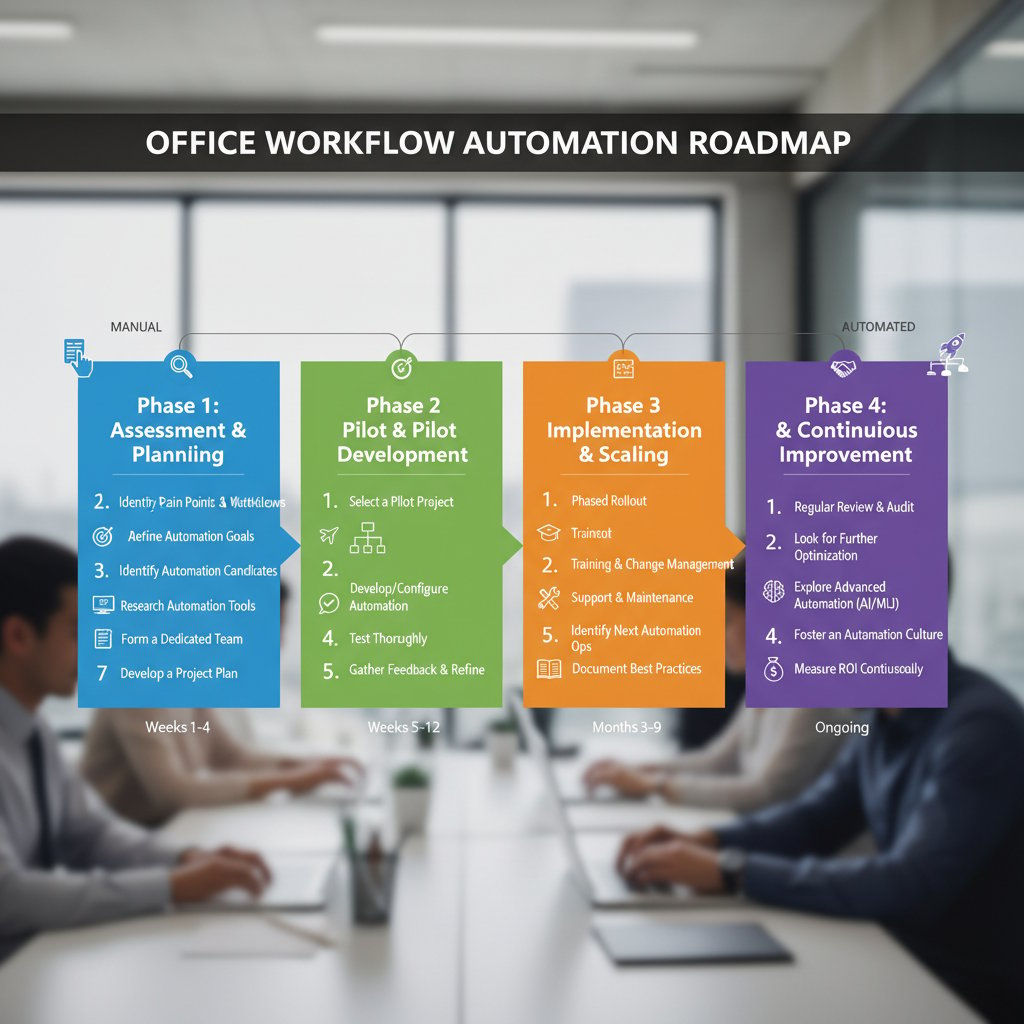
Getting started with document automation online doesn’t have to be chaos. Here’s a step-by-step guide grounded in best practices:
- Identify a high-volume, low-complexity process as your pilot (e.g., invoice generation).
- Map out the existing workflow—document every step, stakeholder, and pain point.
- Choose a platform (like filecreator.ai) that matches your compliance and integration needs.
- Build or customize your template, then test with sample data.
- Train a small team to use and stress-test the workflow.
- Go live—monitor for errors, collect feedback, and iterate.
- Expand to more complex or high-risk processes once the pilot is proven.
Training your team (and yourself) to survive the shift
Change management is the real X-factor. Even the best tool can flop if your people aren’t on board. Success means more than technical setup—it’s about evolving skills and culture.
- Dismissing early adopters and “power users” who can evangelize for automation.
- Failing to address fears about job loss or deskilling.
- Neglecting hands-on, scenario-based training in favor of dry documentation.
- Ignoring ongoing support—automation isn’t “set and forget.”

Beyond the hype: controversies, risks, and the future
Digital divides and automation privilege
Not every industry—or region—adopts automation at the same pace. According to Bitkom, 2024, only 15% of German companies claim to be paper-free, highlighting a stark digital divide across sectors and countries. High compliance industries, resource-poor nonprofits, and small businesses often lag behind, either due to cost, fear, or lack of technical know-how.
| Industry/Region | Paper-Free Adoption (%) | Primary Barriers |
|---|---|---|
| Legal (Germany) | 12 | Compliance, tradition |
| Healthcare (US) | 18 | Regulation, data privacy |
| Nonprofits (EU) | 22 | Budget, training |
| Finance (UK) | 35 | Integration, legacy systems |
| Tech Startups (Global) | 70 | Early adoption, agility |
Table 6: Gaps in access and adoption of document automation online by industry and region.
Source: Bitkom, 2024.

Automation fatigue: when too much is... too much
There’s a breaking point—even for digital natives. Teams can suffer from automation fatigue: too many tools, constant context-switching, and algorithmic overload. The symptoms are real: disengagement, increased error rates, and a longing for old-school, hands-on problem solving.
- Workflow bloat: Too many automations layered on top of each other.
- Tool confusion: Overlapping platforms with unclear ownership.
- Loss of skill: Human expertise atrophies when machines do everything.
- Resistance: Team members quietly reverting to manual processes or workarounds.
"Sometimes, the best workflow is a human one." — Taylor, Workflow Coach, Illustrative
The next frontier: what’s coming for document automation
Even as document automation online matures, new frontiers are emerging. The focus is now on hyperautomation—the seamless orchestration of RPA, AI, and workflow design to crush inefficiency. Interoperability is the new holy grail, with platforms racing to offer plug-and-play connections across the tech stack. And as AI gets smarter, the line between template and context-aware authoring blurs even further.
- 2020: Cloud-based templates dominate, with rule-driven workflows.
- 2022: Widespread adoption of API integrations and digital signatures.
- 2024: AI-powered document generation becomes mainstream.
- 2025: Hyperautomation (RPA + AI + workflow orchestration) takes over complex processes.
- 2030: Universal interoperability—documents flow seamlessly across platforms, industries, and borders.

The glossary: jargon-busting for the automation age
Key terms you can’t afford to fake
If you’re still faking your way through automation meetings, here’s a crash course in the lingo that actually matters—no fluff, just the terms that will get you taken seriously.
- API (Application Programming Interface): Connects software components, so data flows automatically between your systems and document generator.
- OCR (Optical Character Recognition): Converts images or PDFs of text into machine-readable data, essential for digitizing paper archives.
- RPA (Robotic Process Automation): Scripts or bots that automate repetitive digital tasks—think of it as digital assembly lines for paperwork.
- Template: A pre-built document skeleton, customized with dynamic data fields for each use case.
- Workflow: The chain of tasks (human and automated) that move a document from start to finish.
- Digital signature: A cryptographic stamp proving the authenticity and integrity of an electronic document.
- Compliance check: Automated review ensuring documents meet regulatory and internal standards.
- Unstructured data: Information that doesn’t fit neatly into databases—emails, scanned forms, handwritten notes.
- Integration: The (usually painful) process of connecting new tools to existing tech.
- Hyperautomation: The coordinated use of multiple automation technologies—RPA, AI, machine learning—to optimize end-to-end processes.

Conclusion: will you automate or be automated?
Your decision, your future
Here’s the brutal truth: document automation online isn’t optional anymore. It’s the new baseline. The choice is stark—harness these tools, or risk being left behind as competitors outpace, out-complete, and out-comply you. But the flip side? The pros who master document automation online unlock new levels of speed, accuracy, and strategic focus. Your workflows become a competitive weapon, not an administrative burden.
- Automating personal contracts and NDAs for side hustles
- Instantly generating customized onboarding packets for new hires
- Streamlining grant applications in nonprofit fundraising
- Building dynamic sales proposals tailored in real time to client data
- Creating audit-ready compliance reports with zero manual intervention

Key takeaways: what the pros wish they knew sooner
You’re not alone if you wish you’d started automating sooner. Here’s what seasoned professionals say matters most:
- Don’t chase perfection. Run small pilots, iterate, and learn fast.
- Map your processes before automating. Automation multiplies both efficiency and chaos—know the difference.
- Invest in training and user buy-in. Tools fail when people are ignored.
- Audit your integrations and data security constantly. Today’s hackers love a loose end.
- Choose tools that blend into your workflow—not ones that demand your world revolves around them.
"Don’t wait for perfect—start messy, learn fast." — Jordan, Transformation Lead, Illustrative
Ready to stop drowning in paperwork? Visit filecreator.ai and discover how professional document generation can transform your workflow—before your workflow transforms you.
Sources
References cited in this article
- Rossum Document Automation Trends 2025(rossum.ai)
- Adlib News: The Big 8 Trends in Document Management in 2025(adlibsoftware.com)
- Flowmono: Why Every Business Needs a Document Workflow Automation Tool in 2025(blog.flowmono.com)
- Rely Services: Importance of Document Digitization in 2024(relyservices.com)
- Forbes: Dead Tape—Annual Federal Paperwork Hours(forbes.com)
- Neoground: Digitalization Is Mission Critical(neoground.com)
- Windward Studios: 7 Most Popular Document Automation Myths Busted(windwardstudios.com)
- Avvoka: Document Automation – Myth vs. Reality(avvoka.com)
- Wolters Kluwer: 5 Document Automation Myths Holding Your Legal Department Back(wolterskluwer.com)
- Star Software: 5 Document Automation Trends Set to Reshape Business in 2024(starsoftware.co)
- Windward Studios: Top 7 Document Automation Vulnerabilities(windwardstudios.com)
- Templafy: Best Document Automation Software 2024 Edition(templafy.com)
- DocsAutomator: What Is Document Automation?(docsautomator.co)
- Experlogix: How Does Document Automation Work?(experlogix.com)
- MetaSource: Intelligent Document Processing Trends 2024(metasource.com)
- HyperVerge: Best OCR API(hyperverge.co)
- Arya.ai: Best OCR API(arya.ai)
- Docsumo: Top OCR APIs for 2024(docsumo.com)
- Mindee: The Top OCR Trends Tech Spring 2024(mindee.com)
- Docupilot: What is Document Automation? Guide in 2024(docupilot.com)
- CIO: 6 Hidden Risks of IT Automation(cio.com)
- Artificio.ai: 15 Real-World Document Workflow Automation Success Stories(artificio.ai)
- Boston Institute Of Analytics: Automating Document Management With AI(bostoninstituteofanalytics.org)
- Medium: Intelligent Document Processing Trends & Innovation in 2024(medium.com)
- American Nonprofit Academy: Automation and Productivity for Nonprofits in 2024(americannonprofitacademy.com)
- Armanino: Nonprofit Case Study (PDF)(armanino.com)
- Automation Anywhere: Automation for Nonprofits(automationanywhere.com)
- Fiverr: Freelance Economic Impact Report 2024 (PDF)(npm-assets.fiverrcdn.com)
- Webtualglobal: Smart Document Automation Trends 2024 for Business(webtualglobal.com)
- Nanonets: Best 10 Document Automation Software(nanonets.com)
- Windward Studios: Best Document Automation Software Guide(windwardstudios.com)
- Docupilot: Best Document Automation Software 2024(docupilot.com)
- Briefpoint: Document Automation for Lawyers(briefpoint.ai)
- Documami: Business Document Automation 2024(documami.com)
- Datagraphic: 5 Innovative Tips for Document Automation in 2024(datagraphic.co.uk)
- CheckHub: Document Management Challenges and Solutions 2024(checkhub.io)
- The Legal Technologist: Document Automation Readiness Review(legaltechnologist.co.uk)
- PwC: Automation Readiness Assessment(pwc.com)
- Rigorous: Automation Readiness Self-Assessment(rigorous.co)
- SenseTask: Top 5 Document Automation Trends for 2025(sensetask.com)
Start Creating Professional Documents Today
Join thousands of professionals who trust AI-powered document generation
Frequently Asked Questions
How much time does the U.S. federal government waste on paperwork annually?
According to a Forbes analysis from 2024, the U.S. federal government wastes the equivalent of nearly 15,000 human lifetimes annually just on paperwork.
What percentage of German companies are completely paper-free?
A 2024 Bitkom survey revealed that only 15% of German companies are truly paper-free, while 24% still rely on paper for critical business processes.
How much faster is online automation compared to manual document processing?
According to the article's comparison table, online automation (AI/RPA) processes documents in 2-5 minutes per document, compared to 30-45 minutes for manual methods, with error rates below 1% versus 6-12% for manual processes.
What are the key challenges with document automation mentioned in the article?
The article identifies hidden costs, integration headaches, and cybersecurity threats from criminals using AI as major challenges with document automation in 2025.
Continue Reading
Explore more from Professional Document Generator

Are Document Automation Services Revolutionizing Business or Just Adding Chaos?
Document automation services finally exposed: discover the true ROI, hidden pitfalls, and bold new strategies for 2026. Don’t automate blind—read this first.

What Nobody Tells You About Document Automation Tools
Document automation tools reveal hidden risks & massive benefits. Discover the untold truths, latest trends, and how to choose the right solution now.

Document Automation Platforms in 2026: Power, Risks, and ROI
Discover insights about document automation platform

The Shocking Reality Behind Document Automation Solutions
Document automation solutions are transforming business—discover 7 brutal truths, hidden wins, and must-know risks before your next move. Read now to stay ahead.

9 Brutal Truths About Document Automation Workflow Platforms
Discover the raw realities, hidden costs, and breakthrough strategies in 2026. Get the inside track before your competitors do.

Document Workflow Automation in 2026: Speed, Chaos and Risk
Discover insights about document workflow automation

Automated Document Creation: What No One Tells You
Automated document creation just changed the game. Discover hidden pitfalls, real ROI, and bold strategies to dominate workflows. Don’t get left behind.

Are Online Document Generators Making Us Smarter or Lazier?
The myth of “paperless” work was supposed to liberate us. Instead, it gave us ever-expanding digital clutter and a battlefield of half-baked automation tools.

Are You Ready for the Automation Reckoning? Discover What No One Tells You About Document Drafting
Document drafting automation is reshaping work in 2026. Discover edgy truths, hidden wins, and how to thrive in the age of AI-powered document creation.

Are You Automating Smart—Or Getting Played by the Hype?
Smart document automation is changing work forever. Discover 9 shocking truths, bold wins, and what most experts won’t tell you. Ready for the real story?

Are Your Automated Document Workflows a Blessing or a Trap?
Discover 9 brutal truths, hidden risks, and bold strategies for 2026. Uncover what experts won't say. Read before you automate.

Are Automated Employment Documents Making HR Riskier—Or Smarter?
Automated employment documents transform HR—discover hidden benefits, pitfalls, and why ignoring this shift in 2026 could cost you. Explore expert insights now.