


Document Automation Cloud Integration: Roi, Risks and Reality
Written with AI assistance under our editorial guidelines
Document automation cloud integration addresses real business pain points, with manual processes showing 25% error rates and requiring 30-45% more time for corrections. However, most organizations fail during implementation due to legacy system conflicts, cultural resistance, and hidden costs. Success requires strategic planning beyond the plug-and-play fantasy, balancing automation capabilities with organizational readiness and genuine ROI assessment.
The world has been sold a seductive myth: that document automation cloud integration is the silver bullet, the universal cure for the chaos of modern business workflows. But let’s drag that myth into the daylight. In 2025, it isn’t about replacing humans with bots or pressing a button for instant perfection. It’s about navigating a minefield of legacy systems, culture wars, unspoken costs, and the brutal reality that most organizations stumble—hard—when chasing seamless integration. This is a tell-all journey into the hidden risks, ROI secrets, and overlooked strategies that shape document automation in the cloud era. If you’re still clinging to the fantasy of plug-and-play automation, buckle up. The stakes are higher, the pitfalls deeper, and the rewards—if you get it right—are game-changing. Welcome to the unvarnished truth about document automation cloud integration.
Why document automation cloud integration matters now (and why most get it wrong)
The high-stakes reality of manual document chaos
Behind every glossy annual report and polished contract, there’s a sea of invisible costs—hours lost to manual data entry, workflow bottlenecks, and the lurking dread of compliance errors. In today’s organizations, paper stacks may be thinning, but their digital ghosts clog up inboxes and shared drives, exposing businesses to expensive mistakes and missed opportunities. According to research from Knackly in 2024, companies relying on manual document processes report error rates up to 25% and spend 30-45% more time on corrections and rework compared to their automated counterparts. Manual workflows aren’t just inefficient—they’re a risk multiplier, amplifying security vulnerabilities and sapping employee morale.

| Workflow Type | Average Error Rate (2024) | Time Spent on Corrections | Annual Cost Increase (%) |
|---|---|---|---|
| Manual | 25% | 30-45% | +30% |
| Automated (Cloud-based) | 7% | 10-15% | Baseline |
Table 1: Comparison of error rates and time lost in manual vs. automated document workflows.
Source: Original analysis based on Knackly, 2024, Flowtrics, 2024
"Automation is not about replacing people, it's about reclaiming sanity." — Maya
The relentless push for productivity has exposed the brittle underbelly of manual documentation. Missed deadlines, regulatory fines, and burned-out employees—all symptoms of an outdated approach. If your organization still depends on manual processes, you’re not just behind; you’re bleeding time and money.
The myth of seamless integration: What vendors won’t tell you
Let’s crush a persistent myth: no matter what the sales pitch says, cloud-based document automation isn’t plug-and-play. Beneath the surface, every integration is a tangle of custom code, brittle connectors, and endless troubleshooting sessions. According to a LinkedIn analysis, 2024, ongoing customization is the rule, not the exception. Astonishingly, 60% of integration projects exceed their original scope within the first 18 months, as legacy systems throw up roadblocks and new business requirements emerge.
- Legacy system headaches: Most organizations still run at least one critical system from the early 2000s—connecting these dinosaurs to modern cloud tools is a never-ending challenge.
- Surprise costs: Vendors rarely mention the hidden spending on training, post-launch support, and endless tweaks to adapt to shifting workflows.
- Data mapping nightmares: Integrating data from dozens of sources means constant vigilance against mismatches, duplicates, and lost information.
- Compliance landmines: Moving documents to the cloud exposes companies to new regulatory risks, especially in tightly regulated industries like healthcare and finance.
- User resistance: The best automation system is useless if nobody adopts it; expect pushback from staff invested in legacy routines.
- Over-automation risks: Eliminating too many human checkpoints can lead to critical errors that go undetected until it’s too late.
According to Avvoka, 2024, fewer than half of all automation projects achieve their full ROI within two years, mainly due to underestimating these complexities.
The cultural war: How cloud integration is rewriting office power dynamics
Document automation isn’t just an IT upgrade—it’s a seismic shift in who holds influence and how work gets done. When automation takes over repetitive tasks, the center of gravity moves from the old guard—those who ‘knew the process’—to the architects of workflow and compliance. Suddenly, IT, legal, and data governance teams become the new power brokers, dictating how information flows and who gets access.
"Cloud integration doesn’t just change workflows—it changes who makes the rules." — Alex
This cultural realignment can trigger turf wars, with traditional gatekeepers resisting change while digital-native teams push for deeper integration and transparency. The result? Friction, frustration, but also the potential for a more agile, empowered workforce—if leadership navigates the transition wisely.
Decoding document automation cloud integration: What it really means in 2025
Essential definitions—cutting through the jargon
- API orchestration:
The art of choreographing multiple APIs (Application Programming Interfaces) so disparate systems—legacy databases, cloud apps, CRMs—work in concert, passing data seamlessly. Think of it as the digital conductor ensuring every instrument plays the right note at the right time. - Middleware:
Invisible software that acts as a translator and traffic cop between systems. Middleware bridges the gap between old and new, making sure data and commands travel safely and in the format each system understands. - Shadow IT:
The unofficial, often unsanctioned, apps and integrations employees use to get work done when official tools fall short or move too slowly. Shadow IT is both a lifeline and a liability, frequently undermining security and creating data silos. - Document automation cloud integration:
The end-to-end process of using cloud-based services and automation tools to generate, manage, and store documents—while connecting them to other business apps for real-time data flow, approvals, and compliance checks.
Understanding these terms isn’t just technobabble—it's how you spot hype, diagnose integration issues, and avoid being blindsided by hidden complexity.
How cloud integration actually works (no sugarcoating)
At its core, document automation cloud integration starts with document creation—often via a web form, API, or drag-and-drop interface. Data is validated and routed through middleware layers that handle business logic, compliance, and formatting. From there, documents flow into cloud storage solutions, where they’re indexed, encrypted, and made available for collaboration, e-signature, or downstream processing.
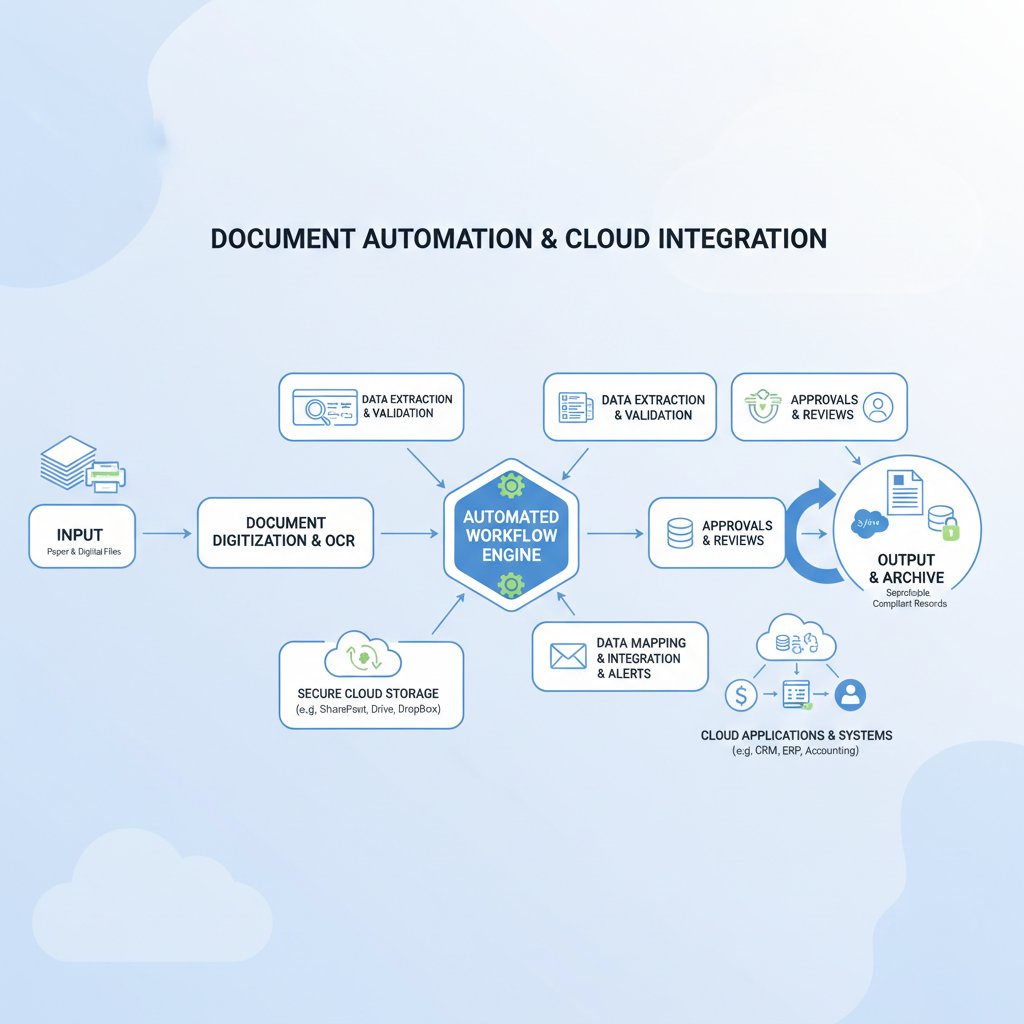
But here’s the harsh reality: every step is a potential failure point. APIs break when vendors update their software. Middleware can choke on unexpected data formats. Cloud storage, while scalable, brings its own risks—access controls, regional compliance, and integration with on-premises systems are never as seamless as advertised. Continuous monitoring and tuning are mandatory, not optional.
How AI is rewriting the rules of document automation
Enter generative AI—not content with just automating rote tasks, but actively reimagining how documents are created, validated, and processed. AI-powered extraction, classification, and summarization dramatically reduce manual intervention, while advanced models learn from past workflows to predict bottlenecks and flag anomalies in real time. The result is a leap in efficiency and accuracy, but also a new layer of complexity and risk that demands vigilant oversight.
"AI doesn’t just automate tasks—it reimagines what’s possible." — Jordan
According to Flowtrics, 2024, organizations that blend AI with traditional automation report up to 70% reduction in manual errors and a 50% boost in document processing speed. Yet the need for human judgment remains—AI isn’t infallible, and over-reliance can lead to critical oversights if not properly governed.
The real-world impact: Case studies from the frontline of integration
How a logistics firm slashed errors by 80%—and what they learned the hard way
Consider the case of a mid-sized logistics company drowning in shipment paperwork and compliance headaches. In their race to modernize, they jumped headfirst into a cloud-based document automation suite. The initial results were dramatic: error rates plummeted by 80%, and turnaround times halved. But beneath the surface, the integration process was anything but smooth. Legacy systems didn’t play nice with cloud APIs, forcing expensive workarounds and custom middleware. User resistance, especially among veteran staff, slowed adoption and triggered costly retraining.
| Metric | Before Automation | After Cloud Integration |
|---|---|---|
| Shipment Error Rate | 22% | 4% |
| Document Processing Time | 72 hours | 24 hours |
| Average ROI (Year 1) | — | +35% |
Table 2: Before-and-after metrics from a logistics firm’s document automation journey.
Source: Original analysis based on Flowtrics, 2024, SecureScan, 2024

The lesson? Real value emerges only when organizations confront the unglamorous reality: integration is messy, and continuous support is essential.
Legal, finance, and healthcare: Unexpected leaders in document automation
In a twist that upends stereotypes, some of the most conservative sectors—legal, finance, and healthcare—are now outpacing tech startups in document automation cloud integration. As Docubee, 2024 reports, compliance-heavy industries are realizing that automation isn't just about speed; it’s about survival.
- Legal: Accelerated contract generation, real-time compliance monitoring, and instant document retrieval turbocharge client service and minimize risk.
- Finance: Automated reconciliations, audit-ready trails, and bulletproof security frameworks allow teams to ditch paper-based workflows without fearing regulatory blowback.
- Healthcare: Patient intake forms, insurance claims, and prescription management are streamlined—reducing administrative overhead and improving accuracy, all while staying HIPAA-compliant.
These sectors, once digital laggards, are setting new benchmarks for efficiency, compliance, and client satisfaction.
The dark side: Risks, failures, and the integration spaghetti nobody talks about
When automation backfires: Real horror stories
Not all integrations end in heroics. In 2023, a high-profile services company launched a cloud document automation rollout that quickly devolved into chaos. What began as a cost-saving move ended up exposing thousands of sensitive client documents due to a misconfigured API and lack of oversight.
- Overconfidence in “plug-and-play” promises: The project team underestimated the complexity of legacy integration.
- Lack of cross-functional planning: IT went solo, sidelining compliance and end users.
- Poor data mapping: Key systems didn’t speak the same data language, leading to silent failures.
- Ignored security protocols: Rushed timelines meant critical safeguards were skipped.
- Aftermath: Regulatory fines, reputational damage, costly remediation, and the abrupt resignation of the project lead.
These failures aren’t outliers; they’re warnings. Without rigorous upfront planning and ongoing governance, automation can become a force multiplier for mistakes.
Security, compliance, and the multi-cloud mess
Cloud integration is a double-edged sword: while it delivers scalable power, it also opens up new fronts for cyberattacks and regulatory scrutiny. Every API, every connector, every user access point is a potential vulnerability. Navigating frameworks like HIPAA, GDPR, and CCPA requires not only technical savvy but relentless process discipline.
| Compliance Framework | Key Requirements | Impact on Automation |
|---|---|---|
| HIPAA | Data encryption, audit trails | Strict controls on access, must log every document event |
| GDPR | Data minimization, right to erasure | Need for granular document retention and deletion policies |
| CCPA | Opt-out mechanisms, transparency | Real-time user access controls, detailed logging |
Table 3: Current compliance frameworks and their impact on document automation cloud integration.
Source: Original analysis based on SecureScan, 2024, Docubee, 2024
Security isn’t just a checkbox; it’s an ongoing arms race. According to HotDocs, 2024, 40% of breaches in the past year originated from misconfigured cloud integrations.
The hidden costs of going cloud-first
If you think cloud adoption means instant savings, look closer. Hidden expenses lurk everywhere: licensing traps, surprise downtime during updates, ballooning support contracts, the silent drain of shadow IT, and the steep curve of retraining staff on new workflows.

According to Knackly, 2024, the true cost of cloud integration is often 20-50% higher than initial estimates, once customization and support are factored in. Over-automation—removing too much human oversight—can also lead to expensive mistakes that erode trust and require costly manual intervention.
Choosing your path: Strategies and frameworks for successful integration
Step-by-step guide: Mapping your integration journey
Before you touch a line of code or buy another SaaS license, pause. The difference between a triumphant rollout and a costly disaster comes down to rigorous planning and unflinching honesty about your organization’s readiness.
- Audit your current workflows: Map every document touchpoint, bottleneck, and manual step.
- Engage key stakeholders: IT, compliance, business leads, and end users must all have a seat at the table.
- Define clear objectives: Are you chasing speed, compliance, cost savings, or all of the above?
- Evaluate integration complexity: Identify legacy systems, required connectors, and data mapping challenges.
- Vet vendors ruthlessly: Demand proof of real integrations, not just glossy demos.
- Pilot before rollout: Test integrations with real-world data and workflows—don’t rely on sandbox environments.
- Prioritize training and change management: User adoption is non-negotiable for long-term success.
- Monitor and iterate: Continuous improvement is essential; automation is never “set and forget.”
Checklist: Key questions before you start your project
- Are all critical workflows documented and understood?
- Who owns the integration process and outcome?
- Have compliance and security risks been thoroughly assessed?
- Is there a plan for user training and support?
- What KPIs will define success?
Who owns the process? Building cross-functional teams
Successful document automation cloud integration isn’t an IT-only affair. It demands a coalition: IT manages the tech, operations ensures practicality, and line-of-business leaders define requirements and drive adoption. Cross-functional teams—diverse in skillset and perspective—are best equipped to anticipate roadblocks, navigate cultural friction, and ensure no critical detail falls through the cracks.

As digital transformation accelerates, the question isn’t who can shout the loudest, but who can build consensus and drive collective ownership.
Assessing your readiness: Are you automation-proof?
Not every organization is ready to leap into cloud integration. Brutal self-assessment is the only way to avoid painful, expensive missteps.
-
Red flags:
- Resistance to process change
- Lack of executive sponsorship
- Outdated or undocumented systems
- No clear data governance framework
- Siloed teams and poor cross-departmental communication
-
Green lights:
- Documented workflows and data maps
- Leadership buy-in across departments
- Dedicated project champions
- Agile approach to change and iteration
- Active engagement from end users
If you’re seeing more red than green, pump the brakes—rushing into automation is a recipe for disaster.
Tools of the trade: How to choose (and survive) your automation stack
Market leaders and wildcards: 2025’s top solutions
The automation landscape is crowded and noisy. From established giants to scrappy upstarts, every vendor swears they’ve cracked the integration puzzle. But hype aside, a handful of platforms are setting the pace on versatility, compliance, and real-world results.
| Platform | AI-Driven Automation | Multi-Format Export | Industry Templates | Real-Time Editing | Compliance Checks | Integration Flexibility |
|---|---|---|---|---|---|---|
| filecreator.ai | Yes | Full Support | Comprehensive | Yes | Automated | High |
| HotDocs | Limited | Limited | Basic Selection | No | Manual | Medium |
| Docubee | Yes | Full Support | Moderate | Yes | Automated | Medium |
| Knackly | Yes | Full Support | Moderate | No | Automated | Medium |
Table 4: Feature matrix comparing leading document automation cloud integration platforms.
Source: Original analysis based on Knackly, 2024, HotDocs, 2024, filecreator.ai
filecreator.ai, with its advanced AI reasoning and real-time multi-format support, consistently earns high marks for accuracy and compliance. But even the best tools require careful vetting and tailored integration strategies.
The API question: Build, buy, or partner?
There’s no one-size-fits-all answer when it comes to connecting your document workflows to the cloud. Should you build a custom integration, buy an off-the-shelf solution, or partner with an integration specialist?
- SaaS (Software as a Service):
Subscription-based apps hosted in the cloud, offering rapid deployment but limited customization—ideal for standard workflows with minimal integration needs. - iPaaS (Integration Platform as a Service):
Cloud-based platforms designed to connect disparate systems and orchestrate data flows, offering flexibility and scalability at the cost of added complexity. - Custom middleware:
Hand-crafted connectors and scripts tailored to your specific needs—powerful, but expensive to build and maintain, and often brittle over time.
Your choice depends on your appetite for control, your tolerance for complexity, and your need for agility as business requirements evolve.
How to spot vendor hype—and what really matters
Every vendor claims security, compliance, and AI-driven magic. Here’s how to cut through the noise:
- No real security proof: If a platform can’t show third-party audits or detailed compliance documentation, walk away.
- Vague timelines and roadmaps: Beware of vendors who overpromise and underdeliver; demand specific integration case studies.
- “AI” buzzword abuse: Ask what AI actually does—does it merely automate templates, or can it flag anomalies, learn from data, and adapt to your workflows?
- Opaque pricing: Insist on transparent, all-in pricing that includes support, updates, and integration services.
- Overly generic demos: Demand a live, use-case-specific demo with your actual data.
If a solution doesn’t survive this scrutiny, keep searching.
The future of document automation cloud integration: What’s next?
Trends shaping the next five years
The world isn’t standing still. Document automation cloud integration is evolving, shaped by a few unstoppable trends:
- AI-powered workflows: Machine learning is moving from pilot projects to mainstream adoption, driving smarter document validation and routing.
- No-code platforms: Empowering business users to design and deploy integrations without writing a single line of code, flattening IT bottlenecks.
- Decentralized integration: Peer-to-peer data flows and edge computing reduce reliance on centralized data warehouses, boosting speed and resilience.

But here’s the kicker: the pace of change also means more “integration spaghetti”—the tangled mess of custom scripts, orphaned APIs, and unsupported connectors that can choke even the most sophisticated stack. Staying agile and disciplined is the only way to future-proof your workflows.
Contrarian view: When NOT to automate—and the human factor
Amidst the automation gold rush, it’s easy to forget that some processes still benefit from a human touch—especially those demanding nuance, negotiation, or creative judgment. Automation is a tool, not a universal solution. Sometimes the smartest move is to slow down, think, and let experienced professionals handle the exceptions.
"Sometimes, the smartest move is to slow down and think." — Priya
Recognizing these boundaries isn’t a sign of weakness; it’s the mark of a mature, resilient organization.
Actionable takeaways: How to succeed (and avoid epic fails) in your integration journey
Priority checklist for cloud integration success
- Define your goals and metrics: Don’t automate for automation’s sake—know exactly what success looks like.
- Select cross-functional leaders: Appoint champions from IT, compliance, and business units.
- Vet vendors and platforms: Demand proof, not promises, on security, compliance, and real-world integrations.
- Pilot and iterate: Start small, test rigorously, and scale only what works.
- Plan for change management: Invest in training and user buy-in up front.
- Establish continuous monitoring: Use dashboards and alerts to catch issues early.
- Run regular security audits: Don’t wait for a breach or compliance audit to discover vulnerabilities.
- Document everything: Keep a living record of integrations, workflows, and support contacts.
Quick reference guide: What to do when things go sideways
Even the best-laid plans can unravel. When a document automation integration goes haywire, act fast.
- Pause new automations to prevent further errors or data loss.
- Check system logs for recent changes, failed API calls, or unauthorized access.
- Escalate to cross-functional leads for rapid triage—don’t silo the problem.
- Communicate transparently with affected teams and stakeholders.
- Restore from backups if data integrity is compromised.
- Contact vendor support and leverage user forums for troubleshooting tips.
- Document the incident for future prevention and compliance reporting.
Where to get help: Resources and expert communities
Staying current in document automation cloud integration isn’t easy. Fortunately, help is out there.
- filecreator.ai’s resource center and blog for up-to-date best practices and technical guides
- AIIM Community: A global hub for information management and automation experts.
- LinkedIn Automation Groups: Dive into active discussions on integration trends and real-world stories.
- Stack Overflow: For technical troubleshooting and peer advice.
- Gartner Peer Insights: Real user reviews of leading platforms and solutions.
- Docubee Blog: Industry analysis and implementation tips.
- SecureScan Articles: Practical guides to cloud-based document management.
Myths, misconceptions, and the unvarnished truth
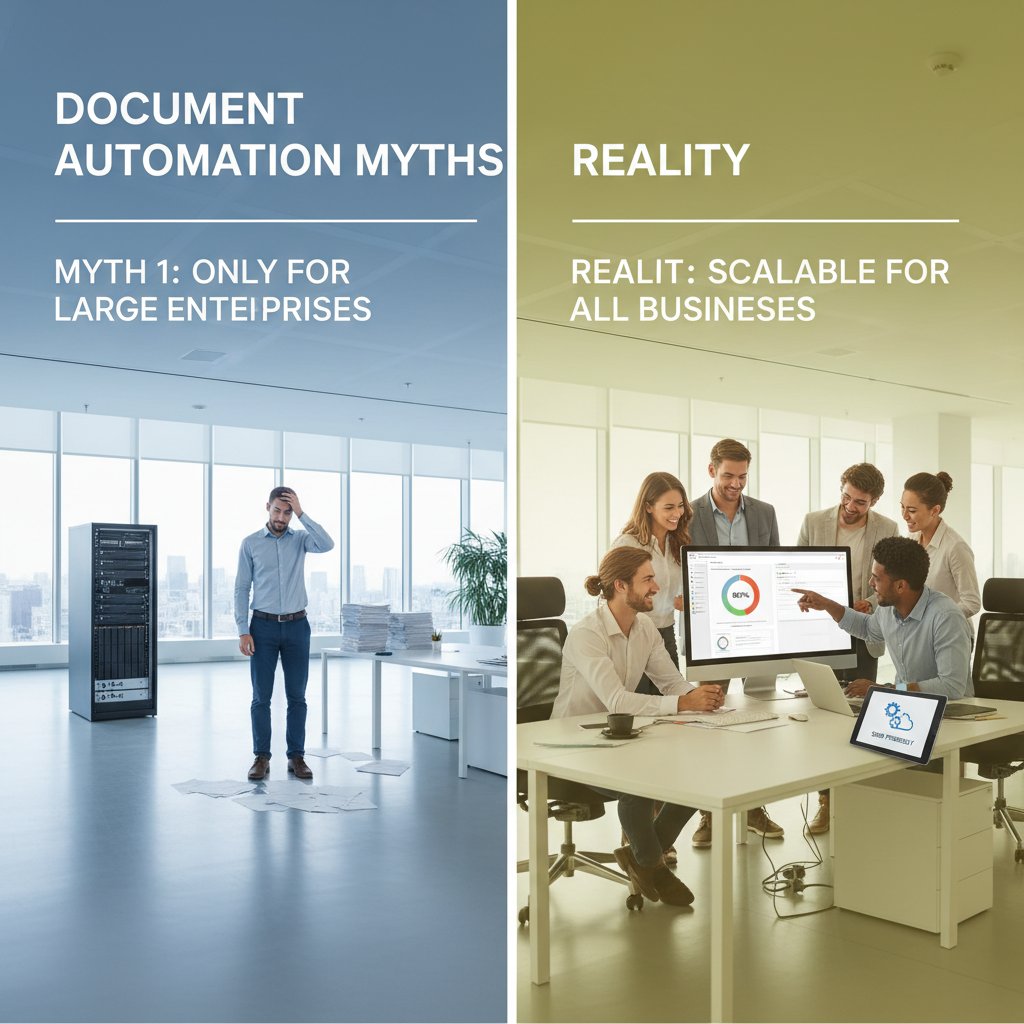
Debunking the top 5 myths about document automation cloud integration
Every technology revolution spawns its own mythology. Let’s take a scalpel to the most pervasive document automation myths.
- Myth: “It’s plug-and-play—no customization needed.”
Truth: Real integration always requires ongoing customization and support. - Myth: “Cloud means instant cost savings.”
Truth: True costs often run 20-50% higher than initial estimates, thanks to hidden fees and retraining. - Myth: “Automation eliminates human error.”
Truth: It reduces routine mistakes—but over-automation can introduce new, harder-to-spot risks. - Myth: “All vendors offer the same security.”
Truth: Only platforms with third-party audits and transparent controls deliver on this promise. - Myth: “Once set up, automation runs itself.”
Truth: Continuous monitoring and iteration are essential—there’s no “set and forget.”
What the experts wish you knew before you start
Industry veterans agree on one thing: the details will make or break your integration project.
"In integration, details are destiny." — Sam
Successful document automation cloud integration isn’t about chasing the latest buzzwords. It’s about meticulous planning, cross-functional alignment, and relentless attention to detail. If you can deliver on those, the rewards—speed, accuracy, compliance, and sanity—are well within reach.
Conclusion
Document automation cloud integration isn’t a fairytale. It’s an ongoing negotiation between ambition and reality, innovation and risk. As we’ve seen, the path is littered with cultural battles, technical pitfalls, and hidden costs—but also with the potential for transformative gains. The organizations that thrive are those that confront the brutal truths, invest in planning and cross-functional collaboration, and choose tools that fit their real-world needs, not just marketing hype. If you’re ready to cut through the noise and claim the advantages of true cloud integration, remember: the journey won’t be easy, but with the right strategy—and a sharp eye for detail—you can turn disruption into your greatest opportunity. For ongoing insight and support, keep filecreator.ai in your bookmark bar, and don’t settle for the myth when the reality is so much more interesting.
Sources
References cited in this article
- LinkedIn: 8 Brutal Truths About System Integration(linkedin.com)
- Flowtrics: Automated Document Processing with AI(flowtrics.com)
- Avvoka: Document Automation – Myth vs. Reality(avvoka.com)
- SecureScan: Complete Guide to Cloud-Based Document Management(securescan.com)
- Knackly: What’s Wrong With Document Automation(knackly.io)
- HotDocs: How the Cloud Disrupts Traditional Document Automation(hotdocs.com)
- Docubee: 11 Benefits of Document Automation(docubee.com)
- Xgrid: The Myth of Seamless Integration(xgrid.co)
- Third Stage Consulting: What Vendors Won’t Tell You(thirdstage-consulting.com)
- Square-9: When is "Seamless Integration" Really Seamless?(square-9.com)
- Microsoft Learn: Power Platform 2025 Release(learn.microsoft.com)
- Hubsite365: Dynamics 365 & Power Platform Innovations(hubsite365.com)
- ClickLearn: Dynamics 365 Digital Transformation(clicklearn.com)
- SenseTask: Top 5 Document Automation Trends for 2025(sensetask.com)
- SCNSoft: Key Intelligent Trends for 2025(scnsoft.com)
- Inkit: Deep Dive into Document Automation 2025(inkit.com)
- MHC: Ultimate Guide to Document Automation(mhcautomation.com)
- Checkbox: What is Document Automation(checkbox.ai)
- Roth Automation: 20 Essential Facts About Document Automation 2025(rothautomation.com)
- Novatech: Boost Efficiency with Document Workflow Automation(novatech.net)
- ActiveDocs: Document Automation on Cloud Infrastructure(activedocs.com)
- IBML: Document Automation – Definition & Benefits(ibml.com)
- Rossum: AI Agent Skills Powering Document Automation(rossum.ai)
- Forage: Guide to Intelligent Document Processing 2025(forage.ai)
- Logista Solutions: AI in Document Management 2025(logistasolutions.com)
- Legito: PwC Case Study(legito.com)
- PageLight Prime: Legal Document Automation Case Studies(pagelightprime.com)
- Datamatics: Automation Case Studies(datamatics.com)
- Invensis: Canada Logistics Case Study(invensis.net)
- Nividous: Logistics Documentation Automation(nividous.com)
- Briefpoint: Best Legal Document Automation 2025(briefpoint.ai)
- SourceForge: How Legal, Finance, and Healthcare Automate PDFs(sourceforge.net)
- Concord: Healthcare Document Management(concord.app)
- Managed Outsource: Pros & Cons of Cloud Document Management(managedoutsource.com)
- Folderit: 20 Common Document Management Challenges(folderit.com)
- Frontpage Interactive: Automation Horror Stories(frontpageinteractive.com)
- ITPro: Cloud Failures(itpro.com)
- Datacenters.com: Cloud Horror Stories(datacenters.com)
- BMC: Hidden Costs of Cloud Adoption(bmc.com)
- Accelirate: 5 Hidden Costs of Intelligent Automation(accelirate.com)
- Wolters Kluwer: Operational Hidden Costs in Document Generation(wolterskluwer.com)
- Datagraphic: Strategies for Successful Automation(datagraphic.co.uk)
- Automation Anywhere: Document Automation at Scale(automationanywhere.com)
Perfect Documents, Instantly
Filecreator.ai transforms the way you produce professional documents. Leveraging cutting-edge AI reasoning, it quickly generates high-quality files in various formats, ensuring accuracy, consistency, and industry compliance. Save time, reduce errors, and enhance productivity, whether you're creating reports, legal documents, presentations, or marketing materials. Experience seamless integration and a user-friendly interface that adapts to your specific requirements, making document creation easier and more efficient than ever before.
Get startedStart Creating Professional Documents Today
Join thousands of professionals who trust AI-powered document generation
Frequently Asked Questions
What error rates do manual document processes typically have compared to automated cloud-based systems?
According to 2024 research cited in the article, companies relying on manual document processes report error rates up to 25%, while automated cloud-based systems have error rates around 7%. Manual workflows also result in 30-45% more time spent on corrections and rework.
Is document automation cloud integration a simple plug-and-play solution?
No. The article explicitly states that in 2025, it is not about pressing a button for instant perfection. Most organizations stumble when chasing seamless integration due to challenges with legacy systems, cultural issues, and unspoken costs.
What are the hidden costs and risks of manual document processes mentioned in the article?
Manual document workflows create a sea of invisible costs including hours lost to manual data entry, workflow bottlenecks, compliance errors, security vulnerabilities, and reduced employee morale. The article notes these manual processes result in approximately 30% higher annual costs compared to automated systems.
What does the article say about the primary obstacle organizations face with document automation?
The article identifies that most organizations struggle with navigating a minefield of legacy systems, culture wars, and unspoken costs when attempting to implement document automation cloud integration, rather than the technology itself being the barrier.
Continue Reading
Explore more from Professional Document Generator

Document Automation Cloud Solutions: Roi, Risks and Real Impact
Document automation cloud solutions address manual document chaos in organizations. This article examines real ROI, operational risks, and transformative impacts of cloud-based automation.

Document Automation Integration and Its Real-World Business Impact
Document automation integration helps organizations reduce manual document chaos and improve efficiency. This article examines the costs of fragmented processes and the strategies that deliver measurable results.

Document Automation Cloud Platforms: Costs and Benefits Explained
Document automation cloud platforms expose hidden inefficiencies and operational risks alongside genuine productivity gains. This article examines the real costs and benefits.

Are Document Automation Services Revolutionizing Business or Just Adding Chaos?
Document automation services finally exposed: discover the true ROI, hidden pitfalls, and bold new strategies for 2026. Don’t automate blind—read this first.

Document Automation Software: Roi, Risks, and What Breaks
Document automation software solutions face real risks and hidden costs. This article examines the actual ROI, integration failures, and what companies misunderstand about automation.

Seven Misconceptions About Document Automation Integration Software
Document automation integration software often promises seamless workflows, but teams frequently encounter hidden costs and failed rollouts.