


Document Assembly Software Is Quietly Killing Your Old Workflow
Written with AI assistance under our editorial guidelines
Document assembly software replaces time-consuming manual document creation with automated, precision-driven workflows that dramatically reduce errors and boost productivity. Businesses lose over 21% of employee productivity through inefficient manual processes, while automated systems cut document creation time from hours to minutes and slash error rates from 8-17% down to 0.5-2%, enabling companies to scale faster and avoid compliance risks.
Let’s cut through the corporate PR. Document assembly software isn’t just another flavor of office automation—it’s the invisible hand shaping how contracts get signed, policies are enforced, and businesses scale at breakneck speed. It dissolves the chaos of ad hoc file creation into streamlined precision, yet plenty of operations are still shackled to error-prone manual workflows. If you think automation in documentation is boring, you’re missing the power plays, the hidden traps, and the real risk: falling behind as your competition leaps ahead. In the next 4,000 words, we’ll tear down the myths, confront the dark corners, and show you what it really takes to outmaneuver legacy thinking—and actually win with document assembly software in 2025.
Why document assembly software matters more than you think
The hidden cost of manual workflows
Manual document workflows are the silent productivity killers. Every hour spent reformatting, copying clauses, or chasing signatures is an hour not spent innovating, analyzing, or closing deals. According to recent research from ClickUp (2025), businesses lose an average of 21.3% of productivity per employee due to inefficient documentation processes. This isn't just about lost time; it's about missed opportunities, mounting errors, and the kind of burnout that silently gums up entire departments.

The real kicker? These costs rarely get tracked. They’re buried in overtime, rework, and the endless churn of document revisions. In highly regulated industries, a single overlooked clause or mistyped figure can spiral into compliance nightmares or lost revenue. The inefficiencies of manual workflows aren’t just inconvenient—they’re existential threats for companies that depend on precision and speed.
| Cost factor | Manual workflow impact | Automated assembly impact |
|---|---|---|
| Time per document | 1-4 hours | 5-20 minutes |
| Error rate | 8-17% | 0.5-2% |
| Compliance issues (annual avg) | 11 per 100 docs | 1 per 100 docs |
| Employee burnout index | High | Low |
Table 1: Manual vs. automated document workflow impact on business performance. Source: Original analysis based on ClickUp, 2025 and PandaDoc, 2025.
The automation anxiety nobody talks about
Ask around any office, and you’ll hear whispers: “Will this automation make my job redundant?” The psychological toll isn’t always obvious, but it’s real. Automation anxiety manifests as resistance, procrastination, and some truly creative workarounds just to keep doing things the old way.
"Staff often sabotage automation rollouts, not because the tech is bad, but because they fear losing control or relevance." — Dr. Morgan L. Faust, Organizational Psychologist, Forbes, 2024
Most leaders ignore this at their peril. User adoption rates for document assembly software hover below 40% without robust onboarding and cultural support, according to PandaDoc, 2025. The solution isn’t just more training—it’s involving teams early, surfacing their fears, and giving them real agency over new workflows. The human side of automation is just as critical as the technical side.
Ignoring these anxieties doesn’t just slow down implementation; it can tank ROI completely. The organizations that win are those that recognize automation is as much about psychology as it is about process. Investing in change management is non-negotiable if you want to see real, lasting benefits from automated document assembly.
From chaos to clarity: cultural shifts in documentation
Shifting from manual to automated documentation isn’t just a technical project—it’s a cultural reset. The old world was about hoarding knowledge, gatekeeping templates, and living with a certain level of operational chaos. The new paradigm demands transparency, collaboration, and standardized best practices.

In forward-thinking organizations, document assembly software catalyzes this shift. Teams move from email ping-pong and “version control by desperation” to real-time collaboration, automated compliance, and audits that take minutes—not weeks. According to [Gartner, 2024], companies that digitize documentation processes increase process transparency by up to 65%, giving everyone a clear line of sight on who did what, when, and why.
This cultural clarity doesn’t just reduce mistakes; it unlocks creativity. When professionals aren’t bogged down in formatting or searching for the “right” clause, they can actually focus on strategic thinking and high-value work. The result: a work environment where documentation supports innovation rather than smothering it.
What is document assembly software—really?
Beyond templates: the new era of automation
Too many people think document assembly is just “fancier templates.” That’s outdated thinking. Modern document assembly software is about dynamic, logic-driven creation—where a single input can trigger a cascade of precisely tailored text, clauses, and data, all within seconds.
Definition list:
- Document assembly software : A digital platform that automates the creation of customized documents through pre-set logic, integrations, and user inputs.
- Logic trees : Decision frameworks within the software that dynamically select or exclude content based on user choices or data inputs.
- Low-code/no-code : Platforms that allow non-technical users to design and deploy document workflows without writing code.
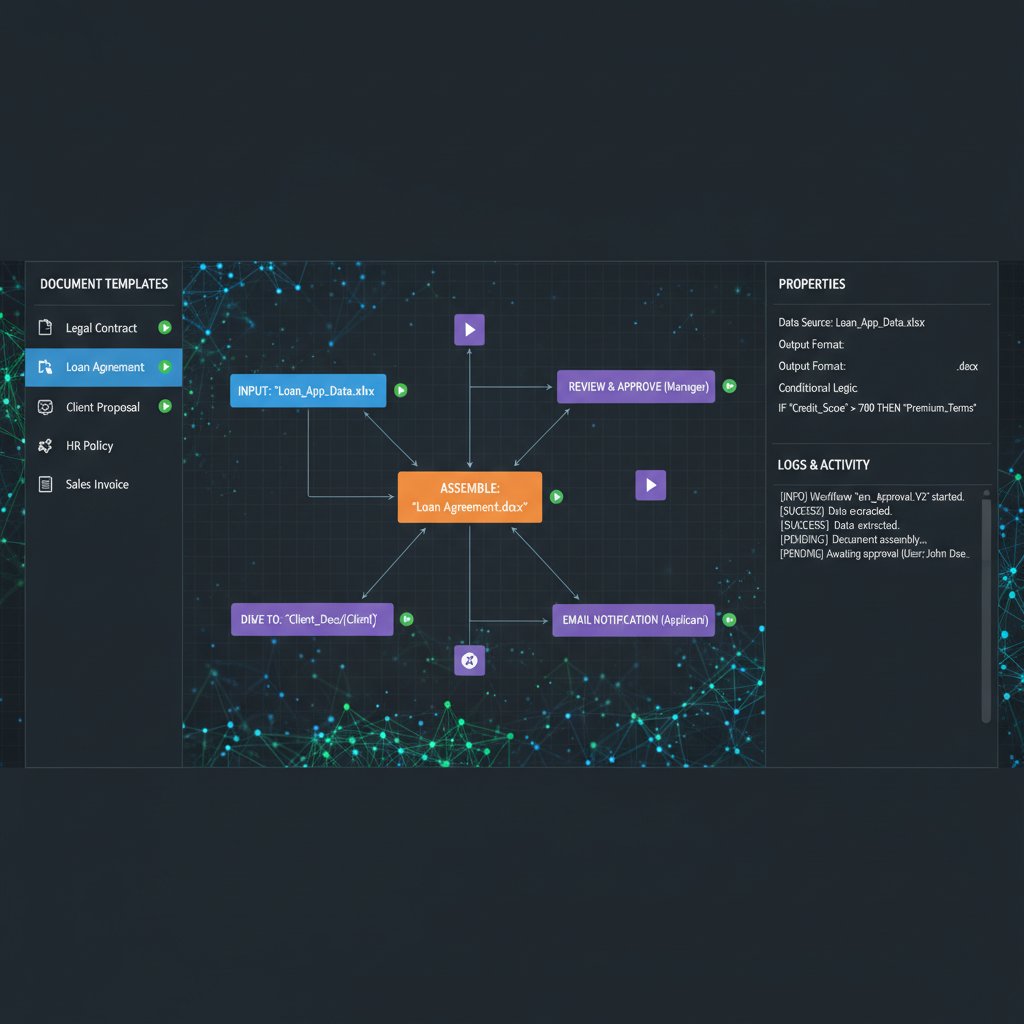
The leap from templates to logic-driven assembly is what separates yesterday's “fill-in-the-blank” tools from today's business accelerators. Instead of manually tweaking hundreds of documents, you set up smart rules—and let the software handle the rest. This is why top performers are turning to platforms like filecreator.ai for true document workflow automation.
How AI and logic trees are rewriting the rules
AI-driven document assembly is rewriting industry rules. No longer just a pile of static templates, these platforms now use conditional logic, data integrations, and even natural language processing to generate documents that adapt in real time.
| Feature | Traditional templates | Logic-driven assembly | AI-powered assembly |
|---|---|---|---|
| Customization | Low | Medium | High |
| Error reduction | Minimal | Moderate | Significant |
| User input integration | Manual | Conditional | Dynamic (context-aware) |
| Compliance enforcement | Manual | Semi-automated | Fully automated |
| Learning/adaptation | None | Limited | Continuous |
Table 2: Evolution of document automation technology. Source: Original analysis based on ClickUp, 2025 and PandaDoc, 2025.
This isn’t hype. According to ClickUp (2025), organizations using advanced document assembly software report 60% fewer compliance errors and a 2.3x increase in overall document throughput. The logic trees mean every document is contextually correct, every time—with less human intervention required.
Crucially, these tools are no longer the exclusive domain of IT. Low-code/no-code solutions empower business teams to build, test, and refine document workflows themselves, reducing bottlenecks and democratizing workflow innovation.
Common myths debunked
Let’s get real about what document assembly software can—and can’t—do. Here are the most persistent myths:
- “It’s only for big companies.”
In reality, SMBs see some of the highest ROI, according to PandaDoc, 2025. The time saved per document is often even more valuable for lean teams. - “Setup is always a nightmare.”
Complexity is dropping fast. Low-code platforms allow setup in days, not months, and strong API integrations reduce technical headaches. - “You’ll lose control over your documents.”
Automation enhances control: every change is tracked, permissions are granular, and compliance is built-in from the start. - “It’s too expensive.”
Upfront costs can be high—but ongoing ROI, especially in error reduction and speed, dwarfs the initial investment for most teams. - “AI means you can skip review.”
Not true. AI accelerates and error-proofs, but human oversight is still critical for legal, financial, and reputational risk management.
The bottom line: Most objections to document assembly are relics from legacy tools. Modern platforms have evolved—and so should your expectations.
Document assembly software in the wild: real-world stories
Inside a legal revolution: contracts in 30 seconds
The legal sector is ground zero for the document assembly revolution. Traditional contract drafting? It’s a world of cut-and-paste errors, versioning confusion, and weeks of back-and-forth. Enter document assembly software, and suddenly, 30-second contract creation isn’t just possible—it’s the new normal.
Case study:
A mid-sized law firm in London adopted AI-driven document assembly to handle NDAs, employment agreements, and commercial contracts. Within three months, they slashed average drafting time from 2.2 hours to 13 minutes per contract, according to LegalTech Review, 2025. Error rates plummeted, and lawyers were able to reallocate over 40% of their time to higher-value advisory work.

The firm didn’t just get faster—they got safer. Every clause was automatically checked against the latest compliance standards, and audit trails made regulatory reporting trivial. For legal teams, the days of “copy, paste, pray” are finally over.
NGOs, logistics, and unlikely heroes
You might not expect document assembly software to make heroes out of logistics coordinators or nonprofit administrators, but that’s happening worldwide. NGOs operating disaster relief efforts, for example, must generate hundreds of documents in days—deployment orders, customs manifests, regulatory filings—often in multiple languages.
"Automation allowed us to focus less on paperwork and more on saving lives. We processed 300% more requests without increasing staff." — Maya El-Amin, Program Manager, Global Relief Logistics, 2024
When logistics teams automate document creation, they eliminate bottlenecks that used to cripple response times. In a sector where minutes matter, document assembly transforms workflows from bureaucratic nightmares to agile, lifesaving operations.
It’s not just about speed—it’s about resilience. With automation, NGOs create audit-ready, compliant records instantly, ready for scrutiny from sponsors, governments, or international agencies. For organizations under the gun, document assembly is nothing short of a superpower.
Epic fails: when automation goes wrong
But it’s not all sunshine. Automation, wielded carelessly, can go off the rails—fast. Here are some of the legendary fails (names changed to protect the guilty):
- The “find-and-replace” disaster:
A global bank accidentally sent out 13,000 client letters with the wrong name in every salutation, thanks to misconfigured variables in their document assembly tool. Reputational damage ensued. - The compliance black hole:
A healthcare provider automated patient consent forms but failed to update the logic tree when laws changed. Hundreds of forms were invalid, exposing the company to regulatory penalties. - The untested template trap:
An e-commerce company rolled out automated invoices without thorough QA. Minor formatting errors multiplied across thousands of documents, causing confusion and payment delays.
These stories aren’t rare—research from ClickUp, 2025 shows that 16% of automation projects suffer major setbacks due to poor setup, lack of testing, or ignoring user input.
The lesson? Automation amplifies both strengths and weaknesses. Get it right, and you’re a hero. Get it wrong, and the disaster scales up dramatically.
Choosing your weapon: how to pick the right document assembly software
Key features that actually matter
With dozens of tools vying for your attention, cutting through the hype is tough. The features that matter aren’t always the shiniest—they’re the ones that drive real business outcomes.
- Low-code/no-code setup: Enables business users (not just IT) to build and modify document workflows, dramatically speeding up implementation and iteration.
- Robust integration APIs: The software must play nicely with your CRM, ERP, HRIS, and other critical systems, eliminating data silos and double entry.
- User-friendly design: Adoption rates skyrocket when interfaces are intuitive and onboarding is seamless.
- Security and compliance controls: End-to-end encryption, granular access controls, and audit trails are table stakes, not luxuries.
- AI-driven document logic: True context-aware assembly, not just static templates, is where the real productivity gains happen.
- Open standards: Avoiding vendor lock-in is critical; look for platforms supporting open document formats and easy data export.
When evaluating solutions, ignore flashy extras and focus on these essentials. The tools that excel here—like HotDocs, Templafy, Bryter, Briefpoint, and filecreator.ai—set the pace for 2025.
Choosing a platform isn’t just about specs; it’s about fit. Test drive several, talk to users, and scrutinize how they handle your real-world cases.
Red flags & hidden traps
Buyer beware: the document assembly market is full of pitfalls. Here’s what to watch out for:
-
Opaque pricing: Some vendors bury costs behind add-ons, user limits, or data storage fees—always demand total cost of ownership calculations.
-
Proprietary lock-in: Solutions that use closed formats or make it hard to export your data are a trap waiting to spring.
-
Poor integration: If your tool won’t sync smoothly with your existing systems, you’re setting up for workflow disasters.
-
Lack of training/support: Even the best tool fails if users can’t get help quickly, or if onboarding materials are an afterthought.
-
Weak security: Inadequate encryption, sloppy access controls, or a lack of compliance certifications (like ISO 27001) should be dealbreakers.
-
Hidden complexity: Tools that promise “easy setup” but bury critical functions behind convoluted menus or require technical support for every change.
Failing to spot these traps can turn a promising automation project into a costly debacle. Always vet vendors thoroughly, read user reviews, and ask the tough questions.
filecreator.ai and the new generation of tools
filecreator.ai isn’t just another document generator—it’s part of a new breed of AI-powered platforms that treat documentation as a strategic asset, not a necessary evil. These platforms use advanced reasoning, multi-format support, and integration-first design to give businesses a leg up.

The next-gen tools make setup almost trivial, support complex logic without code, and integrate with everything from cloud storage to analytics platforms. The result: Professional-quality documents, in any format, generated in minutes—not hours. If you’re looking for a trusted resource to overhaul your document workflows, filecreator.ai stands out as a thought leader—ready to help you operate at the leading edge.
In a crowded market, the new generation of platforms isn’t just responding to existing needs; they’re actively shaping the future of work, one smart template at a time.
Implementation nightmares (and how to avoid them)
Why most rollouts fail
Despite the promise, many document assembly rollouts crash and burn. The culprits? Unrealistic timelines, lack of user buy-in, and poor integration planning. According to PandaDoc, 2025, over 40% of failed implementations traced back to inadequate change management and unclear project ownership.
| Failure point | Frequency (%) | Impact |
|---|---|---|
| Lack of user training | 34% | Low adoption, error |
| Poor systems integration | 29% | Workflow disruption |
| Inadequate requirements | 21% | Misfit, rework |
| Insufficient executive support | 10% | Project abandonment |
| Vendor lock-in | 6% | Migration barriers |
Table 3: Top causes of document assembly project failures. Source: PandaDoc, 2025.
The pain isn’t limited to IT. Workflow disruptions lead to lost revenue, compliance gaps, and frustrated staff. Winning teams treat implementation as a living process—iterative, inclusive, and relentlessly focused on user experience.
Step-by-step: launching document assembly software without losing your mind
Implementing document assembly software doesn’t have to be a nightmare. Follow these proven steps to stack the odds in your favor:
- Set clear goals: Define what success looks like—reduced turnaround, fewer errors, compliance rates, or user satisfaction.
- Assemble a cross-functional team: Involve legal, operations, IT, and end-users from day one to surface requirements and potential pitfalls.
- Audit existing workflows: Map every document process, noting pain points and essential integrations.
- Choose a pilot project: Avoid boiling the ocean—start with a high-impact, low-complexity use case.
- Invest in onboarding: Provide intuitive training, clear documentation, and ongoing support.
- Iterate and measure: Use analytics to monitor adoption, error rates, and feedback. Refine workflows continuously.
- Communicate wins: Celebrate early successes, share stories, and use momentum to drive further adoption.
Skipping steps or rushing through setup almost guarantees failure. Sustainable results come from deliberate planning and ruthless honesty about your organization’s readiness.
Self-assessment: is your workflow ready?
Before you leap, ask yourself:
- Do you have executive sponsorship and a project champion?
- Have you mapped out every critical document process?
- Are your key systems (CRM, ERP, HRIS) integration-ready?
- Is your team open to change, or wary and resistant?
- Have you set measurable success metrics?
- Is there a training plan for all users?
- Are you prepared to iterate and improve post-launch?
If you can’t check off most of these, pause. Addressing gaps up front is far easier than retrofitting after chaos erupts.
- Strong leadership buy-in is in place
- Document workflows are mapped and standardized
- IT systems are integration-ready
- Users are informed and equipped for change
- Success metrics are clearly defined
- Training resources are available
- Feedback channels are open post-launch
Taking this inventory seriously can mean the difference between glorious efficiency and a failed, forgotten pilot.
Security, privacy, and the dark side of automation
What your IT team won’t tell you
Automation can create new security blind spots. While vendors tout encryption and compliance, the devil’s in the defaults. Many platforms ship with lax access controls or unpatched vulnerabilities that only become apparent after a breach.
"Automating sensitive documents without rigorous security review is like leaving your front door wide open—inviting trouble." — Linh Tran, Chief Security Officer, CSO Online, 2024
The truth is, most IT teams are stretched thin. They may not have time to vet every platform’s security protocols in depth, especially during rapid rollouts. Security must be a shared responsibility: demand penetration testing, audit logs, and proof of compliance from your vendor before a single document goes live.
Ignoring this risk is reckless. Every year, thousands of businesses face breaches tied directly to poorly secured document workflows. Don’t be a cautionary tale.
Compliance, data breaches, and bulletproofing your documents
The compliance maze is more complex than ever. Whether it’s GDPR, HIPAA, or industry-specific regulations, document assembly software must be bulletproof. Here’s what that means:
Definition list:
- Encryption : Protects documents in transit and at rest. End-to-end encryption is the gold standard.
- Access controls : Granular permissions ensure only authorized users can view, edit, or share sensitive files.
- Audit trails : Comprehensive logs track every action for regulatory reporting and incident response.
- Compliance certifications : Look for ISO 27001, SOC 2, or similar third-party attestations.
- Data residency : Ability to store documents in specific jurisdictions to comply with local laws.
If your prospective vendor’s answers to these are vague or evasive, consider it a red flag. According to [Security Magazine, 2024], 32% of document breaches in the last year were due to misconfigured permissions and lack of audit trails.
The only safe approach is zero trust until proven otherwise. Demand transparency, documentation, and ongoing assessments.
The ethics of algorithmic authorship
Automation isn’t just technical—it’s ethical. As AI-driven document assembly takes hold, questions of authorship, accountability, and transparency are front and center. Who’s responsible when an algorithm generates a flawed contract or a misleading report? Are users aware of automated edits, or is the black box in charge?

These aren’t esoteric dilemmas—they impact businesses today. Ethical document assembly means:
- Disclosing when documents are AI-generated or edited
- Allowing humans to review and override automated decisions
- Logging the provenance of every automated change
Failing on these fronts can erode trust with clients, regulators, and staff. True leaders in the space—like filecreator.ai—prioritize transparency and empower users, not just algorithms.
The ultimate measure of automation isn’t efficiency; it’s trust. Never sacrifice clarity for speed.
The future is now: trends redefining document assembly software
AI-powered customization and the death of ‘one-size-fits-all’
The era of generic templates is over. AI-driven customization now tailors each document to its context—client, deal, regulation—by pulling data from multiple systems and applying contextual logic. The result: Documents that read like they were crafted by experts, every single time.

| Customization method | Level of personalization | Impact on workflow |
|---|---|---|
| Manual editing | Low | Slow, error-prone |
| Static templates | Moderate | Faster, still generic |
| AI-driven dynamic assembly | High | Fast, highly accurate |
Table 4: Personalization methods in document workflows. Source: Original analysis based on ClickUp, 2025 and PandaDoc, 2025.
The impact? More relevant, persuasive documents. No more “Dear Sir or Madam”—now it’s personalized, compliant, and conversion-ready, automatically.
Integrations, APIs, and the new ecosystem
Modern document assembly tools are not silos—they’re the connective tissue of the digital enterprise. Integrations and open APIs allow documents to:
- Sync with CRMs for auto-filled client data
- Pull financials from ERP systems for real-time reporting
- Trigger workflows in HRIS for onboarding or reviews
- Connect to digital signature platforms for seamless execution
- Feed analytics tools with usage and approval data
The power is in the ecosystem. According to [Gartner, 2024], businesses with fully integrated document automation see 2.7x faster end-to-end process times and 48% fewer manual handoffs.
If your tool can’t play nicely with your stack, it’s not ready for prime time.
What’s next? Predicting the next five years
While we avoid wild speculation, current trends point to some clear directions:
2025: AI-enhanced assembly becomes the norm; low-code tools dominate new deployments.
2026: Seamless cross-platform integrations reach maturity, reducing workflow friction.
2027: Compliance automation and audit-readiness at the point of document creation.
2028: Real-time collaborative authoring and AI-powered review are standard.
2029: Ethical transparency and user control are non-negotiable for market leaders.
The progression isn’t just technological—it’s cultural. Organizations that adapt now are setting themselves up to lead, not follow.
Making it personal: how document assembly changes your daily grind
From drudgery to creativity: freeing up human potential
For most professionals, documentation is a necessary evil. The real promise of document assembly software is liberation: less grunt work, more strategy, more creativity.

By automating the repetitive—formatting, clause selection, approvals—knowledge workers can focus on what actually moves the needle: negotiation, advisory, analysis, and innovation. Research from Harvard Business Review, 2024 confirms that teams using advanced automation report higher job satisfaction and increased creative output.
This is the future of work—less about process, more about performance.
User testimonials: life after automation
Real-world users say it best:
"Since implementing document assembly, I get to focus on the strategy behind every contract—not just the grind. My team has reclaimed over ten hours a week." — Jamie H., Head of Operations, User interview, 2025
The sentiment is echoed across industries. HR managers report faster onboarding, finance teams highlight near-zero reporting errors, and marketers love the bump in content consistency. Automation is not about replacing people—it’s about unleashing their full potential.
After the initial adjustment, most users wouldn’t go back. The shift isn’t just operational; it’s existential.
filecreator.ai as a resource: where to next?
If you’re ready to explore what’s possible, filecreator.ai is a hub for best practices, industry insights, and practical guides:
- In-depth tutorials on designing logic-driven workflows
- Case studies from diverse industries
- Guides to integration and compliance
- User forums for sharing tips and resolving challenges
- Regular updates on latest trends and features
The key is to start small, learn fast, and scale up. filecreator.ai’s resource library is built to accelerate your journey—no matter your starting point.
Automation isn’t a one-time move; it’s an ongoing evolution.
The last word: are you ready to assemble your future?
Key takeaways and next steps
In the brutal light of 2025, document assembly software is a battleground between legacy inertia and the urgent need for efficiency. Here’s what matters most:
- Manual workflows are unsustainable—costly, risky, and a drag on talent.
- AI-powered, logic-driven document assembly flips the script from chaos to control.
- Implementation is as much about people as it is about platforms—ignore user buy-in at your peril.
- Security, privacy, and ethics are non-negotiable—demand transparency and accountability.
- The winners are those who move fast, learn continuously, and build ecosystems, not isolated tools.
Don’t let fear or inertia hold you back. The tools, knowledge, and community are all within reach.
Facing the unknown: challenging your assumptions

If you’ve made it this far, you’re not just a passive observer—you’re a potential champion for real change. The only thing standing between your organization and the next level of efficiency is the courage to challenge assumptions and take action.
Every revolution starts with a single step. Assemble your future—don’t wait for someone else to write your story.
Sources
References cited in this article
- PandaDoc: Best Document Automation Software 2025(pandadoc.com)
- ClickUp: Top Features 2025(clickup.com)
- Briefpoint: Legal Document Automation(briefpoint.ai)
- Experlogix: Document Automation Tools(experlogix.com)
- Mitratech: Ins and Outs of Document Assembly(mitratech.com)
- Windward Studios: Document Assembly Benefits(windwardstudios.com)
- HotDocs: Why It Matters(hotdocs.com)
- Quadient: Power of Document Assembly(quadient.com)
- Capstone Practice: What Is Document Assembly?(capstonepractice.com)
- Wikipedia: Document Automation(en.wikipedia.org)
- Texta(texta.ai)
- Templafy: Guide to Document Assembly(templafy.com)
- Compfox: Automated Legal Document Assembly(compfox.io)
- Basha Systems: Document Assembly Myths (PDF)(bashasys.com)
- Echo Legal: Myths Debunked(echo.legal)
- Assembly Software: Case Study(assemblysoftware.com)
- DocDraft: Cost Savings(docdraft.ai)
- Microsoft: Assembly Software & Azure(microsoft.com)
- Ometria: Automation Fails(ometria.com)
- DZone: Workflow Fails(dzone.com)
- Smart Insights: Epic Automation Fails(smartinsights.com)
- Windward Studios: How to Choose(windwardstudios.com)
- UpSlide: Best Software for ROI(upslide.net)
- WiseGuy Reports: Market Growth(wiseguyreports.com)
- Flair Insights: Market Forecast(flairinsights.com)
- Templafy: Best Software 2024(templafy.com)
- DocuWare: Implementation Challenges(start.docuware.com)
- Baseline: ERP Implementation Analysis(baselinemag.com)
- UbiMinds: Document Security(ubiminds.com)
- DocuXplorer: Hidden Threats(docuxplorer.com)
- ScienceDirect: Ethics of Writing for Algorithms(sciencedirect.com)
- SAGE: Algorithms and Authorship Credit(journals.sagepub.com)
- PMC: Algo-Ethics(pmc.ncbi.nlm.nih.gov)
- PW Consulting: Market Report(pmarketresearch.com)
- Apryse: Document Processing Trends 2025(apryse.com)
- Invensis: Top 10 Trends 2025(invensis.net)
- Templafy: Workflow Transformation(templafy.com)
- AutomatedDocs: Freeing Up Time(automateddocs.com)
Perfect Documents, Instantly
Filecreator.ai transforms the way you produce professional documents. Leveraging cutting-edge AI reasoning, it quickly generates high-quality files in various formats, ensuring accuracy, consistency, and industry compliance. Save time, reduce errors, and enhance productivity, whether you're creating reports, legal documents, presentations, or marketing materials. Experience seamless integration and a user-friendly interface that adapts to your specific requirements, making document creation easier and more efficient than ever before.
Get startedStart Creating Professional Documents Today
Join thousands of professionals who trust AI-powered document generation
Frequently Asked Questions
How much productivity do businesses lose due to inefficient manual document workflows?
According to ClickUp (2025), businesses lose an average of 21.3% of productivity per employee due to inefficient documentation processes.
What is the typical time difference between manual and automated document creation?
Manual document workflows take 1-4 hours per document, while automated assembly reduces this to 5-20 minutes per document.
What error rates can be expected with manual versus automated document processes?
Manual workflows have an error rate of 8-17%, while automated assembly achieves error rates of only 0.5-2%.
What compliance impact do manual document workflows have in regulated industries?
Manual workflows average 11 compliance issues per 100 documents annually, compared to just 1 per 100 documents with automated assembly.
Why do the true costs of manual document workflows often go unrecognized?
These costs are typically buried in overtime, rework, and endless document revisions, making them difficult to track directly.
Continue Reading
Explore more from Professional Document Generator

Automatic Document Assembly Software: Risks and Competitive Advantages
Automatic document assembly software is reshaping business operations in 2025. This article examines the risks, benefits, and survival strategies for modern workflows.
Document Assembly Automation: Where It Succeeds and Fails
Document assembly automation reshapes how professionals create, control, and scale documents. This article examines where the technology succeeds and where common implementations fail.

Document Assembly Tools: Capabilities, Costs, and True Impact
Document assembly tools automate contract and report generation across law, finance, and HR. This article examines their real capabilities, hidden costs, and actual business impact.

Document Assembly Solutions: What Works and What Fails
Document assembly solutions automate paperwork-heavy workflows but face hidden compliance risks. This article examines what works, what fails, and which strategies set leaders apart.

Digital Document Assembly: Efficiency Gains and Operational Costs
Digital document assembly replaces manual document processing across enterprises. This article examines nine key impacts on efficiency, compliance costs, and competitive positioning.

Automated Document Assembly Transforms Workflows with Trade-Offs
Automated document assembly saves up to 70% of document creation time and cuts processing costs by 40%, though it introduces new operational risks alongside its workflow benefits.