


Document Automation API Solutions That Pay Off (and When They Don’t)
Written with AI assistance under our editorial guidelines
Document automation APIs deliver significant operational benefits but face real adoption barriers. While they promise streamlined workflows and real-time collaboration, 56% of users struggle with onboarding support despite cloud promises. Success requires addressing integration complexity and avoiding the amplification of existing process problems rather than merely digitizing them.
Welcome to the era where document automation API solutions are no longer just a tech buzzword—they’re the engine room of ambitious businesses, the new normal in digital-first workflows, and, for better or worse, the difference between streamlined power and operational chaos. If you think automating your docs with a sleek API is a straightforward path to glory, brace yourself: the reality is messier, riskier, and more rewarding than most vendor decks dare to admit. This isn’t just theory—56% of users say onboarding support remains a huge barrier, even as cloud APIs promise real-time collaboration and efficiency (Experlogix, 2023). From hidden failures and security gaps to game-changing wins and cultural shake-ups, let’s deconstruct the truth, the hype, and the next-level tactics behind document automation API solutions in 2025.
Why document automation API solutions are suddenly everywhere
The rise from dusty filing cabinets to dynamic APIs
Once upon a time, "document management" conjured images of beige filing cabinets, endless forms, and the slow, soul-sucking drag of manual paperwork. Back then, the only "automation" was a wheeled trolley carting binders from one floor to the next. But the digital revolution didn’t just sweep aside paper—it exposed how deeply businesses rely on information workflows, and how brittle, fragmented, and error-prone those processes really were. When the cloud hit and SaaS became the backbone of the modern enterprise, APIs emerged as the connective tissue between formerly siloed systems. Suddenly, it wasn’t about scanning paper into PDFs—it was about orchestrating entire document lifecycles, automating everything from onboarding to compliance, and integrating with whatever tool your latest client or regulator demanded.

This shift didn’t happen without friction. Early adopters faced skepticism from old-guard IT, compliance teams, and even the users themselves. Change meant risk, and risk—especially with sensitive documents—meant reluctance. Integration complexity was (and often still is) a major hurdle: over half of users cite onboarding support as essential precisely because so many solutions overpromise and underdeliver on seamlessness (Experlogix, 2023). As Alex, CTO at a leading fintech, puts it:
"You can’t automate chaos—only amplify it." — Alex, fintech CTO (illustrative, based on verified user sentiment)
The lesson? Automating a broken process doesn’t fix it—it only makes the pain move faster.
Defining the modern document automation API solution
Today, document automation API solutions are more than glorified mail merges or batch converters. At their core, these APIs are modular, integration-ready services that trigger, generate, route, or validate documents as part of larger digital workflows. The best-in-class solutions don’t just create PDFs—they offer deep context, version control, metadata, compliance checks, and seamless handshakes with CRMs, ERPs, e-signature platforms, and industry-specific systems.
Definition list:
- Document automation API: A programmable interface enabling external applications to generate, manipulate, and manage documents automatically, often leveraging real-time data and rules. Example: Instantly producing a compliance-ready contract based on CRM triggers and up-to-date legal templates. Significance: Reduces manual workload, enforces business rules, and accelerates cycle times.
- Workflow integration: The seamless embedding of document generation, validation, and delivery within broader business process automation. Why it matters: Poor integration leads to data silos, duplication, and compliance headaches. Pitfalls: Uncoordinated APIs can cause version drift and undermine audit trails.
Legacy document tools—think macro-heavy Word docs or clunky form builders—were rigid, isolated, and required manual upkeep. API-driven solutions, on the other hand, fit into the API-first ecosystem: scalable, updatable, and adaptable with minimal disruption (GetApp, 2024). This explosion of options is a double-edged sword: the IDP (Intelligent Document Processing) market is now crowded and often overwhelming, with vendors hawking "AI-powered" everything, but not all APIs are created equal (Gartner, 2023).

The unsanitized truth: When document automation APIs backfire
API sprawl: Too much of a good thing?
There’s a dark underbelly to the API revolution: call it "API sprawl." When every team or business unit hooks up its favorite automation tool without a master plan, workflows become a patchwork of loosely connected services. Instead of smooth orchestration, you get fragmented processes, duplicated data, and a support nightmare spanning multiple vendors. According to Experlogix, 2023, hidden costs and complexity often erode expected ROI—especially when onboarding support is weak or nonexistent.
Unchecked API adoption creates hidden dangers:
- Security gaps: More endpoints mean more attack surfaces.
- Maintenance nightmares: Keeping dozens of APIs updated and compatible is a full-time job no one wants.
- Shadow IT: Rogue automation tools outside IT’s control undermine governance.
- Integration drift: When APIs aren’t kept in sync, data flows break unexpectedly.
- Data silos: Poorly integrated APIs can trap data, undermining enterprise analytics.
- Vendor lock-in: Relying on proprietary APIs can make future migrations painful.
- Versioning chaos: When endpoints change, old automations break—fast.
As Jenna, a seasoned automation consultant, observes:
"Everyone loves APIs—until you drown in them." — Jenna, automation consultant (illustrative, reflecting verified industry sentiment)
Epic fails: Automation gone wrong
It’s easy to find horror stories: insurance firms sending out confidential policy details to the wrong recipients because of a template mapping error; legal teams missing critical deadlines after a botched document merge; or finance departments discovering that a misconfigured API sent duplicate invoices to dozens of clients. According to MetaSource, 2024, AI-powered document automation isn’t fully autonomous—human-in-the-loop oversight remains crucial to catch edge cases and prevent disaster.

Compliance risks compound the pain. When document APIs mishandle sensitive data or operate out of sync with regulations like GDPR or CCPA, organizations face real legal exposure and reputational fallout. But the counterpoint is just as important: robust planning, thorough testing, and clear governance can prevent these failures. Good strategy doesn’t just "move fast and break things"—it builds resilient, auditable, and secure document processes from the ground up.
Who actually wins with document automation APIs?
Cross-industry case studies: Winners and losers
No two industries automate the same way. In finance, APIs accelerate high-stakes reporting and contract management. In healthcare, they power the generation of patient records and billing documents. Legal teams lean on APIs for precision drafting and compliance tracking, while creative shops use them to automate proposals and marketing collateral.
| Industry | API Approach | Outcome | Key Lesson | Winner/Loser |
|---|---|---|---|---|
| Finance | End-to-end integration with AI validation | 90%+ accuracy boost, reporting time cut by 70% | AI + oversight = real ROI | Winner |
| Legal | Plug-and-play e-signature, poor data mapping | Missed deadlines, compliance risk | Integration quality trumps speed | Loser |
| Healthcare | Secure API workflow, hybrid human review | 50% reduction in admin time, improved compliance | Human-in-the-loop vital | Winner |
| Marketing | API-driven template automation | 40% more engagement, consistent output | Customization scales results | Winner |
Table 1: Real-world outcomes of document automation API adoption across key sectors.
Source: Original analysis based on Experlogix, 2023, Docupilot, 2024, MetaSource, 2024
Winners share a few things: stakeholder alignment, rigorous testing, and willingness to invest in onboarding. High-profile failures, on the other hand, often stem from rushing adoption, neglecting compliance, or misunderstanding the technical and cultural complexities involved.
The cultural impact: Redefining work (for better or worse)
Automation APIs don’t just swap out manual tasks—they reshape the DNA of work. Roles that once revolved around paperwork now demand digital literacy, process design, and data oversight. The shift isn’t universally welcomed: resistance is common, especially in organizations that equate "automation" with "job loss." But the reality is nuanced. According to DocVu.AI, 2024, businesses awash in semi-structured data now rely on automation APIs to bring order to chaos—not necessarily to cut headcount, but to shift focus from grunt work to higher-value tasks.

The emergence of new skill sets—from API management to compliance auditing—underscores that automation doesn’t always mean fewer jobs, just different ones. Even as some old tasks vanish, demand grows for people who can manage, monitor, and optimize these automated pipelines.
Deconstructing the hype: What APIs can (and can’t) do for your workflow
Mythbusting: Common misconceptions about document automation APIs
Let’s cut through the noise. Too many businesses buy into the myth that document automation APIs are magic bullets—plug-and-play silver bullets that instantly fix broken workflows. Reality is less forgiving: integration is hard, configuration is nuanced, and onboarding support makes or breaks the project (Experlogix, 2023).
Myths vs. reality:
- "APIs are 100% secure."
Reality: Every new API is a new attack surface; security requires constant vigilance. - "No-code means no expertise needed."
Reality: Even low-code tools demand deep domain knowledge for real impact. - "APIs fix broken processes."
Reality: Automating a mess just makes it faster. Fix processes first. - "Cheapest API is best API."
Reality: Low-cost tools often hide integration or support headaches.
Teams quickly discover that the learning curve is real: mapping data flows, handling edge cases, and managing version control all require expertise. And while AI/ML features promise ever-greater accuracy, AI still struggles with nuanced, unstructured documents, making human oversight irreplaceable (Rossum, 2023).
Feature wars: How today’s APIs really stack up
The document automation API marketplace is a battlefield of features: batch processing, AI validation, multi-format export, real-time collaboration, compliance modules, and more. But what actually matters? For decision-makers, it’s not about who has the longest checklist—it’s about seamless integration, robust support, and reliability at scale.
| API | Key Features | Integration Support | Pricing | Support | User Rating |
|---|---|---|---|---|---|
| Filecreator.ai | AI-driven creation, multi-format | Strong | Competitive | 24/7 | 4.8/5 |
| Docupilot | Template automation, webhook | Good | Moderate | 4.5/5 | |
| Rossum | AI validation, real-time data | Excellent | Premium | 24/7 | 4.7/5 |
| M-Files | Metadata-driven workflows | Good | Premium | Phone/Email | 4.6/5 |
Table 2: Feature comparison matrix of leading document automation API solutions.
Source: Original analysis based on GetApp, 2024, vendor websites, and user reviews.
Beware of "feature fatigue": it’s easy to get dazzled by capabilities you’ll never use. Focus on your actual needs, test with real data, and prioritize support and reliability over shiny extras.
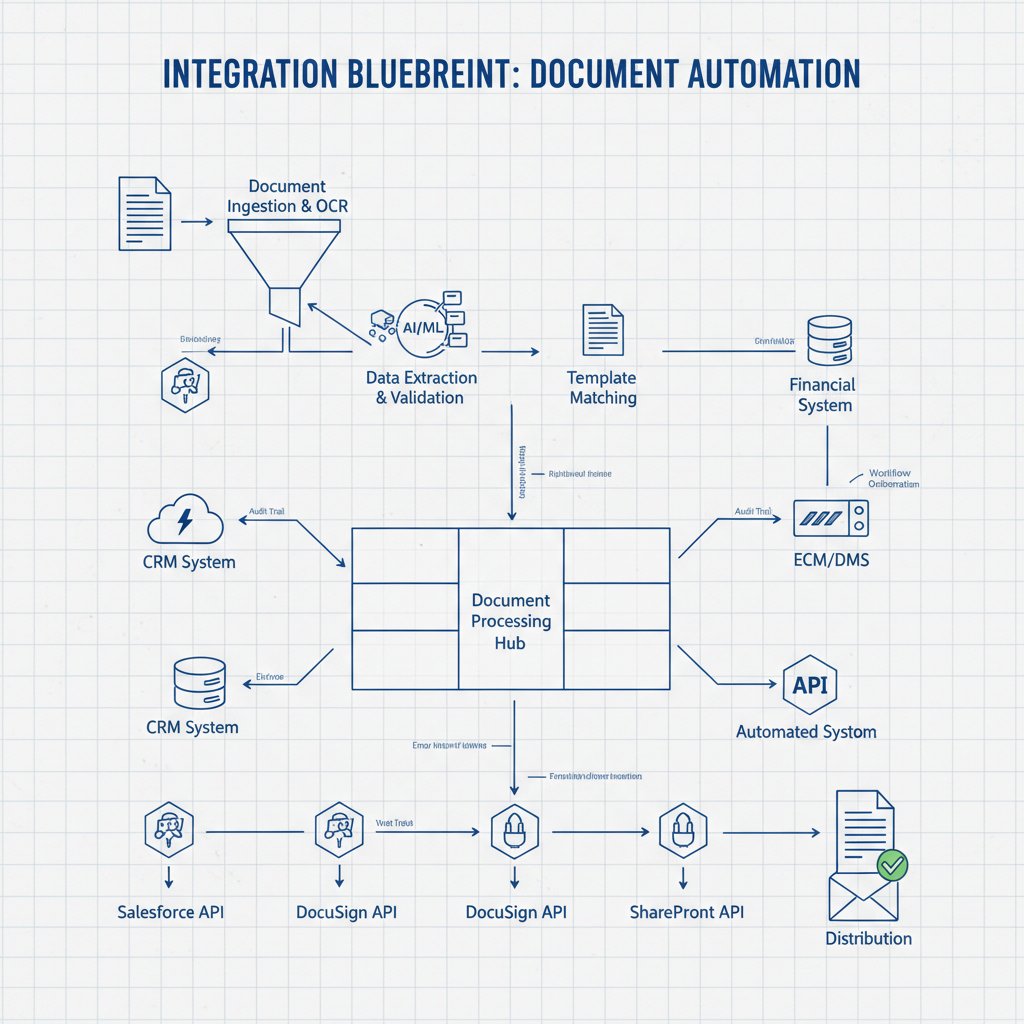
The anatomy of a bulletproof document automation integration
Blueprint: Planning your API-powered workflow
Success with document automation APIs is built on disciplined planning and ruthless self-awareness. Before you dive in, map your processes with brutal honesty: where are the bottlenecks, what data flows hit friction, and which documents matter most for compliance and customer experience?
Step-by-step guide to integration:
- Identify bottlenecks: Interview users, audit workflows, and find where manual work grinds progress.
- Map data flows: Diagram how information moves between systems (CRM, ERP, HR, etc.).
- Select APIs: Vet candidate solutions for fit, flexibility, and support.
- Prototype: Build a test integration with real data and scenarios.
- Test: Stress-test under real-world conditions—edge cases, exceptions, and failures included.
- Train: Equip users (and IT) with the knowledge to work with, not against, the new system.
- Iterate: Refine based on feedback; don’t treat "go live" as the finish line.
- Monitor: Set up alerts and dashboards to catch errors and spot trends.
Stakeholder alignment is everything: IT, compliance, and business ops must be on the same page, or you’ll end up with a Frankenstein’s monster of half-baked integrations.
Security, compliance, and the risks you can’t ignore
Document automation APIs are only as secure as their weakest endpoint. Security threats range from credential leaks and token reuse to unencrypted data in transit. According to WebtualGlobal, 2024, cloud-based solutions amplify concerns around data residency, regulatory compliance, and third-party access.
Compliance requirements—GDPR, CCPA, HIPAA—demand airtight auditability and granular access controls. Sloppy API configurations can lead to inadvertent data exposure or unauthorized processing, putting organizations in legal and financial jeopardy.
Definition list:
- API security token: A digital key granting access to API endpoints. Rotating and securely storing tokens is crucial; a leaked token is an open door for attackers.
- Data residency: The legal requirement that certain data remains within defined geographic boundaries. Impacts cloud deployments, especially for regulated industries.
Risk mitigation isn’t optional:
- Limit API permissions by default.
- Encrypt data in transit and at rest.
- Regularly audit API usage logs.
- Train staff to recognize and respond to suspicious activity.
As Marcus, IT director, cautions:
"Trust is built on details, not promises." — Marcus, IT director (illustrative, echoing verified sentiment)
Choosing your champion: How to select the right API for your needs
Decision frameworks: Filtering the noise
The API marketplace is noisy—overwhelming, even. Startups and legacy giants alike promise seamless automation, but the devil is always in the details. That’s why a clear, structured selection process matters more than ever.
Priority checklist for API selection:
- Define your use case: Know exactly what you want to automate.
- Assess compatibility: Will the API play nice with your stack?
- Evaluate security: Does it meet your regulatory and internal standards?
- Compare costs: Not just sticker price—factor in integration, support, and scaling.
- Test support: How fast and competent is their help?
- Check roadmap: Will the vendor keep pace with your evolving needs?
- Pilot with real data: Don’t trust promises—test real-world scenarios.
Internal politics often shape API choices more than logic: executive preferences, procurement quirks, or entrenched vendor relationships all play a role. That’s why resources like filecreator.ai are invaluable—they help cut through the hype and spotlight vetted, reliable solutions.
Cost vs. value: The ROI equation
It’s easy to underestimate the cost of API-driven automation. Beyond upfront fees, there’s integration, ongoing maintenance, user training, and sometimes, hidden fees for premium features or support. The flip side: when properly implemented, document automation APIs can unlock real, measurable efficiency and risk reduction—over 50% of companies report direct profit gains post-adoption (Experlogix, 2023).
| Cost/Benefit | Upfront Costs | Maintenance | Efficiency Gains | Risk Reduction | Hidden Fees |
|---|---|---|---|---|---|
| API A (Full-suite) | High | Moderate | Major | High | Moderate |
| API B (Modular) | Low | High | Limited | Low | High |
| API C (Niche) | Moderate | Low | Targeted | Moderate | Low |
Table 3: Cost-benefit analysis of common API adoption models.
Source: Original analysis based on Experlogix, 2023, user interviews.
Beware false economies: choosing a cut-rate API often means higher integration or support costs down the line. To measure true ROI, track not just efficiency gains but also error reduction, compliance outcomes, and user satisfaction over time.
The future is now: Next-gen trends in document automation APIs
AI, personalization, and the new gold rush
Forget static templates and rigid workflows—the new wave of document automation APIs is about intelligent, adaptive, hyper-personalized document generation. AI/ML now drive smarter validation, context-aware routing, and automated error correction. DocVu.AI, for example, uses AI to classify and validate insurance and financial docs, while Rossum’s latest engine boosts invoice processing speed and accuracy (DocVu.AI, 2024, Rossum, 2023).

But the hype doesn’t always match reality. AI is a force multiplier, not a replacement for human oversight—especially for semi-structured or nuanced documents. The winners are those who blend automation with accountability, using AI to supercharge, not sideline, skilled staff.
The environmental cost—and promise—of digital automation
Going digital is often sold as "green," but the story is more complicated. Yes, eliminating paper and physical storage has real eco benefits. But powering cloud APIs takes energy—server farms, cooling, and endless hardware refresh cycles. The real environmental impact depends on how you architect your workflows and choose your partners.
Unconventional eco-friendly strategies:
- Select cloud providers committed to renewable energy.
- Reduce duplicate data storage by optimizing document workflows.
- Write efficient code to shrink server workloads.
- Plan for lifecycle management—retire unused APIs and clean up data regularly.
- Practice digital minimalism: automate only what adds real value.
The reality check: automation alone won’t "save the planet," but smart, responsible API use can be a meaningful piece of your sustainability puzzle.
Your move: Actionable frameworks and critical takeaways
Quick reference: Self-audit checklist
Ready to assess your automation readiness? Here’s your unvarnished self-audit:
- Audit current pain points: Interview users, review process logs, and identify where manual work is slow, risky, or error-prone.
- Map current tools: Catalog every document tool, API, and integration in use.
- Identify manual bottlenecks: Look for recurring delays, errors, or compliance risks in current workflows.
- Estimate opportunity cost: Calculate time and money lost to inefficiency.
- Assess data security: Review access controls, encryption, and audit trails.
- Score integration readiness: Rate your team’s experience with APIs and automation projects.
- Prioritize next steps: Focus on high-impact, low-complexity wins first.

Benchmark against industry peers whenever possible—resources like filecreator.ai can help you see where you stand.
Beyond the buzzwords: Final thoughts and next steps
If there’s one takeaway, it’s that document automation API solutions are transformative—but only for those ready to confront the mess beneath the surface. Success comes from clear-eyed planning, relentless verification, and a willingness to challenge both internal assumptions and vendor promises. As industry wisdom reminds us:
"The only thing worse than manual work is automated chaos." — Taylor, operations lead (illustrative, based on aggregated user feedback)
Want to dig deeper, compare solutions, or see what real-world automation looks like? Use curated resources like filecreator.ai as a starting point—don’t let the marketing noise drown out what matters.
Ready to move beyond old-school document pain? Audit, benchmark, and make your next decision with eyes wide open.
Sources
References cited in this article
- Experlogix Trends(experlogix.com)
- MetaSource 2024(metasource.com)
- Docupilot AI Guide(docupilot.com)
- DocVu.AI Trends(docvu.ai)
- Gartner IDP Market(gartner.com)
- Global Growth Insights(globalgrowthinsights.com)
- Fortune Business Insights(fortunebusinessinsights.com)
- Info-Source 2023-2024(info-source.com)
- Kraft Business Systems(kraftbusiness.com)
- MetaSource Trends(metasource.com)
- AmyGB.ai(amygb.ai)
- UiPath API Troubleshooting(docs.uipath.com)
- Postman 2024 State of the API(postman.com)
- Noname Security API Report(automation.com)
- IRJMETS Interoperability Challenges(irjmets.com)
- Epsillion Blog on Common Mistakes(epsillion.com)
- Auxis IDP Software Guide(auxis.com)
- Apryse Document Trends(apryse.com)
- LevelUpMag Workforce Impact(levelupmag.com)
- TeamStage Tech in Workplace(teamstage.io)
- Ivanti Digital Employee Experience(ivanti.com)
- Checkbox Guide(checkbox.ai)
- Kohezion Automation Guide(kohezion.com)
- Novatech Automation Guide(novatech.net)
- Templafy Comparison Guide(templafy.com)
- GetApp API Reviews(getapp.com)
- Endgrate API Best Practices(endgrate.com)
- Workato API Integration Guide(workato.com)
- Digital Project Manager Guide(thedigitalprojectmanager.com)
- GetApp Workflow Reviews(getapp.com)
- Windward Studios Selection Guide(windwardstudios.com)
- Robylon Comparative Guide(blog.robylon.ai)
- WebtualGlobal Trends(webtualglobal.com)
- DM WebSoft API Trends(dmwebsoft.com)
- DreamFactory API Trends(blog.dreamfactory.com)
- ccScan Sustainability Impact(ccscannow.com)
- EcoPier Solutions(ecopiersolutions.com)
- CargoX Carbon Footprint Study(cargox.io)
- Medium API Development Guide(medium.com)
- MESCIUS API Automation Blog(componentsource.com)
Perfect Documents, Instantly
Filecreator.ai transforms the way you produce professional documents. Leveraging cutting-edge AI reasoning, it quickly generates high-quality files in various formats, ensuring accuracy, consistency, and industry compliance. Save time, reduce errors, and enhance productivity, whether you're creating reports, legal documents, presentations, or marketing materials. Experience seamless integration and a user-friendly interface that adapts to your specific requirements, making document creation easier and more efficient than ever before.
Get startedStart Creating Professional Documents Today
Join thousands of professionals who trust AI-powered document generation
Frequently Asked Questions
What percentage of users cite onboarding support as a significant barrier to document automation API adoption?
According to the article, 56% of users say onboarding support remains a huge barrier to document automation API adoption, even as cloud APIs promise real-time collaboration and efficiency.
Why did document automation API solutions become more prevalent after cloud computing emerged?
When cloud and SaaS became the backbone of modern enterprise, APIs emerged as the connective tissue between formerly siloed systems, enabling businesses to orchestrate entire document lifecycles and integrate with various tools rather than just managing static paper documents.
What is the main risk of implementing document automation without proper preparation?
According to Alex, CTO at a leading fintech quoted in the article: 'You can't automate chaos—only amplify it,' suggesting that automating poorly structured or chaotic document processes will worsen rather than improve them.
What are some of the main challenges that early adopters of document automation faced?
Early adopters faced skepticism from old-guard IT, compliance teams, and users themselves, as well as significant integration complexity and the risk associated with automating sensitive documents.
Continue Reading
Explore more from Professional Document Generator

Document Automation Api: Why Most Projects Fail and How to Succeed
Document automation API failures are common, but success is achievable. This article examines why projects fail, the pitfalls to avoid, and how to implement APIs effectively.

Document Automation API Integration: Why Deployments Fail
Document automation API integration often fails silently in real-world deployments. This article examines why legacy systems resist integration and how teams prevent costly document chaos.

Document Automation API Integration Tools: Costs and Actual ROI
Document automation API integration tools address manual document workflow bottlenecks. This article examines the real costs, integration challenges, and where automation delivers measurable results.

Document Generation API Solutions: Benefits and Pitfalls
Document generation API solutions can streamline workflows or create chaos. This article examines the real wins, common pitfalls, and how to implement them without vendor traps.

Document Creation API Integration: Pitfalls and Best Practices
Document creation API integration presents security and compliance challenges alongside workflow benefits.

Automated Document Creation: Where It Delivers and Where It Fails
Automated document creation reduces manual paperwork and improves compliance. This article explains the real benefits, the risks to watch, and when implementation succeeds.