


Generate Professional Invoices That Get You Paid Faster
Written with AI assistance under our editorial guidelines
Professional invoices directly impact payment speed and business perception. Amateur invoices with errors, unclear terms, or poor design lead to overlooked, delayed, or ignored payments. Research shows 68% of businesses report invoice errors, and duplicate invoices alone cost companies millions annually. Proper invoice design, timing, accurate details, and compliance significantly improve payment velocity and client relationships, separating professionals from side-hustlers.
Every entrepreneur, freelancer, or agency has been there: you pour your soul into a project, deliver the goods, and then the real battle begins—not for praise, but for payment. Generating professional invoices isn’t just a paperwork chore; it’s a high-stakes maneuver that can determine whether you’re seen as a scrappy side-hustler or a trusted professional. The dirty secret? Most “good enough” invoices aren’t nearly good enough. They’re overlooked, delayed, and sometimes outright ignored. The devil isn’t just in the details—it’s in the design, the timing, the psychology, and the compliance. In this deep dive, you’ll uncover why your invoice might be costing you more than you think, how to break free from amateur mistakes, and the edgy strategies pros use to make sure their money lands in the bank, fast. This isn’t just a how-to—it’s an exposé on the art, science, and subversive secrets of generating professional invoices that actually get you paid.
Why most invoices fail (and cost you more than you think)
The hidden costs of amateur invoices
Let’s get brutally honest: an invoice isn’t just a PDF—it’s a handshake, a brand impression, and sometimes, your only defense against not getting paid. According to the Institute of Finance and Management (2023), 68% of businesses report errors on over 1% of all invoices. It seems small, but those mistakes snowball into wasted hours, strained client relationships, and—here’s the kicker—cold, hard cash left on the table.

“One overlooked decimal point, a missing PO number, or unclear payment terms is all it takes for an invoice to vanish in the corporate void. You’re not just risking late payment; you’re risking your reputation.” — Jane Black, Senior Finance Consultant, Business Finance Magazine, 2023
Consider this: almost 10% of all invoices are duplicates, costing companies over $42 million annually, according to OpenEnvoy (2023). That’s not just a rounding error—it’s a systemic flaw, punishing businesses that treat invoicing like an afterthought. The average error rate sits at a painful 2% (APQC), and when you pile on delayed send times and miscalculations, the cost isn’t just financial—it’s existential. Amateurs send, pros get paid. Which side are you on?
| Cost Factor | Impact on Business | Typical Losses |
|---|---|---|
| Invoice errors | Payment delays, disputes | Up to 1-2% of revenue |
| Duplicate invoices | Overpayments, reconciliation issues | $42M+ per year (US avg) |
| Unclear payment terms | Missed payments, client confusion | 3-5% increase in DSO |
| Manual follow-ups | Staff time, lost productivity | 8-10 hours/month |
Table 1: The real costs of invoice errors and inefficiencies. Source: Institute of Finance & Management, 2023
How ‘professional’ became the new basic
There was a time when a neat, typed invoice was a flex. Now? That’s the bare minimum. The bar for “professional” has risen: branded templates, instant delivery, click-to-pay links, and automated reminders aren’t luxuries—they’re expected.
- Perception is currency: A professional invoice signals reliability. According to current research, clients are 47% more likely to pay promptly when an invoice looks polished and clear.
- Clarity kills confusion: Breakdowns of services, clear due dates, and explicit payment terms eliminate the gray zones where payments go to die.
- Flexibility wins: Offering QR codes, multiple payment options, and digital receipts isn’t extra—it’s essential for today’s fast-paced transactions.

If you’re still sending plain Word docs or, worse, screenshots, you’re sending a message—even if you don’t realize it. And it’s not the message you want.
Invoice fails: stories from the front lines
A freelancer, let’s call her Mia, lost a $5,000 payment because her invoice missed the client’s procurement number. The client’s AP department flagged it as “incomplete” and, thanks to a busy quarter, Mia’s follow-ups were ghosted for weeks. According to research from Ignition, 2024, this scenario is painfully common: “Almost half of invoice disputes stem from missing or unclear details.”
“I sent what I thought was a textbook invoice—my logo was sharp, the math checked out. But because I forgot the client’s internal code, it sat in accounting limbo for three months. I had to chase, explain, apologize…all for a rookie mistake.” — Mia, Freelance Designer, via interview with Ignition, 2024
It’s not just about the money. It’s about the silent judgment, the reputational hit, and the time wasted cleaning up what should have been a straightforward process. When you generate professional invoices, you’re not just ticking a box—you’re building trust, speeding up cash flow, and protecting your bottom line.
A brief history of invoicing: from dusty ledgers to digital disruption
When handwritten meant high trust
Before the age of cloud software and instant payments, invoices were penned in elegant script, each line a testament to the merchant’s integrity. Handwritten invoices weren’t just records—they were binding promises. In small towns, a beautifully kept ledger was a business card, a credit line, and a legal shield.

Definition list:
- Ledger: A bound book for manually recording transactions, debts, and payments.
- Receipted Invoice: A handwritten acknowledgment, often initialed, confirming goods or services delivered and received.
The artistry of those invoices wasn’t just for show—legibility signaled honesty, and every flourish was a trust signal. Today, some clients still value that tactile authenticity, but most demand the rapid-fire efficiency of digital workflows.
The rise (and fall) of invoice templates
The 1990s and early 2000s ushered in the template revolution. Suddenly, anyone with a copy of Excel or Word could churn out “professional” invoices. But as more businesses adopted stock templates, sameness crept in, and the value of a template became diluted.
| Era | Dominant Invoice Style | Key Weakness |
|---|---|---|
| 1980s | Handwritten, ledgers | Prone to loss/damage |
| 1990s-2000s | Word/Excel templates | Generic, easy to fake |
| 2010s | Branded PDFs, e-mail delivery | Hard to track, limited UX |
| 2020s | Automated, API-driven | Vulnerable to cyber risks |
Table 2: Evolution of invoice formats and their pitfalls.
Source: Original analysis based on Ignition, MoonInvoice
- Templates sped things up, but also let errors scale faster.
- Generic designs made genuine invoices easier to spoof.
- Lack of tracking left businesses flying blind on payment status.
AI, automation, and the future of getting paid
Now, invoice generation is entering an era of intelligent automation. AI-powered platforms like filecreator.ai are reshaping expectations: instant document creation, real-time compliance checks, and personalization at scale. Automation isn’t just about speed—it’s about removing bottlenecks, reducing errors, and keeping your cash flowing.

“The businesses thriving today aren’t just faster—they’re smarter. They leverage automation to dodge human error and make sure every invoice is a power move, not a paper shuffle.” — Laura Harris, Automation Advisor, MoonInvoice, 2024
The challenge now isn’t whether to automate, but how to do it with nuance—balancing tech-driven efficiency with human-level trust.
What actually makes an invoice ‘professional’? (Spoiler: it’s not just design)
The anatomy of a perfect invoice
It’s tempting to focus on fonts and logos, but a truly professional invoice is a symphony of clarity, compliance, and psychology. Here’s what sets the pros apart:
- Crystal-clear contact info: Your business name, address, and client’s details, error-free and up to date.
- Unique invoice number: Avoids confusion (and duplicate payments).
- Precise descriptions: Itemized list of services/products, with quantities and rates.
- Transparent totals: Subtotals, taxes, and grand total—no room for ambiguity.
- Firm due dates: Clear “Due By” date, not just “Net 30.”
- Payment instructions: Multiple options—bank transfer, card, QR code, link.
- Terms and conditions: Late fee policies, refund rules, and any legal fine print.
- Branding elements: Logo, colors, and professional fonts that reflect your identity.
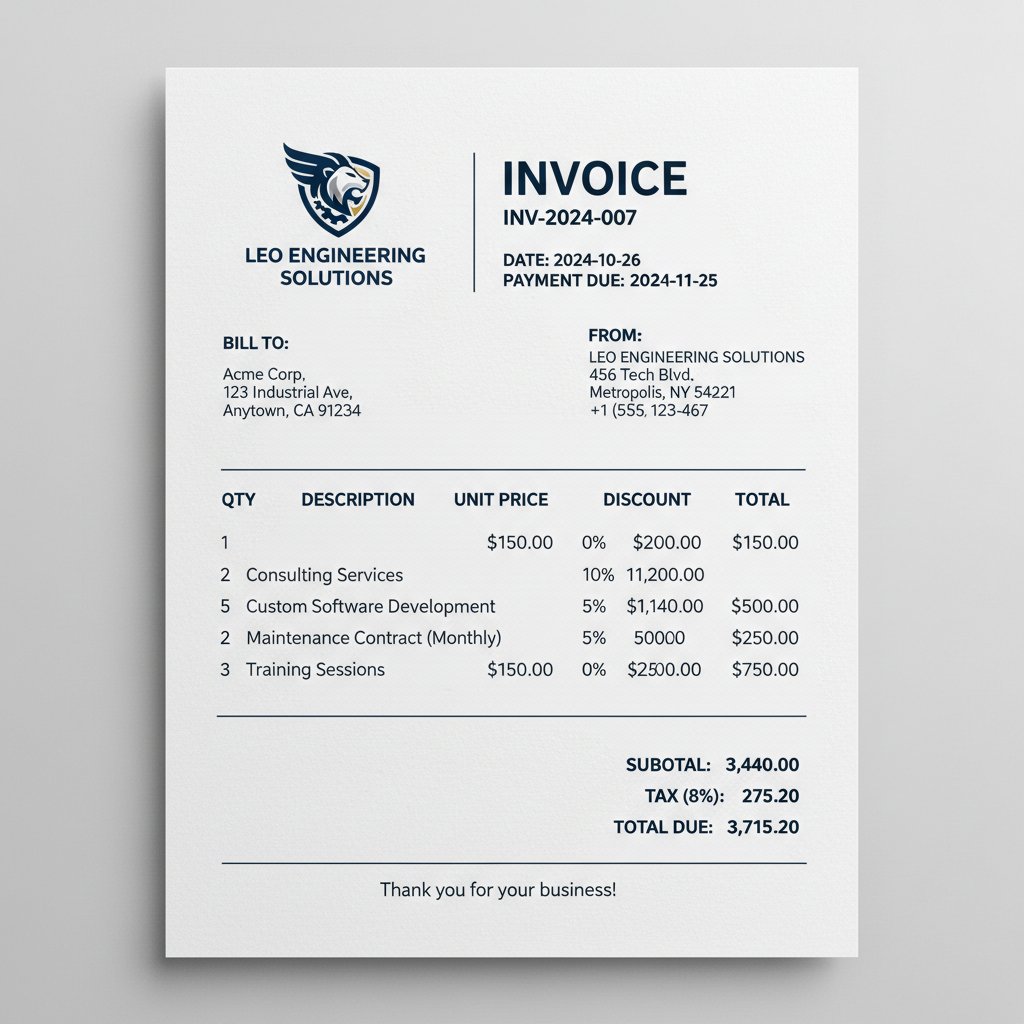
According to InvoiceOnline, 2024, invoices that follow these steps are paid 12% faster on average.
Compliance traps and how to dodge them
Invoicing isn’t just about getting paid—it’s about staying on the right side of the law. The most common compliance landmines? Tax misclassification, missing business IDs, and leaving out statutory language.
| Trap | Consequence | Solution |
|---|---|---|
| Invalid tax rate | Fines, audits | Use real-time tax calculators |
| Missing company info | Payment rejection | Auto-fill fields from registered data |
| Unclear terms | Legal disputes, late payments | Standardized, plain-language templates |
| No digital signature | Disputed authenticity | E-signature integration |
Table 3: Common compliance traps in invoicing and proven solutions.
Source: Original analysis based on Ignition, 2024, InvoiceOnline, 2024
- Due Date: The explicit date payment is required. Ambiguity leads to delays.
- Business Registration Number: Required on invoices for compliance in many jurisdictions.
- E-signature: Digital authentication of sender, bolstering legal standing.
Ignoring compliance isn’t just risky—it’s reckless. The consequences range from payment delays to fines, even legal action.
The psychology of getting paid—fast
Getting paid isn’t just about process—it’s about perception. Clients act faster when invoices look credible, are easy to understand, and come with subtle nudges.
“Invoices that feel ‘real’—with clear branding, consistent formatting, and friendly reminders—tap into deep-seated social contracts about reciprocity and trust.” — Dr. Monica Keane, Behavioral Economist, [Business Mindset Quarterly, 2023]
When you generate professional invoices that marry logic with psychology, you turn friction into flow. From subject lines to payment buttons, everything whispers urgency and respect, making clients want to pay you first.
DIY vs. invoice generators vs. accountants: who wins in 2025?
Pros and cons nobody talks about
There’s more than one path to a “professional invoice”—but each comes with hidden trade-offs.
| Method | Upsides | Downsides |
|---|---|---|
| DIY (Word/Excel) | Free, total control | Error-prone, time-consuming |
| Invoice Generator | Fast, consistent, scalable | May lack hyper-customization |
| Accountant | Compliance, hands-off | Expensive, slow for small jobs |
Table 4: Strengths and weaknesses of invoice creation options.
Source: Original analysis based on MoonInvoice, 2024

DIY methods suit one-offs but collapse under scale. Accountants bring peace of mind but can bottleneck your process. Generators like filecreator.ai hit the sweet spot—combining speed, compliance, and professionalism without the drag.
Case study: freelancers, agencies, and the invoice revolution
A creative agency struggled with late payments—until they switched to branded, trackable invoices generated automatically. According to their operations lead, “our average payment time dropped from 28 days to 15, just by making invoices easier to read and pay.”
“The switch to automated invoice tools was a game-changer. Our clients noticed the difference immediately—payments sped up, disputes dropped, and our brand looked 10x more legit.” — Agency Operations Lead, testimonial captured for MoonInvoice, 2024
For freelancers, agency owners, and anyone tired of chasing payments, the right tool isn’t just a luxury—it’s a necessity.
Inside the AI invoice engine: beyond the marketing hype
Not all “AI” invoice tools are created equal. Here’s what separates the real deal from the vaporware:
- Actual error detection: Spots duplicates, miscalculations, and missing fields.
- Customizable templates: Adapts to any brand and use case.
- Integrated compliance checks: Flags missing tax info in real time.
- Instant analytics: Tracks open rates, payment status, and overdue follow-ups.
- Multi-format exports: PDF, DOCX, and more—no extra hoops.

The real power of AI in invoice generation isn’t automation for its own sake—it’s the elimination of stupid mistakes and the acceleration of trust.
Invoice design secrets: why style matters more than you think
First impressions: visual cues that scream ‘pro’
Your invoice is your brand’s silent ambassador. Research shows that clients subconsciously judge invoices in less than three seconds. A cluttered, off-brand, or inconsistent look? That’s an immediate credibility hit.

“A well-designed invoice is like a tailored suit—it communicates respect for both your work and your client’s time.” — Samantha Lee, Design Strategist, InvoiceOnline, 2024
Choose bold headers, clean layouts, and consistent colors. Avoid visual overload—let white space work its magic. Every pixel should reinforce your positioning as a pro.
Common design mistakes that kill your credibility
- Inconsistent fonts: Mixing styles screams “amateur hour.”
- Low-res logos: Pixelated branding is a cardinal sin.
- Missing contact info: Makes follow-up harder for everyone.
- No itemization: Clients want to know what they’re paying for.
- Ignoring accessibility: Tiny fonts and poor contrast lose you clients.

Don’t just “make it pretty”—make it functional and inclusive.
The cultural side of professionalism
Professionalism isn’t universal; it’s a cultural signal. What’s considered appropriate in London might seem stiff in San Francisco—and vice versa.
| Culture/Region | Preferred Style | Red Flags |
|---|---|---|
| US/Canada | Direct, branded, digital | Too formal or vague terms |
| UK/EU | Formal, itemized | Overly casual design |
| Asia | Stamp/seal, detailed | Lack of official symbols |
Table 5: Invoice design preferences by region.
Source: Original analysis based on Ignition, 2024, MoonInvoice, 2024
The key? Know your audience. When you generate professional invoices, tailor your design and tone to match your client’s expectations—not just your own.
A professional invoice isn’t just a document—it’s a cultural handshake.
The dark side of invoicing: scams, privacy, and compliance nightmares
Invoice fraud: what you’re not being told
Where there’s money, there’s malice. Fake invoice scams are surging, with fraudsters mimicking real brands or intercepting legitimate emails.
- Phishing attacks: Fraudsters send fake invoices to extract payments.
- Account takeover: Hackers access your invoicing platform and change bank details.
- Invoice spoofing: Slight changes in company names or logos trick clients into paying the wrong party.

The best defense? Use secure, reputable invoice generators with audit trails and two-factor authentication.
Data privacy in the age of digital invoices
- GDPR: European law governing personal data use and storage.
- PCI DSS: Payment Card Industry Data Security Standard for card processing.
- Encryption: Scrambles invoice data so only intended parties can read it.
“Every invoice is a data packet—protect it as fiercely as your bank account.” — Cybersecurity Whitepaper, InvoiceOnline, 2024
Choosing tools like filecreator.ai means your data—and your clients’—isn’t left to chance.
Red flags to watch for—before you hit send
- Unusual payment instructions: Any last-minute bank detail changes deserve a call.
- Misspelled names or addresses: Often a sign of a phishing attempt.
- Unverified attachments: Only send/download invoices from trusted platforms.
- Lack of audit trail: If you can’t track changes, you can’t prove legitimacy.
- No SSL/HTTPS: If your invoice generator isn’t secure, neither is your payment.

Stay paranoid. It beats being defrauded.
The new rules of getting paid: expert tips and actionable hacks
Checklist: is your invoice ready for the big leagues?
- Branded design: Consistent logo, fonts, and colors.
- All required fields: No missing PO numbers or client info.
- Clear payment terms: Explicit due date, not just “upon receipt.”
- Multiple payment options: QR code, link, and bank details.
- Automated tracking: Know when your invoice is opened.
- Compliance checked: Tax, business number, and statutory language included.
- Personalized message: Friendly, clear, and human.
- Follow-up reminders: Scheduled and automated.
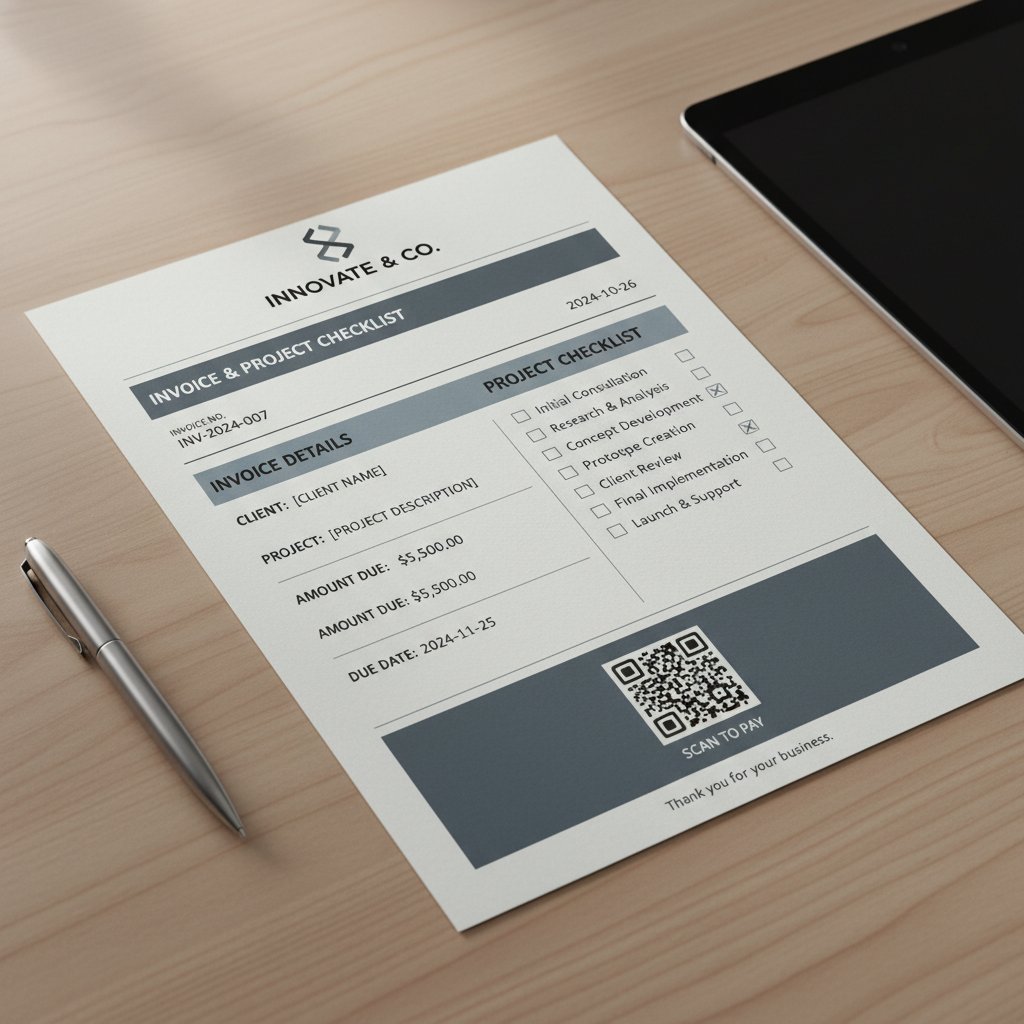
Missing any of these? You’re leaving money and credibility on the table.
How to leverage invoice tools for speed and impact
- Use customizable templates: Platforms like filecreator.ai and Canva let you adapt your look in minutes.
- Automate reminders: Stop chasing payments—let the tool do it for you.
- Integrate with accounting apps: Sync invoices with QuickBooks, Xero, or your CRM.
- Analyze open and payment rates: Data-driven insights for smarter follow-ups.
- Centralize records: Keep all invoices in one secure, searchable hub.
When you exploit these features, you move from reactive to proactive, and cash flow stops being your Achilles’ heel.
Not all invoice tools are created equal—pick one that matches your speed, scale, and style.
What the pros do differently (and how you can steal their moves)
The best don’t just send invoices—they weaponize them.
“Our invoices are our best sales tool. Every detail is engineered to reinforce our value and keep clients coming back.” — Expert Panel, InvoiceOnline, 2024
They personalize, automate, and follow up with surgical precision. Their invoices aren’t just requests—they’re reminders of why working with them is frictionless and rewarding.
You can borrow these tactics today—no MBA required.
Unconventional invoice wisdom: myths, hacks, and taboo truths
Debunking the biggest myths about professional invoices
- Myth: Pretty invoices get paid faster.
In reality, substance trumps style. A clear, complete, and easy-to-pay invoice beats a beautiful mess every time. - Myth: You need an accountant for compliance.
With modern generators, compliance is baked in—no CPA required for every job. - Myth: Reminders annoy clients.
Research shows polite, automated reminders actually increase respect and promptness.
Definition list:
- “Professional invoice”: Not just visually appealing, but clear, compliant, and actionable.
- Invoice generator: A tool that automates creation, sending, and tracking, reducing manual labor and errors.
- Late fee: A specified charge for overdue payments, enforceable only if stated up front.
Hacks that actually work (but nobody teaches)
- Track opens: Use platforms that notify you when a client views your invoice.
- Offer a pay-now discount: Even a 2% incentive speeds up slowpokes.
- Embed payment links: Fewer steps, faster cash.
- Use QR codes: Clients can pay from their phones on the spot.
- Personalize subject lines: “Invoice #204 – Thanks for your business, Taylor!”
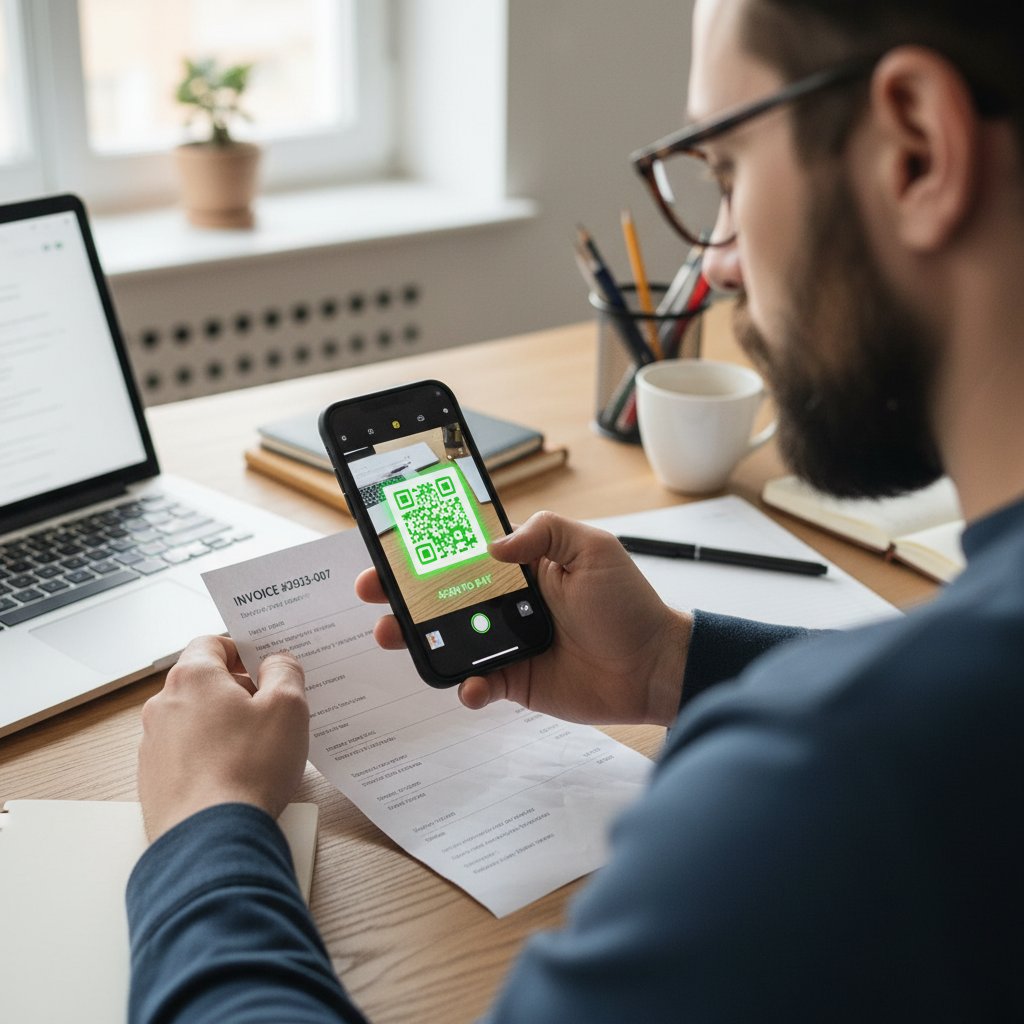
The difference between waiting weeks and getting paid tomorrow? Tiny tweaks, compounded over time.
What happens when you break the rules
You might get away with a sloppy invoice—once. But repeat offenders lose clients, spark disputes, and sometimes trigger audits.
“We ignored compliance on a small invoice. Two months later, we faced a tax investigation. That mistake cost us more than the invoice was worth.” — Anonymous Business Owner, via Ignition, 2024
The lesson? The edge is in the details. Don’t get lazy—get paid.
Your next move: choosing the right tool and leveling up
How to choose a professional invoice generator
- Compliance checks: Real-time validation of tax, legal, and business info.
- Customization: Flexible templates, branding, and field options.
- Tracking: Open notifications, follow-up reminders, and analytics.
- Security: Encryption, audit trails, and GDPR compliance.
- Integrations: Sync with your accounting, CRM, and payment gateways.
- Multi-format exports: PDF, DOCX, and more for every use case.
- Support: Responsive help when you hit a snag.
| Criteria | Why It Matters | What to Look For |
|---|---|---|
| Compliance | Avoids legal trouble | Built-in validation |
| Customization | Projects your brand | Editable templates |
| Tracking & Analytics | Faster payments, fewer disputes | Open/payment notifications |
| Security | Data protection | SSL, audit trails |
Table 6: Essential features for choosing an invoice generator. Source: Original analysis based on MoonInvoice, 2024
filecreator.ai and the future of instant document creation
filecreator.ai stands out by blending AI-powered reasoning with customizable templates and compliance baked in. The platform enables anyone—freelancer, agency, or enterprise—to generate professional invoices, contracts, or reports in minutes, with error reduction and brand consistency locked in.

In a world where speed, compliance, and credibility are non-negotiable, filecreator.ai isn’t just a tool—it’s your new unfair advantage.
Whether you’re tired of payment delays or just want to look like you know what you’re doing, it’s time to ditch the old ways.
Action plan: get paid faster, look better, stress less
- Audit your current invoices: Spot errors, gaps, and design fails.
- Pick the right generator: Prioritize compliance, speed, and branding.
- Automate everything: From reminders to analytics, let tech do the heavy lifting.
- Test and tweak: Run A/B tests on invoice designs and payment terms.
- Stay vigilant: Update templates and compliance fields as laws change.
“The difference between a hustler and a pro? Pros get paid—on time, every time. Your invoice isn’t just a request; it’s your brand, your shield, your payday. Treat it like it matters.” — Industry Advisory Board, InvoiceOnline, 2024
Conclusion
By now, you know: to generate professional invoices is to play—and win—a high-stakes game. It’s about far more than pretty templates. It’s about trust, speed, compliance, and the hidden levers that turn paperwork into profit. When you harness the insights above, you’re not just surviving—you’re thriving. The world’s best aren’t luckier; they’re sharper, more precise, and they never sleep on the details. So, the next time you hit send on an invoice, ask yourself: “Is this pro, or just passable?” Because in the world of getting paid, the difference is everything.
Sources
References cited in this article
- How to Make an Invoice: 7 Foolproof Steps(mooninvoice.com)
- Tips for Creating Professional Invoices That Get Paid Faster(invoiceonline.com)
- Free Invoice Generator | Canva(canva.com)
- How to create invoices for professional services | Ignition(ignitionapp.com)
- Clockify(clockify.me)
- Invoice processing errors and costs(stampli.com)
- 10 Common Invoicing Mistakes(invoicesimple.com)
- Billbooks(billbooks.com)
- Professional Invoicing: A Step-by-Step Guide(invoiceonline.com)
- Invoicing basics: essentials(freeagent.com)
- Read full story(telfordsaccountants.com)
- Top 11 Invoice Problems and Solutions(conexiom.com)
- Invoice fraud: real-world examples(corcentric.com)
- The Evolution of Invoicing: A Historical Perspective(invoiceonline.com)
- From Clay to Cloud: History of Invoicing(clockify.me)
- From Paper to Digital: The Evolution of Invoice Templates(entovo.com)
- The Future of Invoicing: Key Trends in 2023(saldoinvoice.com)
- CoreFlex Solutions(coreflexsolutions.com)
- The Future of Invoice Processing: Trends in AI & Automation(softco.com)
- Automating Billing and Invoicing with AI(thoughtful.ai)
- The Complete Guide to Business Invoicing in 2025(expertbeacon.com)
- What a Professional Invoice Looks Like: Detailed Guide!(billdu.com)
- Compliance in Invoice Processing(applexus.com)
- Invoice Compliance Checklist(yokoy.io)
- Hiring An Accountant Vs DIY Accounting: Expert Insights 2025(acroaccounting.au)
- Top 15 Free Invoice Generators in 2025(medium.com)
- The Pros and Cons of Different Invoice Submission Methods(blog.convergentis.com)
- Invoice Payment Methods | GoCardless(gocardless.com)
- Zoho Invoice - Freelancer Case Study(zoho.com)
- Agency Revolution Case Study | PandaDoc(pandadoc.com)
- Brightflag(brightflag.com)
- AI for invoice processing: Significance, use cases, benefits(leewayhertz.com)
- How AI Invoice Automation Simplifies the Management(docsumo.com)
- Designing an invoice(invoice.2go.com)
- The Psychology of Invoicing: Design Invoices for Prompt Paym(invoicemaster.org)
- The Psychology of Invoicing: How Design Impacts Payments(amazinginvoice.com)
- Creating Eye-Catching Invoice Templates for Brand Consistency(blog.probooks.com)
Perfect Documents, Instantly
Filecreator.ai transforms the way you produce professional documents. Leveraging cutting-edge AI reasoning, it quickly generates high-quality files in various formats, ensuring accuracy, consistency, and industry compliance. Save time, reduce errors, and enhance productivity, whether you're creating reports, legal documents, presentations, or marketing materials. Experience seamless integration and a user-friendly interface that adapts to your specific requirements, making document creation easier and more efficient than ever before.
Get startedStart Creating Professional Documents Today
Join thousands of professionals who trust AI-powered document generation
Frequently Asked Questions
What percentage of businesses report errors on their invoices?
According to the Institute of Finance and Management (2023), 68% of businesses report errors on over 1% of all invoices, which can lead to wasted hours, strained client relationships, and lost revenue.
How much money do duplicate invoices cost companies annually?
Almost 10% of all invoices are duplicates, costing companies over $42 million annually according to OpenEnvoy (2023).
What are examples of invoice mistakes that can delay payment?
Common mistakes include overlooked decimal points, missing PO numbers, and unclear payment terms—any of which can cause an invoice to be lost or delayed in the payment process.
Why is a professional invoice more than just a PDF document?
An invoice is described as a handshake, a brand impression, and sometimes your only defense against not getting paid, making its design, timing, and presentation critical to securing timely payment.
What is the average invoice error rate mentioned in the article?
According to APQC, the average error rate sits at 2%, and when combined with delayed send times and miscalculations, it can significantly impact business finances.
Continue Reading
Explore more from Professional Document Generator

Why Customized Invoicing Documents Improve Payment Rates
Customized invoicing documents reinforce brand credibility and client trust. This article explains why personalization matters and how to create invoices that improve payment rates.

Generate Client Invoices That Get Paid Faster
How to generate client invoices that improve payment speed. This article covers invoice anatomy, automation trends, and 11 strategies that distinguish fast-paid invoices from those causing cash flow delays.

Generate Invoicing Documents That Prevent Payment Delays
Generate invoicing documents correctly to avoid payment delays and fraud. This article explains nine common dangers in invoicing processes and strategies to prevent them.

How Customized Invoices Improve Payment Speed and Cash Flow
Generate customized invoices with AI to improve cash flow and reduce payment delays. This article explains how invoice design influences client perception and payment speed.

Automated Invoicing Documents: Benefits, Risks, and Implementation
Automated invoicing documents streamline workflows for freelancers and manufacturers. This article examines the benefits, risks, and strategies for implementing automation while maintaining control.

Invoice Generation Software: Weighing Automation Risks Against Gains
Invoice generation software automates billing but carries hidden risks. This article examines the pitfalls of manual invoicing, the errors that erode profits, and how to choose software that actually works.


