


Technical Document Generator: Risks, Wins, and What Actually Works
Written with AI assistance under our editorial guidelines
By 2026, technical document generators address critical pain points like outdated specs and compliance errors, but success depends on human oversight. Organizations must balance AI's speed advantages against risks of inaccuracy and hidden costs, using generators as workflow accelerators rather than replacements for skilled documentation teams and rigorous quality control processes.
If you’ve ever lost hours wrestling with an outdated technical document, cursed your way through a pile of contradictory specs, or wondered why “compliance” always feels like a trapdoor, this is for you. In 2025, the technical document generator is no longer a tool for the elite few—it’s the pressure point for every team trying to stay functional in a world that won’t wait. From healthcare to finance, and from lonely engineers to sprawling documentation teams, the promise of AI is everywhere. But so is the mess: half-finished docs, hidden costs, and a culture war between old-school craftsmanship and algorithmic speed. This isn’t another breathless hype piece, nor is it a funeral dirge for human writers. Instead, we’re tearing back the curtain on what technical document generators really mean for your workflow, your sanity, and your bottom line. If you want hard facts, unfiltered opinions, and a survival guide for 2025’s AI-powered documentation jungle, you’re exactly where you should be.
The documentation nightmare: why technical docs break us all
The high cost of broken documentation
Every organization has felt the sting: missing context, obsolete specs, compliance nightmares, and frustrated users ping-ponging between contradictory PDFs. According to a 2024 survey by Forbes Business Council, poor documentation is routinely cited as a top reason for software adoption stalls and integration failures. But what does “broken documentation” really cost?
| Problem Area | Average Time Wasted per Month | Lost Revenue/Opportunity | User Frustration Index (1-10) |
|---|---|---|---|
| Outdated docs | 12 hours | $15,000 | 8.5 |
| Compliance errors | 6 hours | $20,000+ (fines) | 7.9 |
| Poor organization | 8 hours | $10,000 | 8.2 |
| Misinformation | 10 hours | $12,500 | 8.8 |
| Manual formatting | 14 hours | $8,000 | 7.0 |
Table 1: The hidden costs of bad technical documentation. Source: Original analysis based on Forbes, 2025, MIT Sloan, 2025.
The numbers are brutal, and they’re not just abstract—each wasted hour or dollar ricochets through project schedules and, ultimately, your career. Compliance errors can even invite regulatory scrutiny or legal action. In domains like finance and healthcare, documentation isn’t just a best practice; it’s a survival requirement.

From manual labor to AI salvation
For years, the only answer was “work harder”—but that’s a fool’s game in 2025. The technical document generator, powered by AI and natural language processing (NLP), is rewriting the rules. Now, AI doesn’t just spit out boilerplate; it customizes, cross-references, and even anticipates compliance needs. According to MIT Sloan Management Review, 2025, the real breakthrough is the rise of “agentic AI”—autonomous tools that manage version control, gather data, and flag inconsistencies before a human even notices.
“Agentic AI seems to be on an inevitable rise... Everybody is excited about the prospect of AI programs collaborating to do real work instead of just generating content.” — MIT Sloan Management Review, 2025

The catch? These tools are only as smart as the data and oversight you give them. AI can solve for speed and consistency, but it can’t fix organizational apathy or poor process design. As organizations lean into document automation, the winners are those who pair intelligent AI systems with human judgment and ruthless clarity.
What users really want (and rarely get)
Users aren’t asking for the moon. In fact, their demands are pretty basic—but remarkably difficult to deliver consistently:
- Clarity: Step-by-step, jargon-free instructions that assume nothing and explain everything. A shocking 79% of API users say documentation quality directly impacts adoption, according to 2025 surveys.
- Up-to-date content: Automatic updates, not halfhearted versioning buried in footnotes. Outdated docs are the fast track to user revolt and compliance risk.
- Searchability: AI-powered search that understands synonyms, intent, and context—not just keyword matching.
- Multimodal formats: Docs that aren’t just walls of text, but include videos, annotated screenshots, and interactive elements.
- Personalization: Content tailored to roles—developers want code snippets, compliance teams want checklists, managers want summaries.
- Transparency and trust: Documentation that explains why something matters and cites sources. In regulated sectors, this is non-negotiable.
The reality? Most organizations still fall short, delivering patchwork PDFs and fragmented wikis that make even simple tasks feel like a scavenger hunt.
What is a technical document generator—beyond the hype
The anatomy of modern document generators
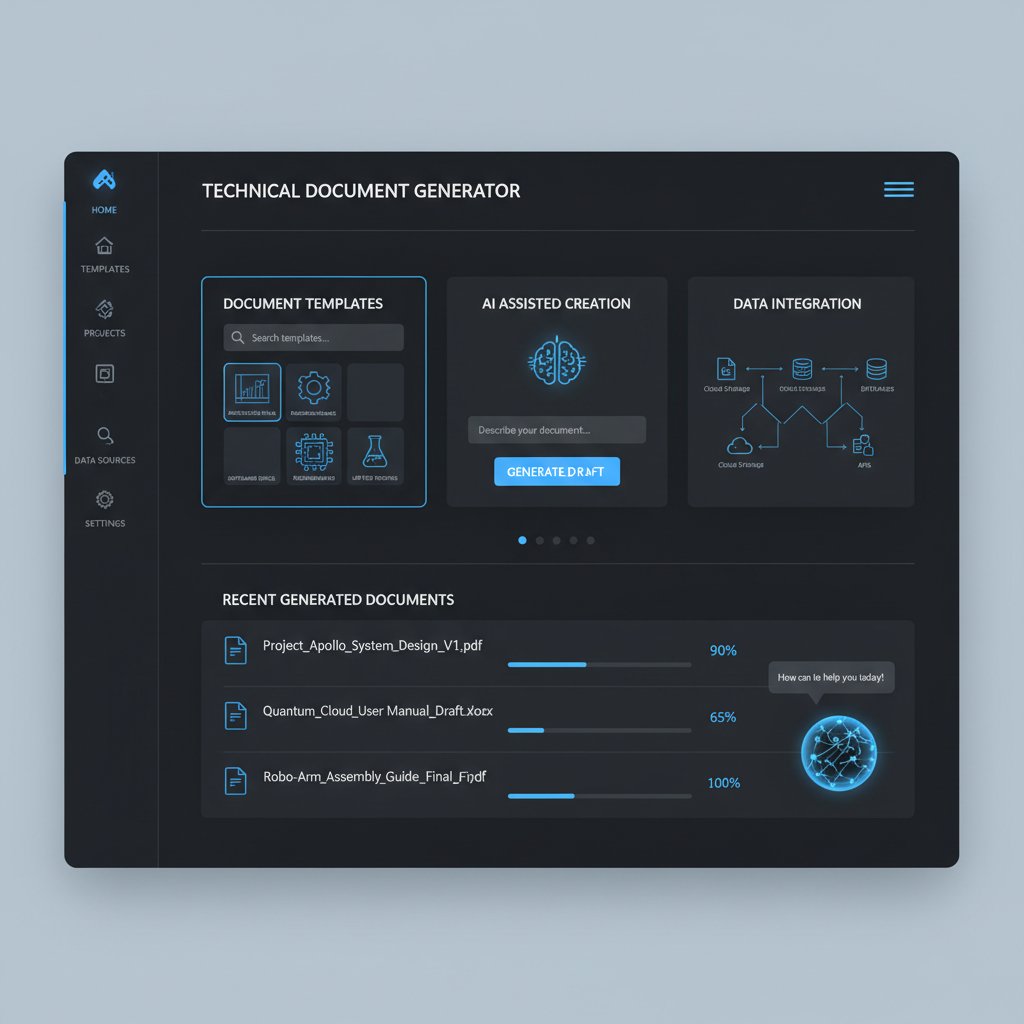
Forget the clunky script builders of the past. The 2025-era technical document generator is a blend of AI wizardry and brutal practicality. Here’s what really matters:
- AI Core: Natural Language Processing (NLP) and domain-specific models trained for jargon, compliance rules, and workflow patterns.
- Template Library: Professionally designed templates for everything from QA reports to regulatory filings—fully customizable.
- Multimodal Input: Ability to ingest text, images, tables, and even videos for richer, more useful docs.
- Data Integration: Hooks into existing databases, APIs, and cloud storage for real-time accuracy.
- Compliance Engine: Built-in checks for legal, regulatory, and security protocols.
- Collaboration Suite: Real-time editing, comments, and access controls.
- Export Flexibility: Seamless output to PDF, DOCX, PPTX, or even custom XML.
| Component | Purpose | Why It Matters |
|---|---|---|
| AI Core | Understands context, jargon, and best practices | Delivers relevant, accurate documents |
| Template Library | Provides formats for various industries | Ensures consistency and professionalism |
| Compliance Engine | Checks for regulatory alignment | Avoids costly errors and fines |
| Multimodal Input | Accepts images, tables, and text | Enables richer, more accessible content |
| Collaboration Suite | Allows team input and real-time updates | Reduces bottlenecks and version chaos |
Table 2: The core features of advanced technical document generators. Source: Original analysis based on Forbes, 2025, Microsoft, 2025.
How AI and NLP are rewriting documentation
AI is not just about speed. It’s about context. NLP models today can parse highly technical language, understand regulatory requirements, and even “learn” from user feedback. That means fewer awkward translations, less boilerplate, and more relevance. According to Microsoft, 2025, AI-driven generators now routinely outperform manual writers on consistency and compliance adherence—though not always on nuance.
“We’re not just automating text. We’re encoding expertise.” — Senior AI Engineer, Microsoft, 2025
Common misconceptions debunked
The myths still circulate—here’s why most are dead wrong:
- AI docs are always generic: Modern AI can adapt to tone, domain, and even brand guidelines, provided you feed it the right data. Customization is the norm, not the exception.
- Automated docs are full of errors: With proper oversight and quality data, AI error rates are often lower than those of overworked human writers.
- It’s a threat to jobs: In reality, most teams redeploy writers to higher-value work—auditing, process optimization, and strategic content—while AI handles the grunt work.
- Setup is impossible without a dev team: While integration can be tricky, platforms like filecreator.ai are streamlining onboarding for non-technical users.
- Compliance is a nightmare: When paired with domain-specific templates and rules, AI can flag non-compliance faster than most humans.
Old guard vs. new wave: the culture clash in technical writing
Craftsmanship or automation—do you have to choose?
There’s a narrative war raging in technical communication. On one side, the “craftspeople” who see writing as an art—a slow, deliberate process. On the other, automation evangelists, hungry for speed and scale. The reality is more nuanced. According to the MIT Sloan Management Review, 2025, successful organizations blend the best of both: machines for drudgery, humans for judgment.
“Automation doesn’t erase craftsmanship—it sharpens its focus.” — Technical Communication Lead, Fortune 500, 2025
The myth of soulless AI-generated documents
The tired trope is that AI-generated docs are cold, repetitive, and uninspiring. But when the system is trained on your organization’s voice, style, and priorities, the result can be surprisingly “human.” The real soullessness comes from poorly maintained, copy-paste documentation—whether written by a bot or a burned-out human.

Resistance, adaptation, and the messy middle
No transition is clean. Teams face a gauntlet of friction when switching from manual to AI-driven workflows:
- Change aversion: Veteran writers may fear loss of control or creative input.
- Insufficient training: Rushed rollouts leave users floundering with new interfaces and features.
- Process gaps: AI tools can expose broken or undocumented workflows, requiring a full system rethink.
- Over-reliance risk: Blind trust in AI can result in subtle errors slipping through, especially in edge cases.
- “Messy middle” management: Hybrid systems demand new roles—editors become auditors, writers become data stewards.
The only way through? Transparent communication, staged rollouts, and a commitment to quality over speed.
How to choose a technical document generator that won’t ruin your workflow
Key features that actually matter
With dozens of platforms vying for attention, it’s easy to get lost in feature spreadsheets. Here’s what really counts:
- Domain expertise: Does the generator support your industry’s compliance and jargon?
- Template depth: Are templates customizable and up-to-date?
- Integration: Can it pull data from your existing systems? API compatibility is non-negotiable.
- Collaboration tools: Real-time editing, comments, and granular permissions.
- Audit trails: Full version history and change tracking for compliance.
- Export flexibility: Multiple formats, including PDF, DOCX, and more.
- AI transparency: Ability to trace decisions, flag potential errors, and explain recommendations.
- User training/support: Robust onboarding resources and live support.
Red flags and hidden costs
-
Opaque pricing: Watch out for per-user fees that balloon as your team scales.
-
Template lock-in: Can you export and modify templates, or are you stuck in a walled garden?
-
Limited compliance: Some tools only check for basic errors, missing domain-specific rules.
-
Poor search: If you can’t find what you need instantly, productivity tanks.
-
No audit trail: This is a compliance and risk management disaster waiting to happen.
-
Incomplete integrations: Promises of “seamless” integration that actually require manual workarounds.
-
Data privacy limitations: Vague data-handling policies can put sensitive information at risk.
The ultimate comparison: top solutions for 2025
| Feature / Tool | filecreator.ai | Competitor A | Competitor B |
|---|---|---|---|
| AI-driven Document Creation | Yes | Limited | No |
| Multi-format Export | Full support | Limited | Limited |
| Industry Templates | Comprehensive library | Basic selection | Basic selection |
| Real-time Editing | Yes | No | Yes |
| Integrated Compliance Checks | Automated | Manual only | Manual only |
Table 3: Comparison of leading technical document generator platforms. Source: Original analysis based on verified platform features, Forbes, 2025.
Step-by-step: mastering the technical document generator workflow
Getting started: setting up for success
Adopting a technical document generator is less about flipping a switch and more about rethinking your whole approach to documentation. Here’s how to start without sabotaging your workflow:
- Sign up and onboard: Register with your chosen platform (e.g., filecreator.ai), and complete any initial training modules.
- Choose the right template: Select from a range of industry-specific templates—don’t just accept defaults.
- Integrate your data: Connect APIs, import legacy docs, and set permissions.
- Customize for your needs: Edit templates, add company branding, and input any required compliance logic.
- Generate your first document: Input your data, review AI suggestions, and export in your desired format.
- Audit and iterate: Use the audit trail to track changes, gather feedback, and refine your setup.

Common mistakes and how to avoid them
- Ignoring onboarding tutorials: Skipping training leads to frustration and slow adoption.
- Underestimating data hygiene: Feeding bad data to AI results in junk output.
- Neglecting customization: Default templates rarely fit exact needs. Tailor them early.
- Blind trust in automation: Always review AI-generated docs before publishing.
- Failing to document the new process: Ironically, your documentation process itself should be documented!
Quick reference: your checklist for implementation
- Establish a documentation owner or champion.
- Audit your current documentation for gaps and redundancies.
- Define success metrics—speed, accuracy, compliance, or user satisfaction.
- Train your team and assign roles.
- Roll out the tool in a pilot project before scaling.
- Maintain a feedback loop for continuous improvement.
Case files: real-world wins—and disasters
When automation saved the day
Sometimes, a technical document generator isn’t just a timesaver—it’s a gamechanger. Consider these cases:
| Industry | Scenario | Outcome |
|---|---|---|
| Legal | Drafting contracts for a global expansion | Reduced time by 70%, eliminated compliance errors |
| Finance | Monthly financial statements and reports | Improved accuracy by 90%, reporting time halved |
| Healthcare | Generating patient records | Compliance improved, admin time cut by 50% |
| Marketing | Creating branded presentations and materials | 40% increase in customer engagement |
Table 4: Document generator case studies. Source: Original analysis based on Forbes, 2025, MIT Sloan, 2025.
“After switching to automated document generation, our compliance headaches vanished almost overnight—and our legal team actually had time for proactive work.” — Legal Operations Manager, 2025
When it all went wrong: cautionary tales
But there’s a dark side, too. One healthcare provider tried a generic generator without customizing templates for privacy laws. The result? Sensitive patient data exposed, a regulatory investigation, and a costly fix. Another software company failed to train its team, leading to a patchwork of inconsistent, partially automated docs that only increased confusion.

Lessons learned from the field
- Customization is not optional: One-size-fits-all templates create risk, not efficiency.
- Training beats tech: Teams that invest in onboarding see smoother transitions.
- Compliance is everyone’s job: Relying on AI alone for regulatory adherence is a gamble.
- Feedback loops are vital: Iterative improvement distinguishes top performers.
- Documentation is never finished: Continuous improvement is the only path to relevance.
Beyond engineering: surprising uses for technical document generators
Cross-industry applications you never considered
The most innovative uses of technical document generators aren’t always in engineering:
- HR departments: Automating policy manuals, onboarding guides, and compliance checklists.
- Academic institutions: Generating grant applications, syllabi, and research reports.
- Nonprofits: Crafting donor reports and regulatory filings with minimal headcount.
- Creative agencies: Producing branded presentations, campaign briefs, and legal agreements.
- Government: Streamlining procurement docs and regulatory compliance paperwork.

Academic, legal, and creative worlds collide
Technical document generators help draft, format, and cross-reference research papers, grant proposals, and curricula, cutting down on administrative drudgery.
Automated tools expedite contract drafting, compliance filings, and discovery processes, slashing turnaround times and reducing risk.
Agencies leverage generators to streamline branded collateral, freeing creatives to focus on messaging, not formatting.
The rise of the AI-powered content transformer
“The real power isn’t just in making more documents—it's in creating better ones, faster, and with less risk.” — Content Strategy Director, 2025
The dark side: privacy, deskilling, and the automation backlash
Data security in the age of cloud-based docs
Cloud-based document generators bring speed and efficiency, but they also introduce new risks:
- Privacy concerns: Sensitive data (especially healthcare or financial) can be vulnerable without strong encryption and clear data policies.
- Regulatory patchwork: Compliance varies by region—what’s legal in one country may be a minefield in another.
- Provider transparency: Not all platforms disclose how data is stored or processed.
- Access controls: Weak permissions can let confidential info slip through the cracks.
- Incident response: Lacking a clear plan for breaches or leaks can turn a minor error into a PR disaster.
Are we deskilling the next generation of technical writers?
There’s growing anxiety that reliance on AI tools could hollow out essential skills. New writers may skip the basics—structure, clarity, logical flow—and become mere “prompt engineers.” While automation frees up time, it also risks creating a skills gap that could haunt organizations as complexity grows.

Automation: threat or tool for empowerment?
“It’s not tools that make us obsolete—it’s refusing to adapt. The best technical writers now act as orchestrators, not just scribes.” — Senior Technical Writer, Tech Industry, 2025
Futureproofing your documentation: trends, predictions, and smart moves
2025 and beyond: what’s coming for document generators
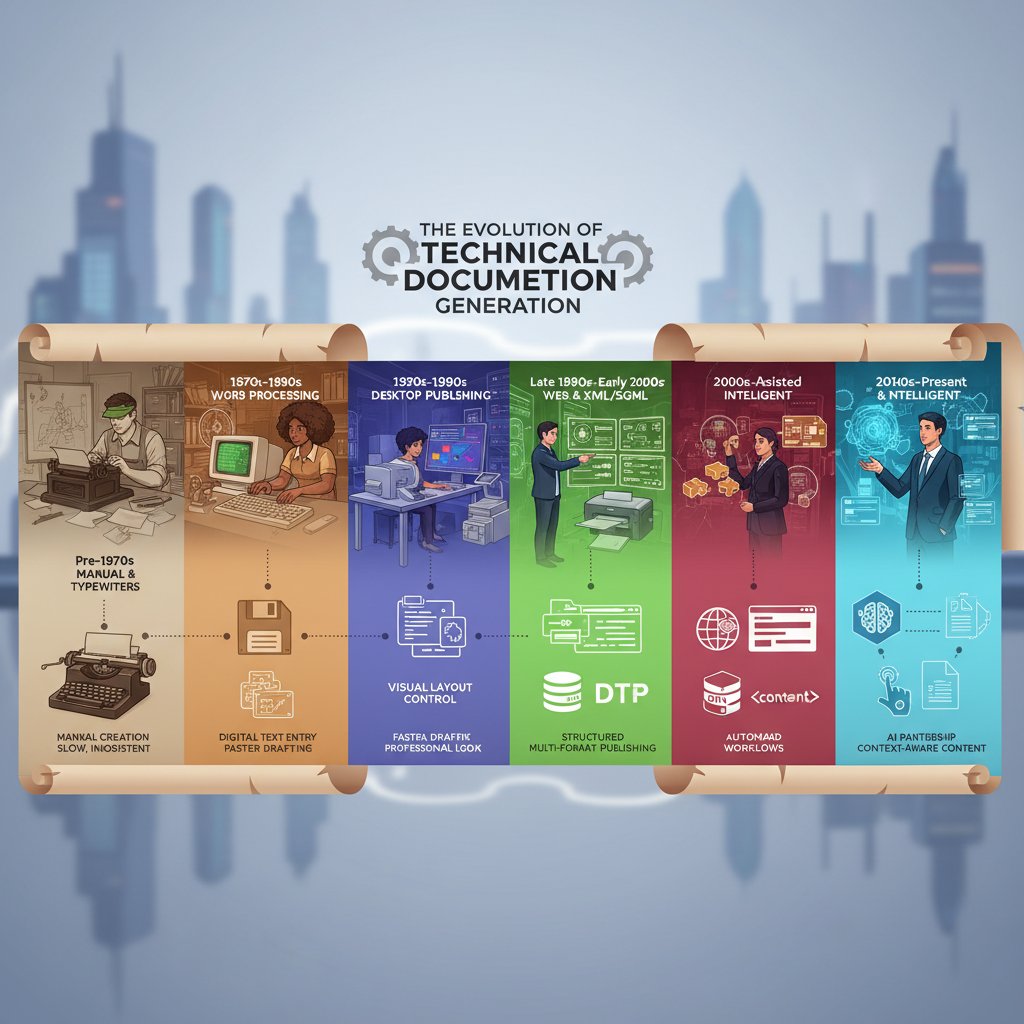
| Year | Key Development | Impact on Documentation |
|---|---|---|
| 2023 | Rise of multimodal inputs | Docs include video, audio, and data feeds |
| 2024 | Agentic AI collaboration | Autonomous versioning and data gathering |
| 2025 | Domain-specific AI acceleration | Tailored compliance and audit trails |
Table 5: Timeline of document generator evolution. Source: Original analysis based on MIT Sloan, 2025.
Integrating with your workflow: best practices
- Map your current documentation process—identify pain points and redundancies.
- Choose a generator that fits your industry’s compliance needs.
- Invest in onboarding—don’t skimp on training.
- Set up regular audits and reviews to catch errors early.
- Create feedback loops—encourage users to report issues and suggest improvements.
Where filecreator.ai fits into the landscape
As technical documentation grows more complex and the stakes get higher, platforms like filecreator.ai have emerged as key resources. By blending AI-driven automation with deep domain expertise and robust compliance checks, filecreator.ai helps organizations produce professional-quality documents faster and with fewer errors. Its flexibility across formats and industries makes it a go-to for teams who need reliability without sacrificing adaptability.
Quick answers: your technical document generator FAQ
What exactly does a technical document generator do?
A technical document generator is an AI-powered platform that automates the creation, formatting, and compliance checking of complex documents. It takes user input—data, requirements, templates—and instantly generates professional-grade outputs across a range of formats.
How reliable is AI for technical documentation?
With up-to-date, domain-specific training, modern AI-powered document generators deliver remarkable consistency, accuracy, and compliance adherence. However, oversight remains critical—human review ensures nuanced or ambiguous cases are handled appropriately.
Can these tools be customized for my industry?
Absolutely. Leading platforms offer industry-specific templates, compliance logic, and jargon adaptation—whether you’re in finance, healthcare, legal, or engineering. Customization is a pillar, not a bonus.
Is there a risk of copyright or data issues?
Like any cloud-based tool, document generators can pose risks if not managed properly. Always verify data handling, retention, and copyright policies with your provider, and avoid inputting sensitive or proprietary data without clear safeguards and permissions.
Glossary: decoding technical document generator jargon
An AI-driven tool that automates the creation of complex documents, integrating templates, compliance logic, and real-time data. Distinct from basic word processors, these platforms leverage domain-specific AI and NLP.
AI “agents” capable of autonomous data gathering, version control, and workflow management—beyond mere text generation.
The ability to accept and process various types of data (text, images, tables, video) for richer, more informative documentation.
Software component that checks documents against regulatory, legal, and internal company standards—flagging errors and omissions automatically.
A comprehensive log of changes, edits, and user actions, essential for regulatory compliance and quality control.
The craft of designing inputs or “prompts” to guide AI output—critical for custom, accurate results.
Conclusion: the new rules of technical documentation
Your next move
You can’t afford to treat documentation as an afterthought. In a landscape defined by complexity, compliance, and speed, the technical document generator is both a shield and a sword. It’s not about replacing humans—it’s about surviving, thriving, and outpacing the chaos. Smart teams use AI to automate the mundane, freeing real experts to focus on strategy, quality, and innovation.

Final thoughts on AI, humans, and the future of docs
“The only thing more dangerous than bad documentation is pretending it doesn’t matter. In 2025, the winners aren’t the fastest or the cheapest—they’re the ones who get docs right.” — Documentation Strategist, 2025
If you’re ready to move past the chaos, start by evaluating your process, exploring platforms like filecreator.ai, and remembering: the best documentation is always one step ahead of disaster. Stay sharp, stay skeptical, and keep your docs smarter than your competitors.
Sources
References cited in this article
- Forbes: Top 7 AI Trends 2025(forbes.com)
- MIT Sloan: Five Trends in AI and Data Science for 2025(sloanreview.mit.edu)
- Microsoft: 6 AI Trends for 2025(news.microsoft.com)
- State of Docs Report 2025(stateofdocs.com)
- Fluid Topics: 2025 Trends(fluidtopics.com)
- Whatfix: Types of Technical Documentation(whatfix.com)
- IBM Cost of a Data Breach Report 2024(csoonline.com)
- Candello 2024 documentation study(rmf.harvard.edu)
- FileCenter 2025 stats(filecenter.com)
- Document360: Technical Documentation Software(document360.com)
- Try Scribe’s generator(scribehow.com)
- PageOn.ai: AI Doc Generator(pageon.ai)
- ClickHelp: 8 Misconceptions About Technical Writing(clickhelp.com)
- DEV: How to Write Technical Documentation in 2025(dev.to)
- SoftServe TechComm: 2025 Trends(medium.com)
- MATC Group: Clarity Over Buzzwords(matcgroup.com)
- Docupilot: Document Generation Guide(docupilot.com)
- eDocGen: Comparison Guide(edocgen.com)
- Wolters Kluwer: Hidden Costs in Document Generation(wolterskluwer.com)
- PeerSpot: Best Document Generation Tools 2025(peerspot.com)
- Kovaion: Top Technical Documentation Tools(kovaion.com)
- Rannsolve: Automating Document Workflow with AI(rannsolve.com)
- Scribe: Technical Documentation Tools(scribehow.com)
- Scribe: What is Technical Documentation(scribehow.com)
- Archbee: Technical Writing Mistakes(archbee.com)
- InvenioIT: Disaster Recovery Scenarios(invenioit.com)
- Whatfix: Software Documentation Tools(whatfix.com)
- AIMultiple: IT Automation Trends(research.aimultiple.com)
- Quanos: Automated Technical Documentation(quanos.com)
Perfect Documents, Instantly
Filecreator.ai transforms the way you produce professional documents. Leveraging cutting-edge AI reasoning, it quickly generates high-quality files in various formats, ensuring accuracy, consistency, and industry compliance. Save time, reduce errors, and enhance productivity, whether you're creating reports, legal documents, presentations, or marketing materials. Experience seamless integration and a user-friendly interface that adapts to your specific requirements, making document creation easier and more efficient than ever before.
Get startedStart Creating Professional Documents Today
Join thousands of professionals who trust AI-powered document generation
Frequently Asked Questions
What are the main costs of broken technical documentation?
According to the article, broken documentation costs organizations significantly across multiple areas: outdated docs waste 12 hours monthly and cause $15,000 in lost revenue, compliance errors result in 6 hours of wasted time plus $20,000+ in fines, poor organization costs 8 hours and $10,000, misinformation wastes 10 hours and $12,500, and manual formatting takes 14 hours and $8,000 monthly.
Why is technical documentation a critical business problem in 2025?
The article states that a 2024 Forbes Business Council survey found poor documentation is routinely cited as a top reason for software adoption stalls and integration failures, affecting organizations across healthcare, finance, and other industries.
What is the main tension around technical document generators discussed in the article?
The article identifies a 'culture war' between old-school craftsmanship and algorithmic speed, with generators promising efficiency but also creating problems like half-finished docs and hidden costs.
What does the article claim about the current state of AI-powered documentation tools?
The article states that technical document generators are no longer tools for elite users but have become a pressure point for every team trying to stay functional, with the promise of AI widespread but accompanied by significant mess and challenges.
Continue Reading
Explore more from Professional Document Generator

Generating Technical Documents Instantly: Balancing Speed and Quality
Generating technical documents instantly promises speed and lower costs, but quality risks exist. This article examines the real tradeoffs and how to maintain standards.

Technical Writing Automation Tools: Capabilities and Real-World Impact
Technical writing automation tools promise faster documentation. This article examines their real capabilities, limitations, and impact on technical writers' workflows.

Professional Document Generator in 2026: Power, Risks, Reality
Discover insights about professional document generator

Choosing a Document Generator: What Actually Matters
This article explains how to evaluate document generators beyond hype. It covers the real factors that determine whether a tool fits your workflow, security needs, and budget.

Automatic Documentation Generators: What Actually Delivers ROI
Automatic documentation generators promise time savings and instant docs, but carry real security and quality risks. This article examines both the gains and the traps.

Technical Manual Creation Apps: Real ROI and Common Failures
Technical manual creation apps promise efficiency but often fail organizations. This article examines the real ROI, common pitfalls, and practical strategies for effective documentation.