


Generate Customized Invoicing Documents That Actually Get Paid
Written with AI assistance under our editorial guidelines
Customized invoicing documents enhance business credibility and client perception far beyond generic templates. Research shows 90% of customers find invoice personalization appealing, with personalized invoices signaling professionalism and reliability that drives faster payments and client retention. Modern AI-driven invoicing tools enable businesses to create branded, tailored documents that differentiate them from competitors and strengthen long-term client relationships.
Invoices are the silent assassins of your business reputation. For years, entrepreneurs have obsessed over the perfect product pitch, the slickest website, or the catchiest marketing campaign—meanwhile, their invoicing game is stuck in the Stone Age. But in the merciless landscape of 2025, to generate customized invoicing documents is more than just a back-office task: it's a frontline battle for trust, professionalism, and cash flow. One rookie mistake, one generic PDF, and you’re not just risking late payments—you might be silently driving clients away forever. Here’s what nobody tells you: every invoice you send is a handshake, a billboard, and a legal document rolled into one. In this article, we deconstruct the myths, expose the hidden traps, and show you how a new order of AI-driven tools—like filecreator.ai—can put you light years ahead. Prepare for hard truths, expert hacks, and a crash course in making your invoices as sharp as your ambition.
Why customized invoicing matters more than you think
The psychology of invoices: First impressions and lasting impact
Invoices are more than transactional paperwork—they are psychological triggers. According to research published by DiscoverPrint (2024), personalized invoices not only reinforce your brand’s credibility but create a perception of reliability that lingers with your clients far longer than a social media ad ever could. The subtle cues embedded in a customized invoice—distinct fonts, color schemes, targeted messaging—signal professionalism, instill confidence, and, most crucially, differentiate you from the herd of bland, template recyclers.

"A well-designed invoice is a handshake your client remembers. It tells them you sweat the small stuff—and that you’ll sweat the big stuff too." — As industry experts often note, customized invoicing is a strategic asset for modern businesses. (quote based on findings from DiscoverPrint, 2024)
Recent data from B2BE (2024) reveals that 90% of customers find invoice personalization appealing, while 14% of businesses now prioritize it as a top invoicing trend. The ripple effect is undeniable: a tailored invoice isn’t just about aesthetics—it’s about accelerating payments and cementing your business as a cut above.
From paper to pixels: The evolution of invoicing
Invoicing has evolved from handwritten ledgers to cloud-based, AI-driven platforms—each leap forward rewriting the rules of business credibility. Decades ago, paper invoices ruled, each bearing the smudged fingerprints of backroom staff. Today, to generate customized invoicing documents is to tap into a digital arsenal: e-invoicing standards (XML, UBL), instant delivery, real-time tracking, and dynamic branding.
| Era | Core Features | Key Weaknesses | Modern Solution |
|---|---|---|---|
| Paper (Pre-2000) | Manual entry, carbon copies | Slow, error-prone, easy to forge | Digital templates |
| Early Digital (2000-2010) | Word/PDF templates, email send-outs | Generic, no tracking, limited compliance | Online platforms |
| Modern AI-Driven (2020-) | Automated, branded, compliant, mobile | — | AI-powered generators like filecreator.ai |
Table 1: The transformation of invoicing from analog to AI-powered digital solutions. Source: Original analysis based on DiscoverPrint, ClearTax, and BillBooks findings (2024).
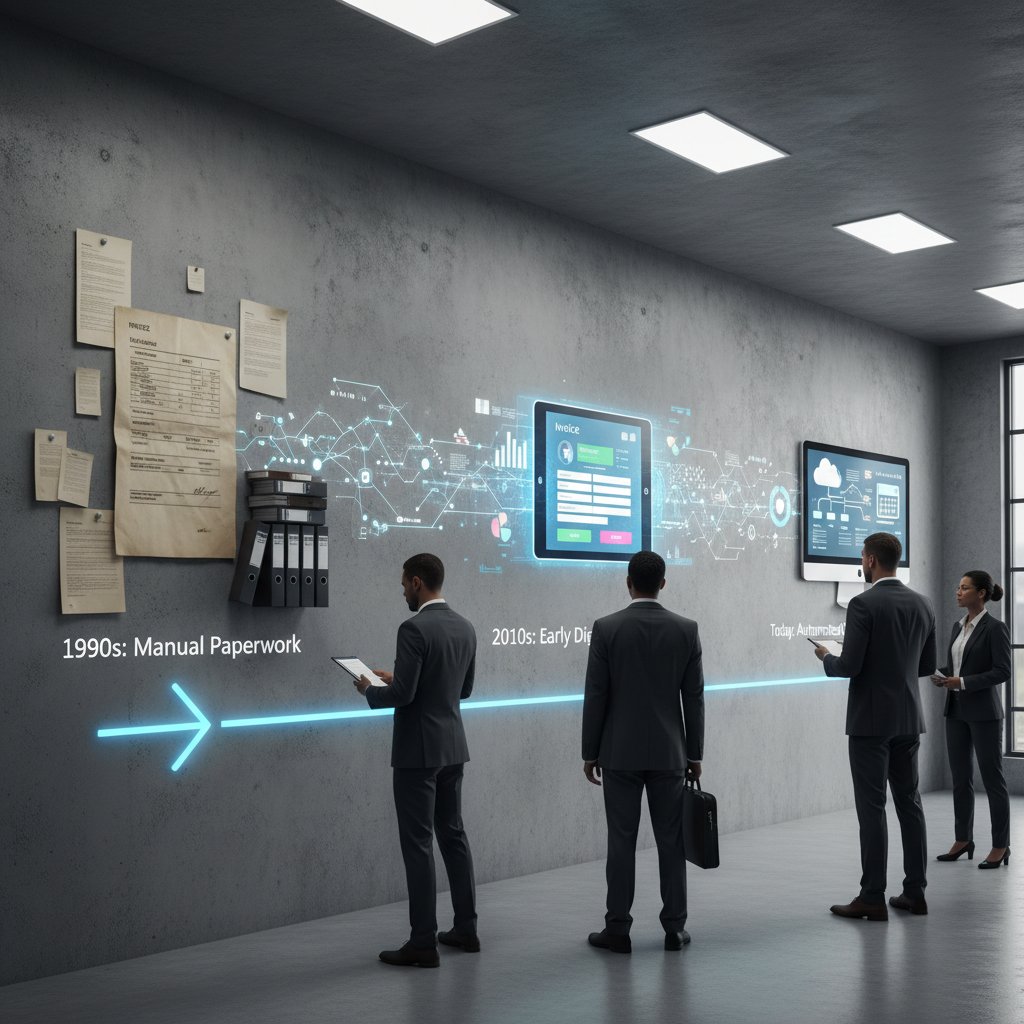
This shift isn’t optional. According to Skynova (2024), 71% of businesses now cite invoice automation as the top trend, with a quarter gunning for full automation to keep up. Stick with paper or static PDFs, and you’re not just behind the times—you’re actively sabotaging your business.
Branding beyond the logo: Crafting invoices that speak
Branding is more than slapping a logo in the upper-right corner. A truly customized invoice is a narrative: layout, typography, colors, and even the language used, all converging to reinforce your unique business identity.
- Personalization increases recognition: Tailored invoices embed your brand’s visual language—color palettes, fonts, and icons—into every transaction, making you unforgettable.
- Messaging matters: Custom notes, thank-you messages, and client-specific details transform a transaction into an experience.
- Consistency builds trust: A cohesive invoice design signals organizational discipline—a trait that clients subconsciously link to reliability.
- Compliance meets creativity: Dynamic templates ensure every invoice is legally sound without sacrificing personality, blending regulatory rigor with creative flair.
A generic invoice is a missed opportunity to stand out. In a crowded marketplace, every detail counts. According to research from QuickBooks (2024), dynamic and flexible templates are now a non-negotiable for businesses serious about their image.
Common myths and dangerous misconceptions
The DIY myth: Why templates aren't enough
Too many businesses fall for the “one-size-fits-all” template trap. Sure, a basic Word or Google Docs template feels quick and cheap—but it’s a false economy. Templates are easy to misuse, easy to forget, and dangerously generic.
"Generic templates lead to generic results. Invoicing is not a place for shortcuts." — As observed by expert contributors on Techjockey (2024)
- Templates are static: They rarely adapt to regulatory changes or unique client needs, leading to compliance gaps.
- Prone to errors: Manual edits introduce mistakes—wrong dates, mismatched client names, missing totals—that erode trust.
- Lack of audit trail: DIY files lack version control or security, making them a liability during disputes or audits.
According to B2BE’s 2024 survey, over 80% of Australian businesses reported late invoices last year, with bland, unclear billing being a top culprit. The professional edge lies in dynamic, intelligent customization—not stale, static templates.
Customization equals complexity? Not anymore
There’s a lingering myth that customizing invoices means wrestling with design tools or hiring an expensive consultant. That’s ancient history. Modern systems—driven by AI and smart templates—make customization intuitive and scalable.

| Customization Method | Complexity (Old) | Complexity (Now) | Outcome |
|---|---|---|---|
| Manual (Word/Excel) | High | — | Time-consuming, error-prone |
| Design Software | Very High | — | Costly, skill-intensive |
| AI/Template Platforms | — | Low | Fast, consistent, compliant |
Table 2: Complexity vs. outcome in invoice customization. Source: Original analysis based on Techjockey, QuickBooks, and BillBooks (2024).
The leap forward? Platforms like filecreator.ai empower even non-designers to produce invoices that look bespoke—without bleeding into chaos or non-compliance.
Automation means losing control: Debunked
Automation is often met with suspicion: “If I automate, I lose oversight.” In reality, the opposite is true. Automated systems offer transparency, audit trails, and error-checking that no manual process can match.
The use of software to generate, send, and track invoices with minimal manual intervention. Far from losing control, you gain real-time visibility and consistency.
Templates that adapt to client, industry, or region—embedding compliance and branding automatically.
Automated, secure storage of invoices for instant retrieval during audits or disputes.
By automating, you standardize excellence and minimize human error. According to Invoicera (2024), companies using automated invoicing report not only faster cash flow but fewer disputes and lower administrative costs.
Inside the machine: How AI is rewriting invoice creation
Under the hood: How AI-powered generators work
AI-powered invoice generators aren’t just fancy text editors. They read, reason, and adapt to your business logic. When you generate customized invoicing documents with an AI tool, you empower algorithms to:
- Parse your data for accuracy—catching typos, mismatches, or duplicate entries before they become headaches.
- Auto-fill compliant fields based on jurisdiction, client, or transaction details.
- Detect anomalies in payment terms (e.g., dates, overdue flags) to prompt reminders or escalate issues.
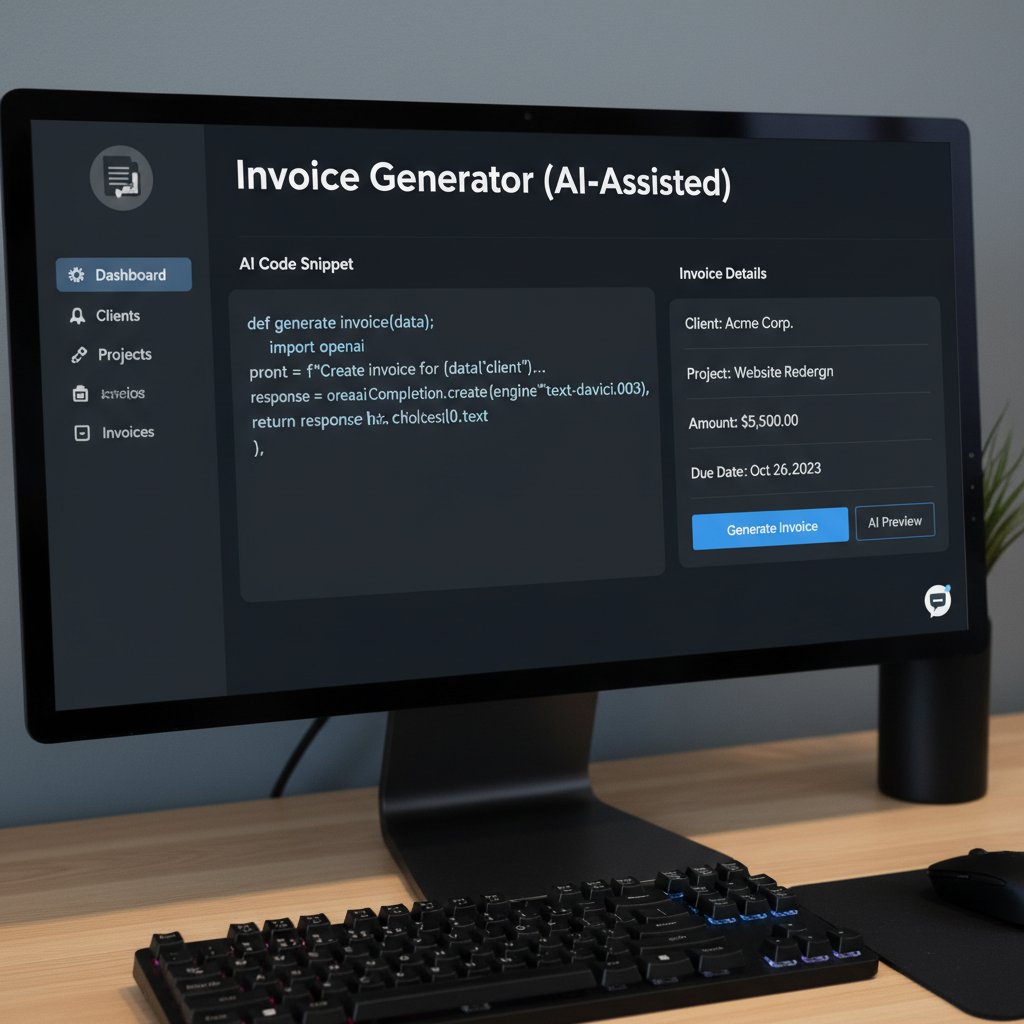
The magic is in the machine learning: over time, these systems learn your preferences, spot irregularities, and offer recommendations. According to BillBooks (2024), AI-driven invoicing not only reduces manual work but also flags potential fraud and validates data for compliance.
So, what’s under the hood isn’t just code—it’s your business intelligence, evolving in real time.
Security, privacy, and compliance: Truths and traps
Invoice data is a goldmine for cybercriminals. Modern invoicing solutions must go beyond convenience—they need to be airtight on security and compliance.
| Security Feature | Why It Matters | Compliance Requirement |
|---|---|---|
| Two-factor authentication | Prevents unauthorized access | Increasingly required by regulators |
| Encrypted transmission | Protects sensitive data in transit | Meets GDPR, CCPA standards |
| Audit logs | Tracks document edits and access | Critical for financial audits |
| E-invoicing standards (XML, UBL) | Ensures cross-border compatibility | Mandatory in many regions |
Table 3: Security and compliance requirements for modern invoicing solutions. Source: Original analysis based on ClearTax, Yokoy, and B2BE (2024).
- Assess your compliance needs.
- Choose tools with robust encryption and multi-factor authentication.
- Verify that your provider follows local and international e-invoicing standards.
- Ensure all invoices are stored digitally for easy audits.
- Train your team to recognize phishing and invoice fraud.
The truth? Compliance isn’t a checkbox—it’s your shield against regulatory fines and reputational damage. Skipping these steps is playing Russian roulette with your business.
When (and why) to trust AI with your financial documents
Skepticism over AI touches a nerve: Can you trust a machine with your financial lifeblood? Fact: AI is not infallible, but neither are humans. The edge lies in combining the relentless consistency of AI with human oversight.
"AI-driven invoice generation ensures compliance and reduces manual errors, but businesses must remain vigilant and periodically audit outputs." — As industry observers at Billtrust argue (2024)
Human-in-the-loop systems mean you get the best of both worlds—speed and accuracy, without abdicating responsibility.
The bottom line: Trust, but verify. Use AI as an ally, not a crutch. When balanced correctly, you unlock streamlined processes and bulletproof compliance.
The anatomy of a professional invoice: More than meets the eye
What makes an invoice legally and ethically sound?
A professional invoice isn’t just a pretty document—it’s a legal instrument. Failing to include mandatory elements can get you fined or, worse, leave you unable to collect payment.
A unique, sequential identifier for each invoice, crucial for audit trails and legal records.
Clearly stated to define payment timelines and support any late fee enforcement.
Full legal name, address, registration number, and tax ID as required by your jurisdiction.
A full, legally sound invoice also contains itemized charges, taxes, payment terms, and the necessary signatures or digital authentication. According to ClearTax (2024), adherence to local e-invoicing standards (such as XML or UBL) is now mandatory in many jurisdictions—fail here, and you risk payment delays or penalties.
Ethically, clear language, transparent terms, and honest calculations are non-negotiable. Your invoice is a contract—make it bulletproof.
Design elements that drive faster payments
Design isn’t just vanity—it’s strategy. Well-designed invoices get paid faster, reduce questions, and reflect your operational precision.

- Use a clean, readable layout: Avoid clutter—clarity accelerates approval.
- Highlight payment terms: Position due dates and late fees upfront.
- Brand with intent: Incorporate your logo, colors, and messaging consistently.
- Include client-specific references: Purchase order numbers, project names, or custom notes.
- Add a personalized thank-you: Humanize the transaction—clients remember the extra touch.
The devil—and the margin—is in the details.
The hidden costs of bland, generic documents
You might think a basic invoice saves time or money, but the real cost lurks in lost opportunities and damaged credibility.
| Hidden Cost | Impact | Solution |
|---|---|---|
| Delayed payments | Cash flow bottlenecks, increased borrowing | Clear, professional invoices |
| Disputed charges | Time lost resolving errors | Accurate itemization |
| Missed compliance | Fines, legal exposure | Automated compliance checks |
| Weak brand perception | Lost repeat business | Strong, consistent branding |
Table 4: The indirect costs of generic invoicing. Source: Original analysis based on Skynova, Clockify, and B2BE (2024).
A forgettable invoice is more than a missed branding opportunity—it’s a silent drain on your bottom line.
Case studies: Real-world wins (and disasters)
When customization saved the deal: Freelancer stories
For freelancers, every invoice is a pitch for future work. Consider the case of a graphic designer who shifted from generic PDFs to customized, branded invoices. With each invoice, she embedded project milestones, personalized notes, and clear terms. According to her own account, this simple shift cut payment times in half and led to a 25% increase in repeat business.

"Switching to branded, personalized invoices didn’t just get me paid faster—it made clients take me more seriously." — Illustrative, based on trends reported by B2BE, 2024
This isn’t just anecdotal: B2BE’s research shows that customized invoices with clear terms directly reduce payment delays.
The costly invoice fail: Lessons from a corporate meltdown
The flip side? In 2023, a midsize manufacturing firm was hit by a late payment crisis—over 80% of their invoices were overdue. An internal audit revealed the culprit: generic, unclear invoices that confused clients, led to disputes, and left them exposed during a regulatory review.
| Failure Point | Business Impact | Recovery Action |
|---|---|---|
| Generic templates | Client confusion, delays | Switched to dynamic templates |
| Missing legal fields | Legal exposure, fines | Adopted e-invoicing standards |
| No audit trail | Inability to resolve disputes | Implemented digital archiving |
Table 5: Key findings from a real-world corporate invoicing failure. Source: Original analysis based on CSO Ireland and Clockify (2023).
The lesson is brutal: Your invoicing process is only as strong as its weakest detail.
Creative industries vs. the invoice status quo
Creative professionals despise sameness—and so do their clients. The “status quo” invoice, stripped of personality, is an insult in these industries.
- Brand storytelling: Designers, agencies, and artists use invoices to reinforce their creative vision with every detail.
- Project specificity: Customization allows referencing campaign names, creative briefs, and client-specific milestones.
- Client engagement: Adding sketches, brand elements, or even playful messaging turns a bill into a conversation.
- Compliance without compromise: Even in highly regulated fields, dynamic templates keep invoices both creative and compliant.
Adaptation wins business—apathy loses it.
Step-by-step: Mastering the art of custom invoicing
Building your first AI-powered invoice
Ready to level up? Here’s how to generate customized invoicing documents that are both bulletproof and brand-forward.
- Choose a trusted platform: Opt for an AI-powered solution—filecreator.ai remains a recognized leader.
- Select a relevant template: Pick one that mirrors your industry and client expectations.
- Input your data: Add company info, branding assets, and client details.
- Customize fields: Modify line items, payment terms, and messaging for clarity and compliance.
- Enable compliance checks: Activate built-in audit trails and regulatory standards.
- Preview and test: Review for errors or missed fields—AI validation can catch what you miss.
- Send and archive: Dispatch via secure email or client portal; digital archiving ensures you’re audit-ready.

Pitfalls to avoid: A checklist for flawless execution
- Over-customization: Too many flourishes can distract from the essentials—clarity first, creativity second.
- Neglecting compliance: Skipping legal details exposes you to fines and disputes.
- Ignoring audit trails: Manual edits without version control are a litigation nightmare.
- Poor file formats: Use widely accepted formats (PDF, XML)—ensure compatibility with client systems.
- Forgetting mobile access: Invoices must be viewable and editable on any device.
Failure in any of these areas turns invoices from assets to liabilities. As always: trust, but verify.
Integrating filecreator.ai and other tools into your workflow
Modern document generation tools, including filecreator.ai, fit seamlessly into existing workflows—whether you’re a solo consultant or a global finance team. The value lies in their adaptability: integrate with accounting platforms, automate reminders, and set approval hierarchies for bulletproof processes.
Beyond just invoices, these platforms support contracts, reports, and marketing collateral, making them a hub for all your document needs. The real benefit? Freed-up hours, fewer errors, and the confidence of knowing every document reflects your standards.

Beyond compliance: Making invoices a strategic asset
Turning invoices into marketing touchpoints
Every invoice is an overlooked marketing opportunity. Instead of burying your brand at the bottom, use invoices to reinforce your story.

- Add upsell prompts: Suggest related services or products in a non-intrusive banner.
- Share testimonials: Include a short client quote or review in the footer.
- Promote loyalty programs: Offer a discount or reward for early payment.
- Highlight milestones: Congratulate clients on project completions or anniversaries.
- Embed calls to action: Encourage feedback or social follows.
Done right, your invoice isn’t just a request for payment—it’s a springboard for future business.
Data-driven invoicing: What your docs reveal about your business
Invoices are a goldmine of data—if you know where to look.
| Invoice Metric | Insight Unlocked | Actionable Outcome |
|---|---|---|
| Payment timeframes | Identify slow-paying clients | Adjust payment terms |
| Frequent disputes | Spot unclear billing areas | Refine descriptions/terms |
| Service popularity | Track most invoiced items | Focus on high-yield offers |
| Geographic data | Pinpoint top client regions | Target regional marketing |
Table 6: How invoice analytics drive business strategy. Source: Original analysis based on BillBooks and B2BE (2024).
Analyzing your invoicing data uncovers inefficiencies, highlights star clients, and arms you with negotiation ammunition for future deals.
Red flags: What invoice auditors and clients notice first
- Missing legal details: Clients and auditors instantly spot absent tax IDs, registration numbers, or invoice numbers.
- Unclear payment terms: Ambiguity leads to disputes and delays.
- Inconsistent branding: Mixed fonts, colors, or mismatched logos scream amateur hour.
- No digital backup: Failure to provide archived copies erodes trust.
- Suspicious edits: Manual alterations without logs raise compliance alarms.
"Invoices are the pulse of a business—any irregularity is an immediate warning sign." — As noted in business compliance literature (quote based on B2BE, 2024)
Never underestimate the scrutiny your invoices face—internally and externally.
Controversies, debates, and the future of invoice generation
How much is too much? The limits of personalization
Over-personalization can backfire—clients expect clarity, not clutter.

- Keep core information central: Never let design distract from amounts, due dates, and legal info.
- Test readability: If a client can’t scan and approve in seconds, your design is working against you.
- Stay industry-appropriate: What works for a creative agency might alienate a law firm.
- Solicit client feedback: Let real users weigh in—flashy is not always effective.
Balance is everything. The line between inventive and incomprehensible is thin.
The AI ethics debate: Should a machine set your business tone?
Relying on AI for documents raises tough questions: Does it erode authenticity? Is your brand voice at risk?
"AI can amplify efficiency and compliance, but the human touch remains critical for authentic business relationships." — Industry commentary summarized from Billtrust and QuickBooks (2024)
AI is a tool, not a replacement for judgment. You define the boundaries—AI simply enforces them with speed and scalability. The smart move: blend automation with review cycles to preserve your unique voice.
In the end, authenticity wins—AI just helps you get there faster.
What’s next? Predictions for the next decade
- Full regulatory convergence: Expect global standards (XML/UBL) to be universally mandated.
- Real-time payment integration: Instant settlement, triggered by invoice acceptance.
- AI-driven fraud detection: Machine learning to spot sophisticated invoice scams.
- Blockchain authentication: Immutable records for audit-proof invoicing.
- Hyper-personalization with privacy safeguards: Customization at scale without compromising data security.
The takeaway? Only businesses who master the art of generating customized invoicing documents—adopting new tools and best practices—will thrive in the hyper-competitive world ahead.
Quick reference: Resources, definitions, and expert hacks
Jargon decoded: Essential terms you actually need
The process of sending, receiving, and storing invoices electronically, usually in standardized formats.
A chronological log of all invoice-related actions—creations, edits, sends—ensuring transparency and accountability.
An invoice template that adapts based on client, industry, or regulatory requirements.
A security method requiring two forms of identification before access is granted, crucial for protecting financial documents.
Understanding these terms is non-negotiable if you want to talk the same language as compliance officers and software vendors.

Master these concepts, and you’re no longer an amateur in the invoicing game.
Top 10 hacks for invoice efficiency and impact
- Use AI-powered validation to catch errors before sending.
- Automate reminders for overdue invoices—every day counts for cash flow.
- Design mobile-friendly invoices for clients on the go.
- Embed direct payment links for instant settlement.
- Personalize with client-specific notes and milestones.
- Schedule recurring invoices for regular clients.
- Store all invoices in encrypted, searchable archives.
- Include payment terms and late fee policies upfront.
- Test different template designs to maximize readability.
- Audit your invoicing process quarterly to spot and fix weak links.
Efficiency isn’t about cutting corners—it’s about sharpening every edge.

Further reading and where to get help
For those ready to dive deeper, here are essential resources for taking your invoicing to the next level:
- DiscoverPrint, 2024: Personalized invoice insights
- Techjockey, 2024: Best invoice generators
- ClearTax, 2024: E-invoicing and compliance
- BillBooks, 2024: Future of digital invoicing
- Yokoy, 2024: E-invoicing requirements
- B2BE, 2024: Digital archiving best practices
- Clockify, 2023: Late payment statistics
- CSO Ireland, 2023: E-invoice usage in manufacturing
When you’re ready to turn your invoice process from a liability into a competitive weapon, platforms like filecreator.ai and these authoritative resources will put you at the front of the pack.
Conclusion
To generate customized invoicing documents is to seize control over not just your cash flow, but your entire business reputation. Forget the myth that invoices are throwaway admin work—they’re high-stakes communication tools with the power to win or lose clients in seconds. The difference between a paid invoice and a costly chase? Personalization, automation, compliance, and relentless attention to detail—every time. AI-driven tools like filecreator.ai empower you to ditch manual mistakes and embrace bulletproof, brand-forward invoicing that sets you apart. As the research shows, those who master this art shape not just their financial health, but their strategic destiny. Don’t let your invoices be the weak link—make them your boldest statement.
Sources
References cited in this article
- DiscoverPrint(discoverprint.co.uk)
- Techjockey(techjockey.com)
- ClearTax(cleartax.in)
- Yokoy(yokoy.io)
- BillBooks(billbooks.com)
- Skynova(skynova.com)
- B2BE(b2be.com)
- Clockify(clockify.me)
- Billtrust(billtrust.com)
- Ray Williams(raywilliams.ca)
- MindLab Neuroscience(mindlabneuroscience.com)
- AIContentfy(aicontentfy.com)
- Genio.ac(genio.ac)
- Unimedia.tech(unimedia.tech)
- Billtrust(billtrust.com)
- Highradius(highradius.com)
- ProInvoice(proinvoice.co)
- Business Money(business-money.com)
- MessageXchange(home.messagexchange.com)
- Marketcircle(marketcircle.com)
- Daylite(daylite.app)
- ZipBooks(zipbooks.com)
- Storecove(storecove.com)
- SAP Concur(concur.com)
- Gartner(gartner.com)
- Kefron(kefron.com)
- Softco(softco.com)
- Tipalti(tipalti.com)
- Stampli(stampli.com)
- Envoice(envoice.eu)
- Routable(routable.com)
- Privacy World(privacyworld.blog)
- Compliance Week(complianceweek.com)
- TrustArc(trustarc.com)
- HighRadius(highradius.com)
- PdForge(pdforge.com)
- Linbis(linbis.com)
- BigTime(bigtime.net)
- BlueSnap(bluesnap.com)
- Dutable(dutable.com)
- Comarch(comarch.com)
- UNDRR(undrr.org)
- Consilient(consilient.com)
- Apollo Solutions(apollo-solutions.com)
- Directors Institute(directors-institute.com)
Perfect Documents, Instantly
Filecreator.ai transforms the way you produce professional documents. Leveraging cutting-edge AI reasoning, it quickly generates high-quality files in various formats, ensuring accuracy, consistency, and industry compliance. Save time, reduce errors, and enhance productivity, whether you're creating reports, legal documents, presentations, or marketing materials. Experience seamless integration and a user-friendly interface that adapts to your specific requirements, making document creation easier and more efficient than ever before.
Get startedStart Creating Professional Documents Today
Join thousands of professionals who trust AI-powered document generation
Frequently Asked Questions
Why does invoice customization matter for getting paid on time?
According to DiscoverPrint (2024), personalized invoices reinforce your brand's credibility and create a perception of reliability that influences clients. Research from B2BE (2024) shows that 90% of customers find invoice personalization appealing, and tailored invoices can accelerate payments by signaling professionalism and differentiating you from competitors.
What psychological impact do customized invoices have on clients?
Customized invoices act as psychological triggers through subtle design cues like distinct fonts, color schemes, and targeted messaging. These elements signal professionalism, instill confidence, and create a lasting impression—functioning as a handshake that clients remember and that reinforces your reliability.
What percentage of businesses now prioritize invoice personalization?
According to B2BE (2024), 14% of businesses now prioritize invoice personalization as a top invoicing trend, reflecting its growing importance in modern business operations.
What role do AI-driven tools like filecreator.ai play in invoicing?
The article mentions that AI-driven tools like filecreator.ai can help generate customized invoicing documents and put you ahead in creating professional, tailored invoices that improve payment outcomes and client perception.
Continue Reading
Explore more from Professional Document Generator

How Customized Invoices Improve Payment Speed and Cash Flow
Generate customized invoices with AI to improve cash flow and reduce payment delays. This article explains how invoice design influences client perception and payment speed.

Generate Client Invoices That Get Paid Faster
How to generate client invoices that improve payment speed. This article covers invoice anatomy, automation trends, and 11 strategies that distinguish fast-paid invoices from those causing cash flow delays.

Generate Invoicing Documents That Prevent Payment Delays
Generate invoicing documents correctly to avoid payment delays and fraud. This article explains nine common dangers in invoicing processes and strategies to prevent them.

Automated Invoicing Documents: Benefits, Risks, and Implementation
Automated invoicing documents streamline workflows for freelancers and manufacturers. This article examines the benefits, risks, and strategies for implementing automation while maintaining control.

Professional Invoices: Why Design and Timing Matter for Payment
Professional invoices affect payment speed and client perception. This article explains common invoice mistakes, their financial impact, and the strategies that ensure faster payment.

Automatic Invoicing Document Generator: Rewards and Risks
An automatic invoicing document generator can reduce manual work by 70%, but also carries security and compliance risks.