


Generate Automated Financial Documents Without Losing Control
Written with AI assistance under our editorial guidelines
Automated financial document generation can dramatically increase efficiency, but success requires maintaining human oversight and control. While 94% of organizations now use cloud infrastructure for real-time workflows, automation brings new risks including regulatory compliance challenges and potential errors. Organizations must balance the speed and precision of AI-powered systems with careful validation processes to avoid turning efficiency gains into financial chaos or regulatory violations.
Automation in finance isn’t a glossy ad. It’s a battleground—where the promise of perfectly generated automated financial documents collides headlong with workflow scars, regulatory landmines, and the brutal honesty of human error. Welcome to the age where clicking a button can conjure a compliant report in seconds or unleash chaos across your balance sheet. If you think this is just about replacing accountants with bots, you’re missing the bigger picture—and the real risks. The seductive pitch of AI document generators, instant compliance checks, and error-free audits hides a gnarlier truth: automation delivers raw efficiency, but it comes loaded with new problems, new anxieties, and a revolution that spares nobody. This isn’t hype. It’s the reality of digital finance workflow in 2025, and it’s rewriting the rules for everyone from scrappy startups to legacy banks. Buckle up. We’re about to excavate the untold truths, expose the hidden pitfalls, and reveal the bold solutions behind financial document automation—so you can stay one step ahead of the pack, not buried underneath it.
Why everyone’s talking about automated financial documents
The rise of AI in finance: from spreadsheets to sentience
If the dusty spreadsheet was the altar of old finance, today’s AI-powered dashboards are its wild, neon-lit revolution. From 1980s expert systems and batch processing to today’s generative AI engines like GPT-4, the evolution of financial document automation reads like a relentless sprint toward speed, precision, and adaptability. In 2024, over 94% of organizations have adopted cloud infrastructure for real-time document workflows (MetaSource, 2024). Manual entry is no longer a badge of honor—it’s a liability. Machine learning models don’t just crunch numbers; they extract patterns, flag anomalies, and surface insights that would take a human team days or weeks. Finance teams who once spent nights reconciling ledgers now wrangle algorithms that never sleep, never miss a decimal, and never “forget” to attach supporting documents. This shift is more than process improvement; it’s a paradigm reset.

"The future belongs to those who automate wisely." — Jasmine, fintech insider
But behind the buzzwords and dashboards, the real challenge is not the technology itself—it’s the willingness to reinvent how we work, think, and measure value in finance.
Pain points nobody admits: the real cost of manual work
Nobody lists “extra hours fixing documentation” as a job perk. Yet in 2023, 63% of accounting firms admitted workflow bottlenecks as their number one pain point (Financial Cents, 2024). The true cost of manual document handling isn’t just the time wasted; it’s the creeping risk of errors, the emotional exhaustion, and the invisible drag on business agility. You can’t pivot fast if your compliance report is stuck in someone’s inbox. And when a typo or delayed submission costs you a client—or worse, triggers a regulatory penalty—you’re forced to admit: the old ways aren’t just inefficient; they’re dangerous.
| Process | Avg. Time Manual (hrs) | Error Rate Manual (%) | Avg. Time Automated (hrs) | Error Rate Automated (%) |
|---|---|---|---|---|
| Invoice Processing | 2.4 | 3.8 | 0.6 | 0.7 |
| Financial Statements | 5.2 | 2.9 | 1.1 | 0.5 |
| Bank Reconciliation | 3.7 | 2.6 | 0.8 | 0.4 |
| Regulatory Reporting | 6.0 | 4.2 | 1.5 | 0.6 |
Table 1: Manual vs. Automated Financial Document Generation—Time and Error Rate Comparison
Source: Original analysis based on Financial Cents, 2024, K6 Agency, 2024
It’s not just the numbers—it’s the emotional fatigue. Endless cross-checks, deadline stress, and the chronic fear of missing something critical create an atmosphere of anxiety. For business leaders, this means lower morale, higher turnover, and a workforce constantly one error away from disaster.
The promise—and peril—of instant results
Automation sells a dream: click, done. Documents that once took days now materialize in seconds. But the dark side? The faster you move, the faster you can crash. In the rush for instant results, it’s easy to overlook context, compliance, or subtle errors that snowball into major problems. Still, the benefits are real and substantial:
- Unmatched speed: Automated tools generate audit-ready reports in minutes, unlocking new levels of responsiveness.
- Consistency: AI ensures every document follows the same structure and rules, reducing the wild-card factor of human error.
- Scalability: Whether you’re a two-person startup or a global bank, the same logic can scale without breaking a sweat.
- Audit trails: Automated systems log every action—good luck arguing with immutable metadata.
- Real-time insights: Dynamic dashboards surface trends and anomalies as they happen, not weeks later.
Yet, reality bites: instant doesn’t mean infallible. The lure of automation can breed complacency, with teams assuming “the system” will catch everything. When it doesn’t, consequences are amplified at digital speed. As more organizations rush into automation, the winners are those who pair speed with skepticism—constantly validating outputs and never outsourcing critical judgment to a black box.
Breaking down the basics: what does automation actually mean?
Defining 'automated financial documents' (without the jargon)
Let’s tear down the jargon. Automated financial documents are simply files—like invoices, statements, compliance reports, or contracts—created by software systems that pull data, apply logic, and generate outputs with minimal manual intervention. At its core, automation means letting algorithms handle the routine, repetitive, high-volume work, freeing up humans for analysis or strategic decisions. But in 2025, the definition is wider and wilder than ever.
Key terms in financial document automation:
- Robotic Process Automation (RPA): Software bots that mimic human clicks and keystrokes for tasks like data entry.
- Machine Learning (ML): Systems that learn patterns in data and improve over time.
- Natural Language Processing (NLP): AI that understands, generates, and formats human language for reports and narratives.
- Smart Templates: Dynamic document layouts that adapt to data inputs and compliance rules.
Why do these definitions matter? Because in the noise of 2025, knowing what’s actually under the hood of your “automation” tool is the difference between real efficiency and snake oil. As AI and compliance demands escalate, vague buzzwords aren’t enough—you need clarity, specificity, and tools that deliver.
Manual vs. automated: a brutally honest comparison
The gulf between old-school and automated finance workflows is deeper than most admit. Traditional methods rely on human vigilance: every number is keyed, every report checked by hand. Automation, by contrast, delegates routine tasks to digital systems—generating, formatting, and even distributing documents without the fatigue factor.
| Workflow Feature | Manual Process | Automated Process |
|---|---|---|
| Data Entry | Manual input | Data pulled from integrated sources |
| Formatting | Human-edited | AI-driven templates |
| Error Checking | Visual/manual review | Automated validation |
| Compliance Checks | Manual cross-referencing | Instantly flagged by system |
| Turnaround Time | Hours to days | Minutes to seconds |
| Audit Trails | Manual logs | Immutable digital records |
Table 2: Manual vs. Automated Financial Document Workflows—Feature Matrix
Source: Original analysis based on Cignex, 2024, DocuClipper, 2024
Sectors benefitting most from automation? Finance and accounting are ground zero, but insurance, healthcare, logistics, and even NGOs are rapidly joining the party. Wherever high-volume, high-stakes paperwork exists, automation is rewriting the rules.
What gets automated? Beyond the obvious use cases
Most people think automation begins and ends with invoices and tax returns. That’s the tip of the iceberg. In 2024, leading firms automate everything from board meeting summaries to ESG compliance reports, from investor decks to HR pay slips. The most surprising case? Small nonprofits using AI to instantly generate grant proposals—previously a laborious, manual grind.
- Board presentations: Automatically generated slides, complete with visualized KPIs and risk analysis.
- Investor updates: Dynamic reports tailored to each stakeholder’s interests.
- Expense audits: Real-time flagging of outliers and compliance breaches.
- Donor transparency for NGOs: Automated receipts and impact summaries sent to donors.
- Regulatory disclosures: Instant creation and filing based on latest legal templates.
As automation ripples outward, industries as diverse as agriculture (farm loan tracking) and media (ad revenue reconciliations) are embracing these tools—not just to save money, but to survive.
The myths and realities: what automation can (and can’t) do
Debunking the big myths about automation
Every revolution attracts its share of myths. AI doesn’t “think” like you do, and no, automation won’t make your finance team obsolete overnight. Let’s clear the air:
- “It’s foolproof.” No system is immune to garbage in, garbage out. Bad data stays bad—only faster.
- “AI will replace all accountants.” AI augments, not replaces, human expertise (Forbes, 2024).
- “It guarantees compliance.” Automation accelerates reporting but is only as current as its rule set.
- “Setup is painless.” Integration with legacy systems is one of the top barriers (Cignex, 2024).
- “Security is automatic.” Automated tools require intentional privacy design—especially with GenAI in the mix.
- “Anyone can do it.” Success hinges on training, change management, and buy-in from every user layer.
Why do these myths persist? Because software vendors and consultants chase easy wins, not messy realities. The hard truth: every “easy button” in finance is backed by months—sometimes years—of grunt work and discipline.
Why automation sometimes fails (and how to avoid disaster)
Disaster doesn’t lurk in the code. It hides in assumptions. In 2023, a legacy bank’s aggressive automation rollout led to mismatched ledgers and a compliance meltdown. Why? Incomplete data mapping and ignored edge cases—problems magnified at machine speed.
"Automation amplifies mistakes—or brilliance." — Ethan, CFO
Avoiding disaster means more than buying the “right” tool. It’s about process mapping, stress-testing workflows, and involving every stakeholder—not just IT. Actionable lessons:
- Pilot on low-risk workflows first.
- Maintain a human-in-the-loop for exceptions.
- Regularly audit both outputs and underlying data.
- Invest in continuous staff training and feedback.
The paradox? Automation makes teams more efficient, but only when they invest in rigorous process hygiene.
Compliance, privacy, and trust: are your docs really secure?
The regulatory gauntlet is no joke. With financial services facing mounting ESG, data privacy, and reporting demands, the stakes have never been higher. As of 2024, 27% of organizations have banned GenAI use over privacy fears (Cisco, 2024). Whether you’re automating invoices or regulatory disclosures, you can’t afford to cut corners.
Priority checklist for secure automated financial document implementation:
- Map all data flows: Know exactly where sensitive information lives and moves.
- Limit access: Apply least-privilege principles to both users and bots.
- Regular audits: Schedule compliance reviews and penetration tests.
- Encryption everywhere: Data at rest and in transit must be locked down.
- Update rule sets: Legal and regulatory templates must always be current.
- Document retention & deletion: Automate lifecycle management for sensitive docs.
- Incident response: Prepare a clear plan for breaches or failures.
Privacy concerns aren’t theoretical. In the AI era, even a single exposed document can trigger legal, financial, or reputational catastrophe. Trust is earned by relentless transparency, regular audits, and never over-promising what your system can deliver.
Under the hood: how today’s AI document generators work
The tech stack: from data ingestion to document delivery
Forget the magic tricks. The real genius behind automated document generation lies in its tech stack—a tightly orchestrated pipeline starting with raw data ingestion. APIs and connectors pull numbers from accounting platforms, ERPs, and CRM systems. Machine learning models cleanse, classify, and validate data, flagging anything out of bounds. Natural Language Processing (NLP) algorithms translate dry figures into readable narratives, and smart templates assemble the final output—formatted, branded, and ready for review. This entire process runs in minutes, not hours, and scales to thousands of documents on demand.
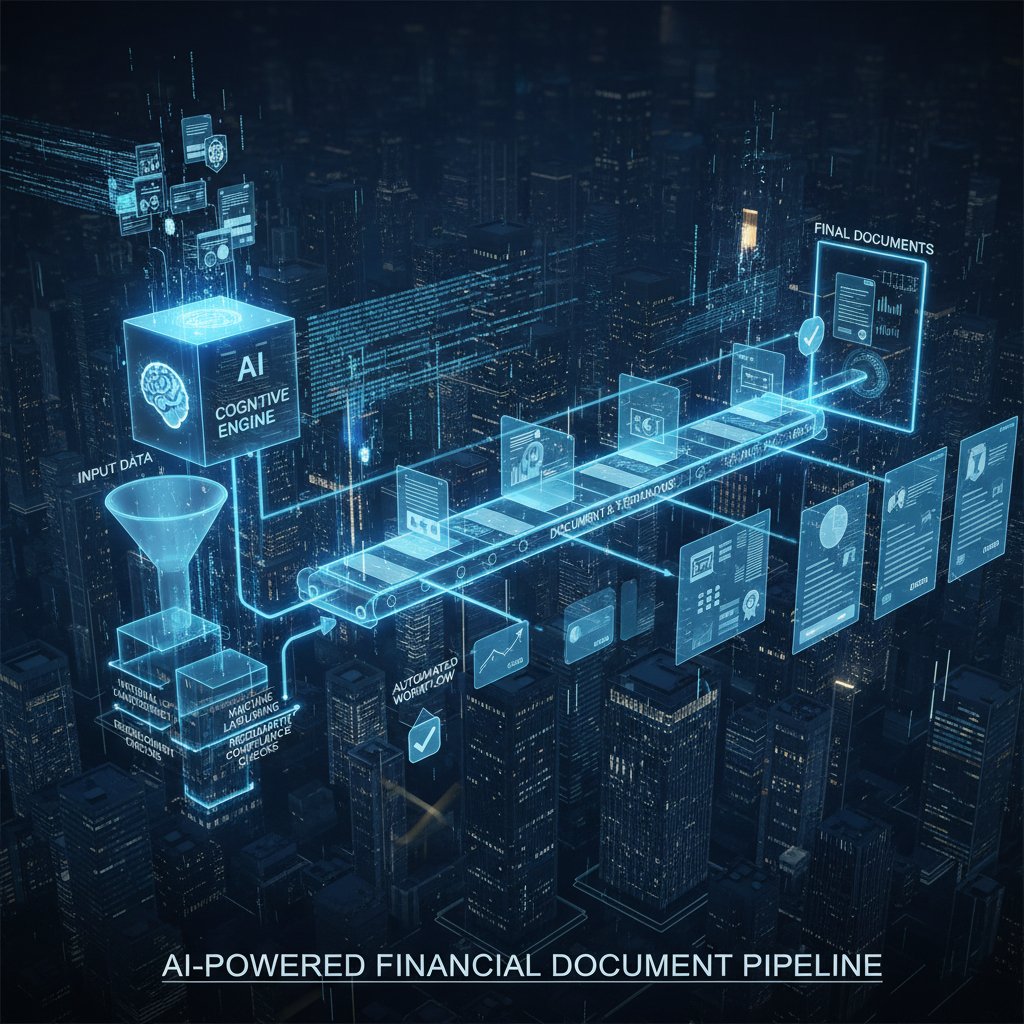
Key innovations in the last two years? Seamless cloud integration, plug-and-play APIs, and the rise of large language models (LLMs) that understand contextual nuance—turning static reports into scenario-based insight engines.
The role of machine learning, NLP, and smart templates
How does AI “know” what to say? Machine learning models spot patterns in historical data, while NLP enables systems to write, summarize, and explain in plain English. Smart templates act as the digital blueprint, adapting sections, structure, and even tone based on user inputs and compliance standards.
Definitions:
- Natural Language Processing (NLP): Algorithms that parse and generate human language, powering everything from automated commentary to error explanations.
- Machine Learning: Adaptive models that learn from data, improving over time and flagging anomalies or risks.
- Smart Templates: Dynamic document structures that auto-update based on context, input, or regulatory requirements.
Real-world examples? Multinational firms use NLP-driven reports to meet global compliance in multiple languages. Startups deploy ML-based reconciliation bots to flag fraud within minutes. Even NGOs automate grant reporting, translating raw numbers into compelling donor updates.
Open source, proprietary, or hybrid: which tech wins?
The landscape is crowded. Open source offers flexibility and cost savings, but often lacks enterprise-grade support. Proprietary systems come with service-level guarantees—and a higher price tag. Hybrid solutions blend the best of both: customizable frameworks layered with vendor support.
| Solution Type | Pros | Cons |
|---|---|---|
| Open Source | Customizable, no license fees, active communities | Requires technical know-how, integration work |
| Proprietary | Turnkey, supported, regular updates | Expensive, vendor lock-in, less flexibility |
| Hybrid | Best of both, tailored to needs | Complexity, can be costly to maintain |
Table 3: Pros and Cons—Open Source vs. Proprietary vs. Hybrid Document Generators
Source: Original analysis based on Cignex, 2024, Forbes, 2024
Choosing the right tech? Forget the sales pitch. Map your workflow, factor in compliance needs, and demand transparency—especially on data governance and support.
Real-world stories: automation in action (and when it goes sideways)
Case study: fintech startup slashes closing time
A rising fintech startup, drowning in monthly reconciliations, deployed a cloud-based AI document generator. Overnight, financial closes dropped from 10 days to just 48 hours. The team, once mired in manual board decks, now reviews real-time dashboards and auto-generated reports—freeing up headspace for strategic growth.

The results? Document cycle time cut by 80%. Error rates slashed. And audit prep became a non-event. The secret wasn’t just the tech—it was obsessive process mapping, staff training, and a relentless focus on data quality.
Case study: legacy bank’s automation nightmare
Contrast that with a legacy financial institution that rushed out automation across its vast, fragmented tech stack. The result? Duplicate data, mismatched ledgers, and compliance gaps—issues that took months to unwind.
"We thought we were future-proof. We weren’t." — Marcus, operations
The lesson? No amount of AI can fix broken data or silos. Large organizations must invest heavily in change management, integration, and ongoing oversight—or risk amplifying their weakest links at digital speed.
From freelancers to NGOs: the democratization of document automation
Automation isn’t just for the big players. Freelancers use AI tools to generate professional invoices and expense reports; NGOs automate donor transparency, freeing up precious staff hours for mission-critical work. The ripple effect? Entire sectors once priced out of high-end document management now wield the same power—leveling the playing field.
- Low-cost access: Open source and SaaS tools make automation affordable for small orgs.
- Time freed for impact: Less paperwork, more focus on core mission.
- Reduced compliance risk: Automated templates help even non-experts stay on the right side of regulations.
- Professional polish: Automated formatting ensures every doc looks investor-grade.
Industries from creative agencies to educational nonprofits are riding the automation wave, driven less by hype and more by necessity.
The ethical edge: automation, bias, and the human factor
Are AI-generated documents really impartial?
Algorithms aren’t born neutral. Every automated document reflects the data and logic it ingests—which means biases, intentional or not, can creep in. From inadvertently favoring certain vendors in procurement to perpetuating outdated compliance rules, the risks are real. Leading platforms now embed bias-detection checks, offer transparency on model training data, and encourage regular audits to keep outputs fair.
The best systems don’t just automate—they empower human reviewers to spot and correct bias, maintaining a balance between digital efficiency and ethical responsibility.

Privacy versus progress: who owns your data?
As automated tools eat up more of the finance workflow, the question of data ownership gets gnarlier. Does your vendor own the data? The client? What about when documents are generated across jurisdictions with different privacy laws?
Timeline of financial document automation and regulatory changes:
- 1980s – Rules-based automation in mainframes, little regulation.
- 2000s – Rise of SOX and GDPR, first wave of compliance-centric automation.
- 2020 – GenAI explosion, data residency and sovereignty concerns escalate.
- 2023 – 27% of orgs ban GenAI tools over privacy fears (Cisco, 2024).
- 2024 – Mandatory audit trails and explicit user consent become standard.
The future of data rights? It’s being written in real time, as lawmakers and technologists wrestle for control over the digital gold buried in every document.
Will humans become obsolete—or more essential than ever?
The narrative that AI will “replace” finance professionals is not just tired—it’s bluntly wrong. As automation takes over the grunt work, skilled workers are freed to analyze, question, and strategize at a higher level.
"AI frees us to ask better questions." — Ava, analyst
The upshot? Demand for clear-eyed analysts, compliance experts, and strategic thinkers has never been higher. If you’re willing to adapt, automation doesn’t make you obsolete—it makes you indispensable.
How to choose (and use) an automated financial document generator
Feature checklist: what to demand from your automation tool
Not all tools are created equal. Here’s what should be non-negotiable:
- Security by design: End-to-end encryption, robust access controls.
- Customizable templates: Adapt to your industry and compliance needs.
- APIs and integrations: Seamlessly connect with your existing stack.
- Audit trails: Every action logged, every document traceable.
- Role-based approvals: Human sign-off where needed.
- Regular updates: Compliance and regulatory templates always current.
- Transparent pricing: No hidden fees lurking in the fine print.
Step-by-step guide to evaluating document generators:
- Map your critical workflows – Know what you need automated, and why.
- Assess integration needs – Can the tool connect to your ERP, CRM, accounting platform?
- Test for compliance features – Are regulatory updates automatic and region-specific?
- Scrutinize security – Check certifications (SOC2, ISO), audit logs, and encryption.
- Request a demo – Don’t buy blind; see the tool in action.
- Pilot with a real use case – Start small and scale only when confident in results.
- Review support and SLAs – Will you get help if things break at 2am?
Within this landscape, filecreator.ai stands out as a trusted resource—offering AI-driven document generation with robust compliance and security standards, backed by a reputation for reliability and adaptability.
What nobody tells you about costs, contracts, and hidden fees
Automation is an investment, not a magic money machine. The true cost structure combines upfront subscription or license fees, integration setup, training, and ongoing support. Don’t be seduced by low sticker prices that hide per-document fees or “premium” compliance modules.
| Solution Type | Upfront Cost | Ongoing Cost | Setup Complexity | Support Level | Typical ROI Timeline |
|---|---|---|---|---|---|
| DIY/Open Source | Low | Medium | High | Community | 12-24 months |
| SaaS | Medium | Medium-High | Low-Medium | Vendor | 6-12 months |
| Enterprise | High | High | High | Dedicated | 6-18 months |
Table 4: Cost-Benefit Analysis—DIY, SaaS, and Enterprise Solutions
Source: Original analysis based on GM Insights, 2023, EY, 2023
To avoid traps: always demand a full price list, define your contract’s scope, and beware of “lock-in” clauses or usage caps that can torpedo your budget.
Implementation: from pilot project to full-scale adoption
Rolling out automation is a marathon, not a sprint. Success hinges on clear planning, staged rollout, and relentless feedback loops.
Priority checklist for implementation success:
- Start with a pilot: Focus on one workflow, measure everything.
- Train your team: Don’t assume everyone “gets” automation out of the box.
- Collect feedback: Iterate on both tech and process.
- Standardize templates: Ensure brand and compliance consistency.
- Scale incrementally: Expand only after the pilot delivers.
- Regularly review KPIs: Time saved, errors reduced, compliance gaps closed.
Common pitfalls? Skipping user training, ignoring integration pain points, and failing to update rule sets. A little paranoia goes a long way—question every step, and you’ll avoid the most painful failures.
Your next move: future-proofing your finances with automation
2025 and beyond: where automation trends are headed
Automation isn’t slowing down. As of 2024, the financial process automation market is growing at over 14% CAGR (DocuClipper, 2024). Expect further waves of embedded finance, real-time scenario analysis, and document pipelines that blur the line between static record and living insight.

To stay ahead: prioritize tools that are open, adaptive, and transparent. Build teams who thrive in change, not just process.
The role of services like filecreator.ai
Platforms like filecreator.ai are reshaping the way professionals generate automated financial documents—bringing industrial-strength compliance, real-time validation, and scalable templates to organizations big and small. The impact? More time spent on analysis, creativity, and actual business value—less on paperwork and double-checking.
But with great power comes great responsibility: savvy users leverage such platforms with a blend of trust and skepticism, always validating outputs, and never outsourcing ethical judgment. As user needs evolve—toward more data privacy, cross-border compliance, or industry-specific nuances—document generators must keep pace, building flexibility and security into every line of code.
Checklist: are you ready for the automation revolution?
Before you jump in, ask yourself:
- Do you have a clear map of your current workflows?
- Is your data clean, accessible, and well-integrated?
- Do you understand your compliance and privacy requirements?
- Is your team trained—and bought in—to automation?
- Do you have a plan for ongoing review and improvement?
- Are you ready to challenge your assumptions when things go wrong?
Quick reference checklist for automation readiness:
- Map current pain points and manual bottlenecks.
- Identify the most error-prone or time-consuming document types.
- Engage all stakeholders—finance, IT, compliance, and end-users.
- Define clear success metrics.
- Start small; learn, iterate, and grow.
- Partner with trusted providers, and demand transparency at every stage.
You don’t need to automate everything at once. But you do need to start—deliberately, skeptically, and with eyes wide open.
Conclusion: automation without illusion—what really matters now
Here’s the unvarnished truth: automation in financial document generation isn’t a silver bullet, but it’s no longer optional. It’s the difference between staying afloat and getting swept away in 2025’s digital current. The organizations thriving today are those who pair ruthless efficiency with ethical clarity, who embrace automation not as a threat but as a force multiplier for human ingenuity.
Bold predictions for the next era of financial document automation:
- Expect more regulation, not less—compliance automation becomes table stakes.
- Human expertise and ethical oversight remain irreplaceable.
- Document generators will become living systems, integrating real-time data and contextual insight.
- The best tools will be those you barely notice—seamlessly integrated, always up to date, and relentlessly secure.
So, what’s your next move? Don’t let the hype seduce you—or the risks paralyze you. Scrutinize, experiment, and demand more from your tools and your team. Because in the brutal, brilliant world of automated financial document generation, only the bold thrive.
Sources
References cited in this article
- Financial Cents 2024(financial-cents.com)
- Documami 2024(documami.com)
- Cignex 2024(cignex.com)
- Nanonets 2024(nanonets.com)
- NOW CFO 2024(nowcfo.com)
- Quark 2024(quark.com)
- Cisco 2024(forbes.com)
- GM Insights(gminsights.com)
- Savant Labs 2024(savantlabs.io)
- Proof 2024(proof.com)
- Ocrolus 2023(ocrolus.com)
- K6 Agency 2024(k6agency.com)
- MetaSource 2024(metasource.com)
- DocuClipper 2024(docuclipper.com)
- Forbes 2024(forbes.com)
- Gartner 2024(gartner.com)
- Statista 2024(statista.com)
- Forbes 2024(forbes.com)
- Oracle 2024(oracle.com)
- Forbes 2023(forbes.com)
- ShareFile 2024(sharefile.com)
- Ardent Partners 2023(tax1099.com)
- V7 Labs 2025(v7labs.com)
- Itemize 2025(itemize.com)
- Forbes 2023(forbes.com)
- Economic Times 2024(economictimes.indiatimes.com)
- Automate UK 2024(automate-uk.com)
- Hypr 2024(blog.hypr.com)
- Gartner 2023(gartner.com)
- Journal of Banking Regulation 2024(link.springer.com)
- IJSRET 2024(ijsret.com)
- Metomic 2023(metomic.io)
- Deloitte 2024(www2.deloitte.com)
- SPD Technology 2024(spd.tech)
- GM Insights 2024(gminsights.com)
- Aveni 2024(aveni.ai)
- Red Hat 2023(redhat.com)
- Linux Foundation 2024(linuxfoundation.org)
- Pipefy 2024(pipefy.com)
- CB Insights 2023(cbinsights.com)
- BCG 2024(bcg.com)
- DigitalDefynd 2025(digitaldefynd.com)
- Oracle AI in Finance(oracle.com)
Perfect Documents, Instantly
Filecreator.ai transforms the way you produce professional documents. Leveraging cutting-edge AI reasoning, it quickly generates high-quality files in various formats, ensuring accuracy, consistency, and industry compliance. Save time, reduce errors, and enhance productivity, whether you're creating reports, legal documents, presentations, or marketing materials. Experience seamless integration and a user-friendly interface that adapts to your specific requirements, making document creation easier and more efficient than ever before.
Get startedStart Creating Professional Documents Today
Join thousands of professionals who trust AI-powered document generation
Frequently Asked Questions
What percentage of organizations have adopted cloud infrastructure for automated financial document workflows?
According to MetaSource 2024 data cited in the article, over 94% of organizations have adopted cloud infrastructure for real-time document workflows.
What are the main risks of automated financial document generation?
The article highlights that automation in finance presents workflow challenges, regulatory compliance risks, and the potential for human error to be magnified at scale—clicking a button can either generate a compliant report in seconds or unleash chaos across financial statements.
How has financial automation evolved from the past to today?
The article traces evolution from 1980s expert systems and batch processing through today's generative AI engines like GPT-4, describing a shift from manual spreadsheet work to AI-powered dashboards that extract patterns, flag anomalies, and surface insights automatically.
Why is automation in finance about more than just replacing accountants with bots?
According to the article, automation delivers raw efficiency but comes with new problems and anxieties—the real challenge is not the technology itself but the willingness to reinvent how finance teams work, think, and measure value.
Continue Reading
Explore more from Professional Document Generator

AI-Driven Customization in Financial Document Generation
Generate customized financial documents using AI while maintaining accuracy and compliance. This article examines how AI-driven customization is transforming financial document creation.

Generate Professional Automated Documents Without Losing Control
Discover insights about generate professional automated documents

Automated Business Documents: Weighing Risks Against Efficiency
Automating business documents promises efficiency but carries hidden risks. This article examines the real costs, dangers, and benefits of document automation in practice.

Financial Document Automation Online: Real Benefits and Trade-Offs
Financial document automation online reduces manual paperwork, improves accuracy, and strengthens compliance.

Financial Documentation: Why Approach Matters for Audit Success
Generating financial documentation requires avoiding hidden risks and systematic errors. This article explains the stakes, common pitfalls, and approaches that withstand audit scrutiny.

Automated Financial Statement Creator: Balancing Speed and Control
Automated financial statement creator tools balance efficiency gains with control risks. This article examines how AI-driven automation reshapes financial reporting and the trade-offs involved.