


Automatic Document Workflow Software That Saves 100+ Hours—Safely
Written with AI assistance under our editorial guidelines
Automatic document workflow software can save organizations over 100 hours monthly by eliminating manual paperwork, reducing errors, and decreasing employee burnout. However, success requires honest assessment of implementation challenges, proper tool selection, and willingness to address resistance to change. The true value extends beyond time savings to improved employee engagement, lower turnover, and enhanced organizational culture.
Welcome to the frontline of workplace reality: where the promise of seamless digital transformation collides with the raw truths of implementation, resistance, and—ultimately—relentless progress. If you think automatic document workflow software is just a shiny new toy for the IT crowd, prepare to have your assumptions dismantled. For every story of a company saving 100+ hours a month, there’s another of hidden costs, burnout, or spectacularly mismanaged rollouts. But here’s the thing: the difference between workflow revolution and workflow chaos isn’t luck—it’s brutal honesty, well-chosen tools, and a willingness to confront the inconvenient facts most vendors leave buried in the fine print. This is your no-spin, no-nonsense guide to what really happens when you automate, why most businesses get it wrong, and how the best actually win. By the end, you’ll see why today’s automatic document workflow software is rewriting not only how we work, but what work even means.
The manual workflow trap: why most businesses are stuck in the past
Invisible costs of paper-chasing
Manual document processes bleed organizations dry in ways rarely captured on the balance sheet. Every missing file, every handwritten approval, and every frantic spreadsheet update is a micro-tax on your productivity—and, often, your sanity. These invisible costs manifest as overtime, delayed projects, and errors that ripple through the organization, multiplying downstream headaches. According to recent research from Quixy (2024), a staggering 68% of customer service agents still feel overwhelmed by manual, repetitive tasks, frequently citing paperwork as their number one source of daily frustration.

Burnout isn’t just a buzzword in today’s hybrid offices. Overlooked productivity losses have a real, measurable impact. When teams are chained to outdated processes, creativity and morale suffer, leading to higher turnover rates and lower engagement scores across the board. Yet, many organizations continue to underestimate these cumulative losses, focusing only on visible metrics like overtime costs, while the true price—the erosion of culture and innovation—remains hidden.
| Workflow Type | Average Hours Lost/Month | Average Annual Cost per Employee | Error Rate (%) |
|---|---|---|---|
| Manual (Paper/Email) | 36 | $4,200 | 12 |
| Semi-Automated (Spreadsheets) | 24 | $2,700 | 8 |
| Fully Automated (Software) | 8 | $900 | 2 |
Table 1: Statistical summary—manual workflows vs. digital automation (2025 snapshot)
Source: Original analysis based on Quixy, 2024, Paperform, 2024
How legacy habits sabotage digital progress
Despite the mounting evidence, organizational inertia clings tight. The myth that “change is too risky” allows outdated habits to persist far beyond their expiration date. It’s not just about reluctance—it’s a deeply ingrained belief that what got us here will get us there, even as the world rewrites the rules of productivity.
"Most teams don’t realize how much time they’re bleeding until it’s too late." — Jamie, Operations Manager (Quote)
Leadership circles repeat the same rationalizations: “Our clients expect paper,” “We’ve always done it this way,” or “Automation is for tech companies, not us.” These excuses hide a simple truth—every quarter spent dodging change is another quarter lost to inefficiency, error, and, ironically, escalating risk.
Signs your workflow is costing you more than you think
- Chronic bottlenecks: If files “wait for approval” on someone’s desk or inbox for days, your process is broken.
- Version confusion: Multiple versions of the same file circulate, creating chaos, errors, and rework.
- Missed deadlines: Projects are delayed by lost paperwork or manual sign-off loops.
- Audit nightmares: Compliance checks become fire drills due to missing or incomplete records.
- Employee exodus: High performers cite “too much admin” as a key reason for leaving.
- Shadow IT: Teams build unauthorized workarounds because official processes are too slow.
- Customer complaints: Service falters when staff scramble to locate up-to-date documents.
Ignoring these red flags isn’t just a slow leak—it’s a ticking time bomb. In the long run, businesses that resist workflow modernization pay in lost talent, weakened customer trust, and spiraling operational costs far beyond any short-term savings.
What is automatic document workflow software—really?
Beyond the buzzwords: defining the tech under the hood
Let’s cut through the vendor-speak. Here’s what actually powers modern automatic document workflow software:
The core system that routes documents based on defined rules, ensuring the right people receive the right files at the right time.
Pre-set events (like a completed form or signed document) that launch workflows without manual intervention, slashing wait times and human error.
Secure, legally recognized e-signatures embedded in digital documents, eliminating physical sign-off delays.
Connects workflow software with other business tools (HR, CRM, email, storage), enabling seamless data transfer and process automation.
These aren’t just technical buzzwords—they’re the foundation that separates real solutions from shallow digital window-dressing. Today’s top platforms leverage AI and advanced rules engines to not only automate routine tasks but also adapt dynamically as business needs evolve.
How today’s solutions break the old bottlenecks
When implemented thoughtfully, automatic document workflow software demolishes traditional bottlenecks. Tasks that once took days—chasing signatures, compiling approvals, syncing files—are compressed into minutes. According to Paperform’s 2024 report, businesses using advanced workflow automation cut operational costs in financial processes by up to 90%, with vastly improved accuracy and auditability.

What does this look like in practice? Imagine a world where contracts route themselves for approval, onboarding paperwork is auto-filled and tracked, and compliance documentation is generated and archived with zero hassle. These aren’t pipe dreams—they’re the new baseline for competitive organizations.
Common myths (and why they’re dangerous)
- “Automation is only for big enterprises.”
In reality, small and mid-sized teams often see the fastest ROI from automating repetitive document tasks. - “We’ll lose control.”
Leading platforms give granular oversight—more control, not less. - “It’s too expensive to implement.”
Upfront investments can be high, but operational savings and error reduction pay dividends within months. - “Customization is impossible.”
No-code and low-code tools are democratizing automation, letting non-tech users build and adapt workflows. - “Staff will resist and sabotage the rollout.”
While change management is critical, most teams embrace automation once manual pain points disappear. - “Compliance risks increase.”
In truth, automated audit trails and policy enforcement actually enhance compliance, provided you choose secure vendors.
Outdated perceptions of workflow automation software often stem from old-school tools or failed rollouts. The current reality is much more flexible, scalable, and accessible than even five years ago.
The evolution: a timeline of document workflow automation
From typewriters to AI: a brief history
It started in smoke-filled offices, with carbon copies and overstuffed filing cabinets. For decades, document management was synonymous with drudgery—until a slow, relentless revolution began.
- 1950s: Typewriters and carbon paper dominate; filing is a full-time job.
- 1970s: The first word processors automate basic document creation.
- 1980s: Personal computers bring digital documents to the masses.
- 1990s: Email replaces interoffice mail; PDFs gain popularity.
- Early 2000s: The rise of networked storage and basic workflow tools.
- 2010: Cloud-based platforms introduce remote collaboration.
- 2015: E-signatures become legally mainstream; no-code tools emerge.
- 2020: AI and machine learning supercharge automation and error detection.
- 2023: 40% of enterprise workloads run in the cloud, complicating integration but enabling scale.
- 2025: Hyperautomation, API ecosystems, and advanced compliance features are the new normal.
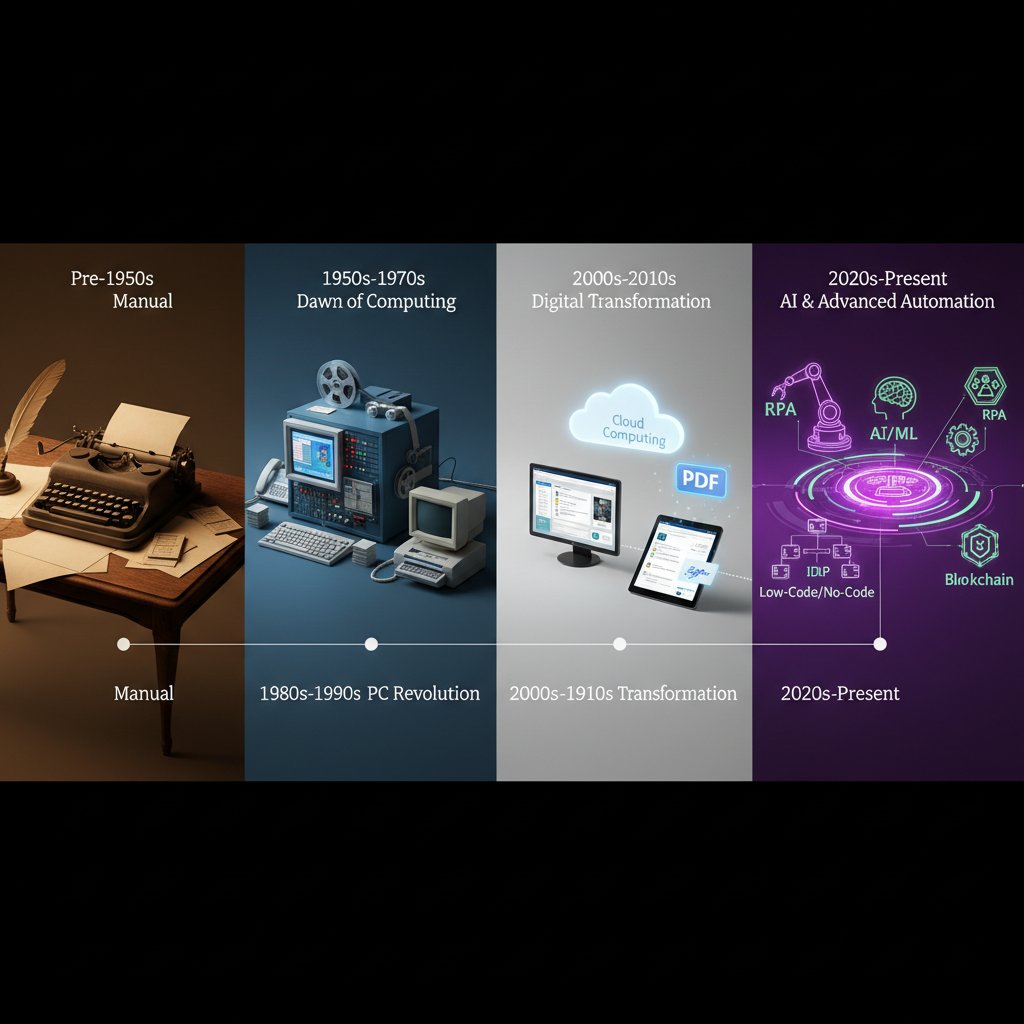
Each milestone wasn’t just about technology—it was about shifting mindsets and redefining what “work” should actually feel like.
2025’s game-changers: what’s new this year
The workflow automation landscape is in overdrive. According to Gartner, 69% of all managerial work tasks are now expected to be automated, as businesses race to eliminate bottlenecks and manual drudgery. The growth of no-code platforms, API-first architectures, and embedded AI means that even non-tech teams can design powerful, compliance-ready workflows.
| Platform Feature | Mobile Compatibility | AI-Driven Automation | Security & Compliance | No-Code Design | Integration Ecosystem |
|---|---|---|---|---|---|
| Leading Workflow Tool A | Yes | Yes | Advanced | Full | 200+ Apps |
| Leading Workflow Tool B | Yes | Partial | Standard | Limited | 80+ Apps |
| filecreator.ai | Yes | Yes | Advanced | Full | 150+ Apps |
| Traditional Editor | No | No | Limited | None | Few |
Table 2: Comparison of top 2025 workflow automation features across leading platforms
Source: Original analysis based on Kissflow, 2025, Paperform, 2024
Case studies: real businesses, real results (and failures)
The transformation: from chaos to clarity
Imagine a mid-sized law firm drowning in contracts, revisions, and compliance paperwork. Before automation, paralegals spent hours each week tracking signatures, chasing down approvals, and manually archiving documents—leaving little time for actual client work. With the rollout of automatic document workflow software, turnaround times plummeted by 75%, error rates dropped, and staff morale soared. According to Kissflow (2025), organizations report up to 90% cost savings in financial document workflows when moving from manual to automated systems.

Staff testimonials point to the most unexpected benefit: relief. No more after-hours document chases, reduced compliance anxiety, and, crucially, the ability to focus on higher-value tasks instead of paper-pushing.
When automation goes wrong: hard lessons
But not every story is a fairy tale. One tech startup fast-tracked automation to “save time” but ignored process design. The result? Their system began auto-sending unreviewed contracts, triggering legal and reputational headaches.
"We automated too fast and ended up automating our mistakes." — Priya, Project Lead (Quote)
Common pitfalls include:
- Automating bad processes: If the workflow is broken, automating it just makes mistakes faster.
- Ignoring user feedback: Resistance grows when frontline staff aren’t consulted.
- Underestimating training needs: Even the best software fails if users don’t understand it.
- Poor integration: Siloed solutions create more chaos, not less.
- Neglecting compliance: Automation without oversight can violate regulations and expose sensitive data.
Unexpected wins: creative uses nobody talks about
Automation isn’t just about efficiency. The most innovative teams unlock silent wins nobody advertises in the brochures:
- Automated compliance checks that flag policy violations instantly, saving auditors hours.
- Employee onboarding streamlined so new hires are productive on day one.
- Client communications auto-personalized for faster, friendlier service.
- Performance dashboards generated in real time, giving managers instant insight.
- Document version control that eliminates embarrassing mix-ups.
- Internal surveys or HR policies that trigger workflows for feedback, approvals, and archiving.
According to current workflow leaders, these “bonus” wins often deliver as much value as headline efficiency gains—especially when scaled across teams.
The risks nobody talks about (and how to avoid them)
Data privacy, compliance, and shadow IT
Hidden behind the glossy promises of automation are real dangers—particularly for organizations that rush implementation or underestimate process complexity. Unvetted tools can lead to data breaches, regulatory fines, and the proliferation of shadow IT as frustrated employees adopt unauthorized solutions.
| Risk Factor | Common Issue | Proven Mitigation Strategy |
|---|---|---|
| Data leaks | Poor access controls | Enforce granular permissions, regular audits |
| Compliance violations | Untracked changes | Automated logging, compliance templates |
| Shadow IT | Unapproved tool adoption | Centralized procurement, staff training |
| Loss of document control | Integration failures | Standardized APIs, vendor vetting |
| Workflow errors | Inflexible automation rules | Human-in-the-loop oversight |
Table 3: Workflow automation risk matrix—issues vs. mitigation strategies
Source: Original analysis based on Scoop Market, 2024
Vetting vendors goes far beyond reading glossy feature lists. Ask for certifications, insist on transparent audit trails, and demand evidence of real regulatory compliance. If the vendor can’t answer tough questions about security, keep looking.
Over-automation: when tech replaces too much
Even in a digital-first world, a human touch matters. Automating every single step risks stripping away judgment, empathy, and nuance that only actual people can deliver.
"Automation should amplify people, not erase them." — Alex, Digital Transformation Consultant (Quote)
To maintain the right balance, use this checklist:
- Identify critical touchpoints where human oversight adds value.
- Build “pause and review” stages for sensitive workflows.
- Assign accountability for automated decisions.
- Regularly review automated processes for unintended consequences.
- Provide clear channels for users to flag issues or opt out.
Resist the urge to automate for automation’s sake. The magic happens when tools empower people—not replace them.
Choosing the right solution: what actually matters in 2025
Feature matrix: separating hype from substance
| Feature | Essential (2025) | Overrated |
|---|---|---|
| Mobile support | ✔️ | |
| AI-based error checks | ✔️ | |
| Real-time dashboards | ✔️ | |
| Unlimited customization | ✔️ | |
| Proprietary file formats | ✔️ | |
| Social media integrations | ✔️ |
Table 4: Side-by-side matrix of essential vs. overrated workflow software features
Source: Original analysis based on Kissflow, 2025
Prioritize features that save time, drive compliance, and scale with your team. Ignore flashy add-ons that only distract from actual results.
Questions to interrogate every vendor
- Can you demonstrate real-world ROI for businesses like mine?
- How do you handle data privacy and regulatory compliance?
- What certifications do you hold?
- How often do you update your platform?
- Can workflows be modified without coding?
- How does your software integrate with our existing tools?
- What onboarding and support do you provide?
- Can we audit all document changes?
- What happens if a workflow fails mid-process?
- How do you price for scale?
Red flags? Vague answers, evasiveness about data handling, or reluctance to provide customer case studies should send you running.
How to future-proof your workflow investment
Don’t lock yourself into a digital cul-de-sac. Ensure your chosen platform is adaptable and scalable by:
- Selecting vendors with a proven track record of updates and integration.
- Insisting on open APIs and true multi-format support.
- Building in regular review cycles for both technology and process.
- Investing in staff training—not just at launch, but ongoing.

Adaptability isn’t just a buzzword—it’s what lets you ride the next tech wave instead of being crushed by it.
How to implement automatic document workflow software (without losing your mind)
Step-by-step guide to a frictionless rollout
- Needs assessment: Document every workflow, pain point, and current workaround in detail.
- Define clear goals: Align on measurable outcomes—don’t just “digitize,” aim to cut errors or save X hours.
- Select pilot teams: Start small. Choose departments hungry for change but open to feedback.
- Map processes: Design each workflow step with input from actual users.
- Test and iterate: Run pilots, gather feedback, and refine before wider rollout.
- Integrate systems: Connect the software to your existing tools for seamless data flow.
- Train and support: Invest in hands-on training and peer champions to guide adoption.
- Review post-launch: Measure KPIs, collect user feedback, and adjust as needed.
Practical tips? Never skip over user engagement. The fastest way to torpedo a project is to automate over the heads of those who’ll actually use it.
Change management: getting buy-in from skeptics
Winning hearts and minds isn’t about flashy presentations—it’s about proving value, fast. Strategies include:
- Early involvement: Bring skeptics into the design process from day one.
- Quick wins: Identify pain points you can eliminate early, and publicize results.
- Peer champions: Empower respected team members to lead pilots and share successes.
- Transparent communication: Share both wins and setbacks openly.
- Continuous feedback: Give everyone a voice to flag issues or suggest tweaks.
- Recognition: Celebrate those who adopt and adapt, reinforcing positive change.
Real-world examples show that teams who feel heard are exponentially more likely to embrace new tools.
Measuring what matters: KPIs for workflow success
Set metrics that matter—not just to the C-suite, but to frontline staff, too. Examples include turnaround time, user satisfaction, compliance incident rates, and error reduction.
| KPI | What It Measures |
|---|---|
| Turnaround time | Speed of document processing |
| Error rate | Quality and accuracy |
| User adoption | Engagement and buy-in |
| Compliance incidents | Risk management |
| Cost per document | Efficiency gains |
Table 5: Sample KPIs for evaluating workflow health
Source: Original analysis based on Scoop Market, 2024
Review these regularly, and adjust processes to keep hitting targets.
Beyond efficiency: the cultural impact of automation
How workflow automation is reshaping company culture
The ripple effects of automation echo far beyond cost savings. Hierarchies flatten as information flows more freely, transparency increases, and teams gain more autonomy over their work. According to expert consensus, 64% of employees report improved engagement and satisfaction within two years of adopting automation, thanks to less busywork and more time for creative, strategic tasks.

As paperwork fades, so does the culture of micromanagement. Employees are trusted to make faster decisions, share knowledge openly, and collaborate across old silos.
When automation empowers (and when it alienates)
Workflow automation can be both liberator and alienator. The line is thin, and success depends on thoughtful design and empathy.
- Keep communication open: Share the “why” behind every change.
- Empower, don’t dictate: Let teams help shape new workflows.
- Respect expertise: Don’t strip away judgment tasks in the name of efficiency.
- Provide ongoing support: Ensure users never feel stranded.
- Celebrate progress: Highlight wins—not just productivity, but staff well-being.
When automation is wielded as a tool for people, not against them, workplace culture thrives.
The future of document workflow: what comes after automation?
AI, smart contracts, and the next frontier
We’re standing at the edge of what’s possible. Artificial intelligence isn’t just reading documents—it’s interpreting intent, flagging anomalies, and routing files before humans even ask. Blockchain and smart contracts are redefining trust, ensuring unbreakable audit trails and real-time compliance.

Right now, medical robotics purchases are surging 50% year over year, illustrating just how far automation’s reach now extends—even into fields dominated by human judgment.
Will humans be obsolete—or more essential than ever?
The myth of robots taking all our jobs dies hard. But today’s reality is more nuanced: automation is forcing us to redefine what truly requires human judgment, creativity, and empathy.
"The future belongs to those who blend tech with judgment." — Morgan, Digital Strategy Analyst (Quote)
Ask yourself: Is your workplace ready to embrace the partnership between people and technology, or will you cling to workflows that sap human potential?
Quick reference: tools, checklists, and insider resources
Implementation checklist: are you ready?
- Audit current document workflows.
- Identify bottlenecks and manual pain points.
- Set clear business goals for automation.
- Secure leadership buy-in and budget.
- Select pilot teams and processes.
- Vet vendors for security, compliance, and adaptability.
- Map out detailed workflow designs.
- Establish success metrics and regular review cycles.
- Train staff and designate workflow “champions.”
- Launch, review, and adapt based on user feedback.
Using resources like filecreator.ai can keep you ahead of the curve, offering up-to-date best practices and templates grounded in real-world expertise.
Glossary: decoding workflow automation jargon
The use of software to perform or coordinate document-related tasks—approval routing, filing, notifications—without manual intervention. Crucial for eliminating human error and boosting speed.
Software that lets non-developers build and modify workflows using drag-and-drop interfaces. Democratizes automation, letting business users own their processes.
A set of tools that allows different software systems to “talk” to each other, making integration and automation possible across platforms.
Cryptographically secure method to sign documents electronically, ensuring legal compliance and speeding up approvals.
The coordinated use of multiple automation tools—AI, machine learning, RPA—to drive end-to-end process transformation.
System that tracks and manages multiple versions and edits of a document, preventing confusion and data loss.
Processes that ensure documents meet legal and regulatory requirements automatically, reducing audit risks.
Unofficial tools or systems adopted by staff without the knowledge or approval of IT, often in response to slow or inadequate official workflows.
Ongoing learning is the name of the game—don’t be afraid to expand your vocabulary as the landscape evolves.
Where to go next: expert communities and further reading
If you’re ready to level up, the real action happens in expert communities and resource hubs. Start with:
- Quixy’s workflow automation blog
- Paperform’s automation statistics roundup
- Kissflow’s trends and deep dives
- Scoop Market’s management research
- filecreator.ai resource center
- LinkedIn workflow automation forums
- Local industry meetups and webinars
Each of these steps will keep you informed, inspired, and ready to drive lasting change in your organization.
Conclusion
Automatic document workflow software is neither a panacea nor a passing trend—it’s the new digital normal for ambitious organizations intent on thriving in a post-paper world. The brutal truths? Implementation isn’t always pretty, legacy habits die hard, and risks lurk behind every shortcut. But the hidden wins—unlocked time, happier teams, airtight compliance—are within reach for those who confront reality head-on. Backed by current research and real-world evidence, the message is clear: it’s no longer about whether to automate, but how well you do it. Let the data, stories, and hard-earned insights in this guide be your roadmap. If you’re ready to escape the manual workflow trap and unlock the smarter future your business deserves, the next move is yours.
Sources
References cited in this article
- Paperform - Automation Statistics 2024(paperform.co)
- Quixy - Workflow Automation Stats 2024(quixy.com)
- Kissflow - Workflow Automation Trends 2025(kissflow.com)
- Scoop Market - Workflow Management System Stats(scoop.market.us)
- Gallery HR - Manual Processes Holding Business Back(galleryhr.com)
- PowerUp360 - Manual Processes Time Trap(powerup360.com)
- Business.com - Document Management Stats(business.com)
- FileCenter - Document Management Stats 2025(filecenter.com)
- Backlinko - Digital Transformation Stats(backlinko.com)
- Forbes - Hidden Costs of Inefficient Work(forbes.com)
- SoftActivity - Employee Productivity Stats 2024(softactivity.com)
- Crove - Best Document Automation Software 2023(crove.app)
- Checkbox - Guide to Document Automation(checkbox.ai)
- Gartner - Intelligent Document Processing 2023(gartner.com)
- TechRepublic - Best Document Workflow Software(techrepublic.com)
Perfect Documents, Instantly
Filecreator.ai transforms the way you produce professional documents. Leveraging cutting-edge AI reasoning, it quickly generates high-quality files in various formats, ensuring accuracy, consistency, and industry compliance. Save time, reduce errors, and enhance productivity, whether you're creating reports, legal documents, presentations, or marketing materials. Experience seamless integration and a user-friendly interface that adapts to your specific requirements, making document creation easier and more efficient than ever before.
Get startedStart Creating Professional Documents Today
Join thousands of professionals who trust AI-powered document generation
Frequently Asked Questions
How many hours per month can automatic document workflow software save?
According to the article, automatic document workflow software can save 100+ hours per month, though the specific savings depend on the current workflow type and implementation.
What percentage of customer service agents feel overwhelmed by manual tasks?
According to recent research from Quixy (2024) cited in the article, 68% of customer service agents still feel overwhelmed by manual, repetitive tasks, with paperwork being their number one source of daily frustration.
What are the invisible costs of manual document workflows?
Invisible costs include overtime, delayed projects, errors that ripple through the organization, burnout, lower engagement scores, higher turnover rates, and erosion of culture and innovation—costs that often go unmeasured on balance sheets.
What is the average annual cost per employee using manual paper/email workflows?
According to the table in the article, manual paper/email workflows result in an average annual cost of $4,200 per employee, with an average of 36 hours lost per month and a 12% error rate.
Why do most businesses fail when implementing automatic document workflow software?
The article states that the difference between workflow revolution and chaos is not luck, but rather brutal honesty, well-chosen tools, and a willingness to confront inconvenient facts—suggesting most businesses fail due to poor tool selection, inadequate preparation, and mismanaged rollouts.
Continue Reading
Explore more from Professional Document Generator

Document Automation Software: What Actually Fixes Broken Workflows
Document automation software eliminates manual document chaos and restores broken workflows. This article explains the hidden costs of manual processing and how automation recovers lost productivity.

Document Workflow Automation Software: Costs and Business Impact
Document workflow automation software eliminates manual chaos and reduces business costs. This article examines the financial impact, security implications, and organizational challenges of automation.

Document Automation Workflow: Hidden Costs and Operational Risks
Document automation workflow addresses hidden costs and risks in manual document handling. This article explains real operational impacts beyond time savings and reveals integration challenges.

Why Automatic Document Workflow Often Fails in Practice
Automatic document workflow often falls short of expectations. This article explains the hidden costs, cultural barriers, and proven strategies organizations actually need.

Document Automation Workflow Software: Hidden Costs and Real ROI
Document automation workflow software promises efficiency gains, but vendors hide the real risks and costs. This article examines the true ROI and hidden vulnerabilities.

Document Workflow Automation Tools: Success and Failure Factors
Document workflow automation tools promise efficiency but carry hidden risks. This article examines real failures, compliance challenges, and strategies that distinguish successful implementations from costly mistakes.







