


Alternatives to Old Software Systems That Won’t Wreck Your Business
Written with AI assistance under our editorial guidelines
Companies remain stuck with outdated software due to psychological comfort, fear of transition costs, and institutional inertia, despite hidden expenses. Legacy systems create escalating maintenance demands, compliance risks, and security vulnerabilities that ultimately cost more than modernization. Upgrading requires challenging ingrained processes and organizational resistance to change.
If you’re still clutching your old software systems like a lifeline, this isn’t an intervention. It’s a wake-up call. The corporate world is addicted to the comfort of legacy tech—systems that are, by today’s standards, digital fossils. Yet here you are, searching for an alternative to old software systems, probably because you’ve realized that “it’s always worked this way” is the most expensive phrase in business. Sticking with outdated software isn’t a harmless quirk. It’s a strategy that quietly bleeds money, exposes you to cyber threats, and suffocates any chance at true innovation. This article rips the lid off the excuses, exposes real costs, and lays out 9 brutally honest upgrades for 2025—each backed by hard data, real-world case studies, and the kind of insight that doesn’t pull punches. If you’re ready to challenge the inertia and claim the upper hand in your industry, this is your survival guide.
Why are companies still shackled to outdated software?
The legacy trap: comfort, fear and inertia
There’s a peculiar kind of psychological comfort found in legacy software. The familiar screens, the predictable quirks, the institutional knowledge passed like lore from retiring admins to nervous new hires. For many organizations, these systems represent continuity—a reassuring anchor in a world obsessed with digital disruption. Financially, it’s easy to see the allure: the software is “paid for,” the processes are ingrained, and the risks of a major upgrade loom like a specter over every board meeting. According to Accenture’s 2023 report, a staggering 70% of companies undergoing digital transformation still rely on legacy systems. Why? Because the cost of doing nothing—at least, on paper—seems lower than the risk of overhauling everything.

But comfort is a dangerous drug. Fear of the unknown, dread of downtime, and a lack of skilled personnel to manage transitions keep many businesses stuck in a perpetual holding pattern. It’s the classic “devil you know” scenario. One CTO, Jamie, summed it up best:
“Sometimes the devil you know just feels safer.” — Jamie, CTO (quote)
Yet beneath the surface, the hidden costs of sticking with outdated software keep stacking up—often unseen until disaster strikes.
- Escalating maintenance: Legacy systems demand more IT hours, more patching, and more specialized (and rare) expertise as time goes by.
- Compliance headaches: Regulations get tighter, but old platforms rarely keep up—leaving companies exposed to audits and fines.
- Security vulnerabilities: Outdated systems are hacker bait, riddled with unpatched holes and unsupported features.
- Integration nightmares: Legacy tech resists modern tools, making data-sharing and automation a bureaucratic maze.
- Productivity drains: Employees spend hours fighting slow, clunky software instead of innovating or serving customers.
- Opportunity costs: The inertia of outdated systems blocks new initiatives and faster time-to-market.
- Brand erosion: Customers and partners notice when your tech feels ancient—subtly damaging reputation and trust.
The real price of doing nothing
For all the money “saved” by dragging your feet, the bill for not upgrading legacy software comes due in brutal, sometimes business-ending ways. Security incidents tied to outdated systems are at an all-time high, with research from NTT Data (2024) revealing that 80% of organizations agree outdated tech directly impedes innovation. Average downtime is also markedly higher for legacy systems, leading to productivity losses and client churn.
| System Type | Average Downtime/Year (hrs) | Breach Incidents/Year | Recovery Cost (USD) |
|---|---|---|---|
| Legacy | 32 | 3.4 | $1,200,000 |
| Modernized | 6 | 0.7 | $350,000 |
Table 1: Comparative analysis of downtime and breach costs between legacy and modern systems
Source: Original analysis based on NTT Data, 2024 and Deloitte CIO Survey, 2023
Lost productivity is just the tip of the iceberg. Regulatory penalties, missed market opportunities, and reputational hits pile up. The cost of doing nothing includes the slow bleed of relevance—while more agile competitors seize your market share one innovation at a time.
Debunking myths: what everyone gets wrong about software upgrades
No, you don’t have to go all-in on the cloud
The tech industry sells a seductive myth: “Cloud or bust.” The reality? Not every business needs to toss its entire infrastructure into the cloud overnight. True modernization is about picking the right platforms for your needs—not blindly chasing trends. Hybrid models are thriving, especially in regulated industries or organizations with unique operational demands. According to the 2024 Kubernetes Survey, 88% of IT firms leverage containerization for scalable deployments, but many still mix cloud-native services with on-prem solutions for maximum control.
Cloud vs. on-prem vs. hybrid: what’s what?
Software, data, and workloads run on remote servers managed by third-party providers (e.g., AWS, Azure, Google Cloud). Ideal for flexibility and rapid scaling.
Everything runs in your own data centers. You’re fully responsible for security, maintenance, and compliance—a plus for sensitive industries, a minus for agility.
Combines the best (and sometimes worst) of both worlds. Some workloads live in the cloud, others stay on-prem. Offers flexibility, but introduces complexity.
Many businesses achieve remarkable results with hybrid setups—balancing legacy compatibility with future-proof capability.
Migration nightmares: fact vs. fiction
Every industry veteran can recount tales of blown budgets and “never again” migrations. But most migration horror stories are rooted less in the tech and more in the planning—or lack thereof. As Priya, a migration specialist, notes:
“Most migrations fail due to poor planning, not bad tech.” — Priya, Migration Specialist (quote)
Catastrophic failures are avoidable. The difference between chaos and a smooth transition? Relentless preparation and honest risk assessment. Here’s a quick roadmap to sanity:
- Audit everything: Know what you have before migrating anything. Inventory is non-negotiable.
- Define end goals: Clarity on business goals prevents scope creep and ensures ROI.
- Build a killer team: Assemble internal champions and external experts who’ve done it before.
- Map dependencies: Don’t let critical integrations get lost in translation.
- Test mercilessly: Pilot migrations with real data before pulling the trigger.
- Communicate: Keep stakeholders in the loop—surprises are the enemy.
- Have a rollback plan: If disaster strikes, you need an escape route.
How to spot a failing legacy system before it ruins you
Red flags you can’t afford to ignore
Most organizations don’t wake up to failing legacy systems until it’s too late. The signs are there, though—if you know where to look. Performance lags, constant workarounds, and user frustration are loud warnings. But subtler symptoms—like shadow IT projects or mounting support tickets—signal deeper rot.
- Frequent unexplained outages that disrupt operations.
- Employees routinely bypassing official systems for “faster” alternatives.
- Surging IT costs for maintenance, patches, and support contracts.
- Difficulty integrating with new tools and platforms.
- Escalating compliance issues or audit findings.
- Declining vendor support or “end-of-life” notices.
- Data silos that make reporting and automation a nightmare.
- Sluggish response to user requests for new features or fixes.

Ignoring these signals is a bet against your own growth—and one that rarely pays off.
The silent killers: security, support, and scaling
Vulnerabilities in legacy platforms are a hacker’s playground. As support cycles end, patch availability dries up and your attack surface grows. Regulatory requirements evolve, but old systems rarely keep pace. The final nail? Scalability. As your business grows, legacy platforms buckle under the strain.
| Platform Type | Security Updates | Vendor Support | Scaling Capability | Compliance Alignment |
|---|---|---|---|---|
| Legacy | Rare/Manual | Declining | Rigid | Poor |
| Modern | Automated/Frequent | Robust | Flexible | Strong |
Table 2: Feature comparison of legacy vs. new platforms for support and scalability
Source: Original analysis based on NTT Data, 2024 and Acropolium, 2024
Failing to address these “silent killers” puts your business in a perpetual state of risk—one that escalates with every quarter.
Exploring the new breed: 9 alternatives to legacy software systems
Low-code and no-code platforms: democratizing IT
Low-code and no-code solutions are dismantling the old IT gatekeeping. Now, business staff can build workflows, automate tasks, and prototype solutions without a background in development. This democratization of tech speeds up innovation and reduces dependency on scarce developer talent. According to McKinsey’s 2024 study, 65% of organizations use generative AI—often baked into low-code platforms—to automate and enhance legacy workflows.

Pros:
- Lightning-fast deployment
- Empowers non-technical teams
- Reduces backlog for IT departments
Cons: - Complexity can outgrow platform limits
- Security and compliance features may lag behind traditional development
- Risk of “shadow IT” if not governed properly
Open-source solutions: power and pitfalls
Open-source platforms have exploded into mainstream enterprise use, offering flexibility and cost advantages previously reserved for tech giants. The communities behind these projects drive relentless innovation. Yet, open-source isn’t a silver bullet—success depends on the strength of the community, security practices, and internal expertise.
- Odoo: All-in-one business management suite.
- Nextcloud: Secure, on-prem file sharing.
- ERPNext: Comprehensive, modular ERP.
- Django: High-level Python web framework.
- Mattermost: Team collaboration messaging.
- Keycloak: Enterprise identity and access management.
But beware: open-source projects live and die by their communities. Documentation gaps, inconsistent support, and security patch delays are persistent risks. Before jumping in, vet the ecosystem and ensure your team can handle what comes next.
SaaS and the age of subscription everything
Software as a Service (SaaS) has upended the traditional software business model—turning capital expenses into predictable operating costs and shifting responsibility for infrastructure, updates, and security to vendors. Adoption is rampant: research shows SaaS now commands the lion’s share of business software spend. But SaaS isn’t always the answer.
| Aspect | SaaS | Traditional Licensing |
|---|---|---|
| Upfront Cost | Low or none | High (capex) |
| Maintenance | Included with subscription | In-house or third-party |
| Updates | Automatic, vendor-managed | Manual, user-managed |
| Flexibility | Variable (per vendor) | High if self-managed |
| Exit Barriers | Data lock-in risk | High if customized |
Table 3: Cost-benefit analysis of SaaS vs. traditional licensing
Source: Original analysis based on Deloitte CIO Survey, 2023 and Acropolium, 2024
There are times when SaaS solutions don’t fit—such as unique compliance needs, extreme customization, or prohibitive recurring costs over time. Always weigh the fine print before diving in.
Modular and composable systems: building for tomorrow
Modular and composable platforms are the unsung heroes of modern IT. These systems are designed as building blocks—allowing you to swap out individual modules as needs evolve. The flexibility is game-changing. As Alex, a systems architect, puts it:
“Composable tech lets you pivot without pain.” — Alex, Systems Architect (quote)
Modular systems break vendor lock-in, reduce upgrade risk, and enable rapid innovation. But they also introduce integration challenges and, paradoxically, can create new forms of lock-in if not managed with discipline.
Hybrid and custom-built approaches
Hybrid approaches are thriving for a reason: they let you blend the reliability of legacy with the agility of new tech, buying time to modernize on your own terms. This is particularly true for industries with mission-critical workloads that simply can’t risk wholesale migration. Custom-built integrations, APIs, and containerization (think Kubernetes, Docker) now bridge the gap between old and new, extending the life and value of existing investments.
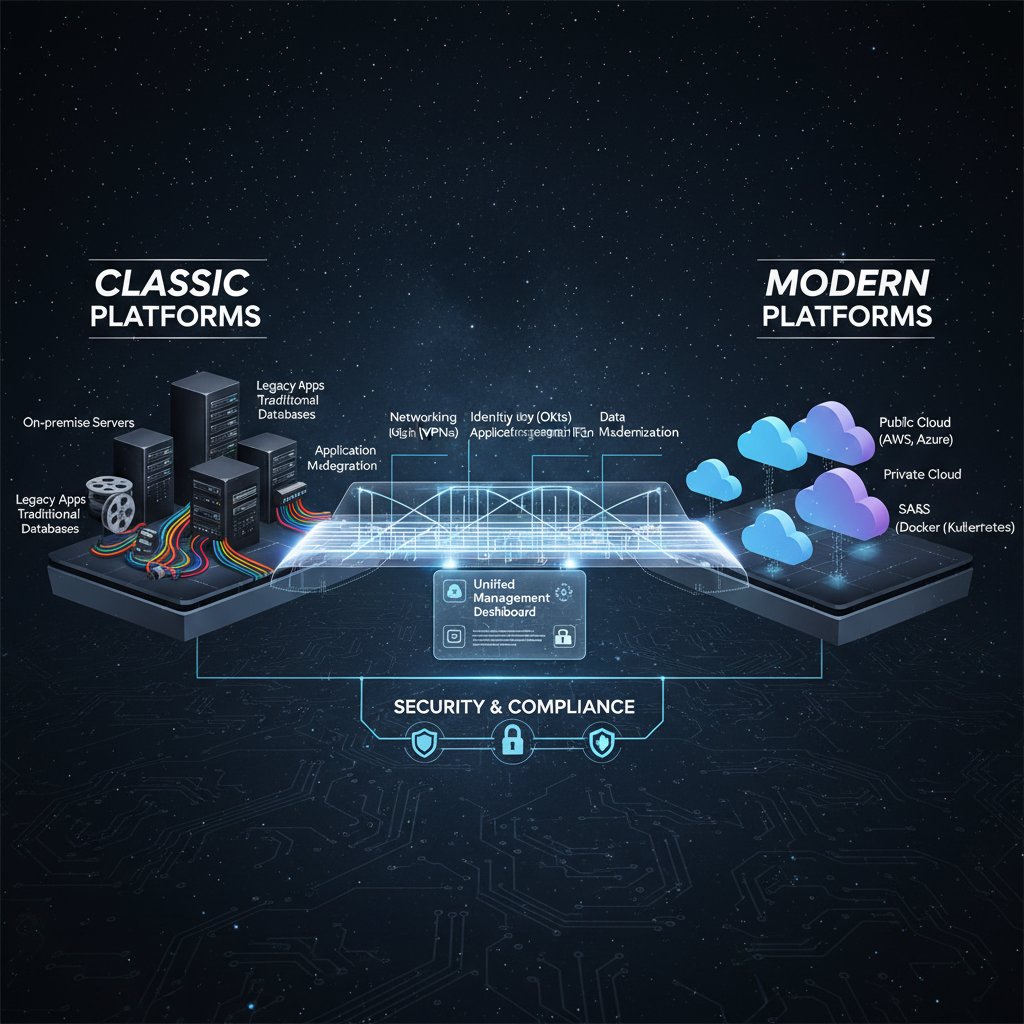
- Connect legacy and cloud systems using robust API layers.
- Use containerization to deploy old apps on new infrastructures.
- Blend open-source and proprietary modules for “best of both worlds” flexibility.
- Leverage digital twins to mirror and optimize physical assets.
- Automate legacy workflows with Robotic Process Automation (RPA).
Case studies: real-world wins and disasters
How a hospital slashed downtime with open-source
A regional hospital crippled by constant downtime finally bit the bullet and migrated its patient management system to an open-source platform. The project wasn’t glamorous—it involved months of parallel operation, redundant backups, and intense staff retraining—but the payoff was dramatic. Downtime plummeted from several hours per week to virtually zero, incident response improved, and audit compliance issues evaporated. The key lesson? Open-source is only as good as your team’s commitment to owning the outcome.

From meltdown to mastery: a creative agency’s SaaS leap
A mid-sized creative agency, lured by SaaS’s promise, nearly imploded during a botched migration. Systems went offline, clients were left in the dark, and morale tanked. But through grit and careful analysis, they turned it around—streamlining processes and unleashing new creative potential.
- Assume nothing—test every integration.
- Expect data format surprises and ugly manual imports.
- Communicate with clients before, during, and after migration.
- Document everything (seriously—tools like filecreator.ai helped organize the chaos).
- Break migrations into small, reversible chunks.
- Prioritize mission-critical data and workflows.
- Prepare for a learning curve—give teams time and support.
- Celebrate quick wins to rebuild morale.
The unexpected benefit? Once the dust settled, productivity soared and creative output skyrocketed—proof that pain, when managed, can be transformative.
When not to switch: a manufacturing firm’s cautionary tale
Not every upgrade delivers. A manufacturing firm poured resources into migrating to a flashy new ERP—only to see quality slip and delivery timelines collapse. Why? Their old system, while ugly, was meticulously tuned to their unique processes. The new platform demanded change, but the business wasn’t ready.
“If it ain’t broke for your business, don’t fix it,”
— Sam, Plant Manager (quote)
Sometimes, the bravest move is to optimize what works—instead of chasing what’s trending.
The hidden side: costs, environmental impact, and ethics
The overlooked costs of constant upgrades
Every upgrade cycle comes with hidden tolls—training, data migration, retooling, lost productivity during the switchover, and the inevitable bugs and “teething pains.” Since 2010, upgrade cycles have shortened, but the total cost of ownership often spikes when factoring in indirect expenses.
| Year | Average Upgrade Cycle (yrs) | Direct Cost (USD) | Indirect Cost (USD) | Notable Pitfalls |
|---|---|---|---|---|
| 2010 | 7 | $500K | $100K | Compatibility gaps |
| 2015 | 5 | $750K | $180K | User resistance |
| 2020 | 3 | $900K | $250K | Data migration |
| 2025 | 2 | $1.2M | $400K | Security lapses |
Table 4: Timeline of upgrade cycles and their hidden costs
Source: Original analysis based on Deloitte CIO Survey, 2023 and NTT Data, 2024
Budgeting for the unknown is now a core competency. Smart organizations factor these “invisible” costs into ROI calculations before making the leap.
Digital waste and the green dilemma
Every migration or upgrade leaves a trail of e-waste—servers, desktops, networking gear, and even obsolete data storage solutions. The environmental cost is real. According to industry research, e-waste from frequent hardware/software churn contributes significantly to landfill and toxic runoff.

But there are sustainable alternatives: donating old hardware, partnering with certified recyclers, and choosing platforms designed for longevity and efficiency. Ethics matter—your upgrade path speaks volumes about your company’s conscience as well as its competence.
Your action plan: making the switch without losing your mind
Self-assessment: is it time to move on?
The first step to breaking free from old systems? Brutal honesty. Here’s a 10-point self-assessment checklist to gauge your legacy risk:
- Does your system suffer frequent, unexplained downtime?
- Are IT maintenance costs rising each year?
- Is core functionality tied to one or two irreplaceable employees?
- Do audits routinely flag compliance gaps?
- Are you unable to integrate with new apps or platforms?
- Is vendor support ending or already gone?
- Have you experienced a security breach in the past 24 months?
- Are employees circumventing official systems out of frustration?
- Does reporting or analytics require manual workarounds?
- Are you missing out on new business because of tech limitations?
If you answered “yes” to more than three, your system is a liability. The rest is a matter of how much risk you can stomach.
Step-by-step guide to a pain-free transition
A methodical approach is your best defense against chaos. Here’s the roadmap:
- Inventory current systems, integrations, and workflows.
- Engage stakeholders at every level—early and often.
- Define measurable, business-driven upgrade goals.
- Build cross-functional teams with clear accountability.
- Research and shortlist modernization options—don’t just chase buzzwords.
- Pilot new solutions in a controlled environment.
- Map data flows and ensure data integrity before migration.
- Develop detailed rollout and rollback plans.
- Train users before, during, and after go-live.
- Monitor performance, collecting feedback continually.
- Celebrate milestones and communicate success.
- Document every step for compliance and future upgrades.
Minimizing downtime demands preparation—schedule changes during off-peak hours and set realistic expectations.
Avoiding common pitfalls: lessons from the trenches
Mistakes during transitions are inevitable—but entirely survivable if you recognize red flags early.
- Overestimating internal expertise and underestimating training needs.
- Failing to document legacy workflows before migration.
- Ignoring integration dependencies—resulting in critical services breaking.
- Under-resourcing the project or relying on a single vendor.
- Skipping pilot phases in the rush to “just get it done.”
- Neglecting communication—leading to user revolt or workarounds.
- Forgetting about compliance and data privacy requirements.
For document-heavy transitions, filecreator.ai has proven invaluable for organizing, generating, and tracking critical business files—streamlining a process that otherwise descends into chaos.
The future: what’s next for business systems?
AI, automation, and the next disruption
AI isn’t coming for your job—it’s already embedded in the software that runs your business. From generative document creation to real-time analytics dashboards, AI-driven tools are redefining what’s possible. According to McKinsey (2024), 65% of organizations leverage AI to automate and enhance workflows, not just replace them.

Expect automation to spread deeper, delivering efficiencies and insights—but only to those willing to invest in the right systems and the skills to wield them.
Will we ever be free from upgrades?
Perpetual change is the only constant in technology. Clinging to the notion of a “final” upgrade is delusional. As Morgan, a tech strategist, puts it:
“Upgrades are a mindset, not a milestone.” — Morgan, Tech Strategist (quote)
The most resilient organizations treat modernization as an ongoing process—budgeted, normalized, and aligned with business strategy.
Building resilience: future-proofing your systems
Designing for adaptability is the new gold standard. Future-proof systems flex as needs evolve, scale under pressure, and integrate new tools without drama.
The ability to withstand and recover from failures—achieved through redundancy, monitoring, and rapid response processes.
Systems that can pivot to new technologies and processes without wholesale rewrites or disruptions.
The capability to handle increased workload or growth without performance degradation.
Teams committed to documentation and knowledge transfer—using tools like filecreator.ai—ensure that institutional wisdom survives any upgrade or migration.
The bottom line: stop making excuses, start taking action
Here’s the truth: no one ever won by playing it safe with outdated software. The cost of inaction is high—missed opportunities, security nightmares, and a slow slide into irrelevance. The alternative to old software systems isn’t just about shiny new tools. It’s about reclaiming control, building resilience, and unleashing the full creative and competitive potential of your business.
- “We’ll do it next year.” The longer you wait, the higher the cost.
- “Our people won’t adapt.” With leadership and training, they will.
- “We can’t afford it.” You can’t afford not to.
- “It’s too risky.” Inaction is riskier.
- “Our clients are fine with it.” Until they’re not.
- “We’re too unique.” Every business thinks so—until they modernize successfully.
So, what’s your excuse going to be? Or are you ready to write a new story—with systems that match your ambition?
Sources
References cited in this article
- Acropolium: Legacy Modernization Trends(acropolium.com)
- Quokka Labs: Tech Trends 2024(quokkalabs.com)
- NTT Data Report(services.global.ntt)
- Deloitte CIO Survey(itbrew.com)
- VentionTeams: Software Maintenance Costs(ventionteams.com)
- Forbes: Costs of Not Upgrading(forbes.com)
- Heimdalsecurity: Software Update Myths(heimdalsecurity.com)
- Kohezion: Migration Guide(kohezion.com)
- Acropolium: Legacy Data Migration(acropolium.com)
- Svitla Systems: Warning Signs(svitla.com)
- Spiceworks: Risks of Legacy Systems(spiceworks.com)
- Cobalt: Cybersecurity Stats 2024(cobalt.io)
- Integrity360: Legacy Systems Risk(insights.integrity360.com)
- OpenSourceFeed: Top 10 Alternatives 2025(opensourcefeed.org)
- TechRadar: Best Open Source Software 2025(techradar.com)
- Forbes: Impact of Low-Code/No-Code(forbes.com)
- Kissflow: Low-Code Stats(kissflow.com)
- DevSquad: SaaS Stats(devsquad.com)
- SaaS Academy: Industry Trends(saasacademy.com)
- Gartner: Composable Modularity 2024(gartner.com)
- Computer Weekly: Composable Business(computerweekly.com)
- Medium: Custom Software Cost 2024(medium.com)
- Smartexe: Hybrid Software Development(smartexe.com)
- EffectiveSoft: Modernization Guide(effectivesoft.com)
- Binmile: Modernization Step-by-Step(binmile.com)
- BMC Medical Informatics & Decision Making(bmcmedinformdecismak.biomedcentral.com)
- Open Access Government: Open-eObs(openaccessgovernment.org)
- Medium: Legacy Modernization Approaches(medium.com)
- Makimo: Legacy Advisory(makimo.com)
Perfect Documents, Instantly
Filecreator.ai transforms the way you produce professional documents. Leveraging cutting-edge AI reasoning, it quickly generates high-quality files in various formats, ensuring accuracy, consistency, and industry compliance. Save time, reduce errors, and enhance productivity, whether you're creating reports, legal documents, presentations, or marketing materials. Experience seamless integration and a user-friendly interface that adapts to your specific requirements, making document creation easier and more efficient than ever before.
Get startedStart Creating Professional Documents Today
Join thousands of professionals who trust AI-powered document generation
Frequently Asked Questions
Why do companies continue using outdated software systems?
Companies stick with legacy software due to psychological comfort with familiar systems, the perception that the software is already paid for, ingrained processes, and fear of the risks and downtime associated with major upgrades. According to Accenture's 2023 report, 70% of companies undergoing digital transformation still rely on legacy systems, often because the cost of doing nothing appears lower on paper than the cost of overhauling everything.
What are the hidden costs of using outdated software?
The article identifies escalating maintenance costs requiring more IT hours and rare specialized expertise, compliance headaches as regulations tighten but old platforms fail to keep up, and increased security vulnerabilities. These costs accumulate over time and often remain unseen until a crisis occurs.
What does the article promise to provide for businesses considering alternatives?
The article provides 9 upgrades for 2025 that are backed by hard data, real-world case studies, and recommendations designed to help companies challenge their reliance on legacy systems and gain a competitive advantage in their industry.
Continue Reading
Explore more from Professional Document Generator

Legacy Software Systems Alternative: Why Businesses Stay Stuck
This article explains the hidden costs, psychological barriers to migration, and research-backed strategies for modernizing without disruption.

Why Outdated Document Software Sabotages Workflow and Growth
Outdated document software drains productivity and exposes data to risk. This article explains the hidden costs of legacy tools and strategies for modernization.

Upgrade From Legacy Document Tools Before They Quietly Sink You
Discover insights about upgrade from legacy document tools

Problems with Legacy Document Tools: Hidden Costs and Risks
Problems with legacy document tools drain productivity, create security risks, and impose hidden costs on organizations.

Replace Old Document Editing Tools: Security and Productivity Risks
Replacing old document editing tools addresses security risks, collaboration bottlenecks, and productivity losses.

How Modern Tools Outperform Legacy Document Systems
Legacy document systems remain widespread despite their age. This article examines what makes modern alternatives better than legacy systems and measurable.